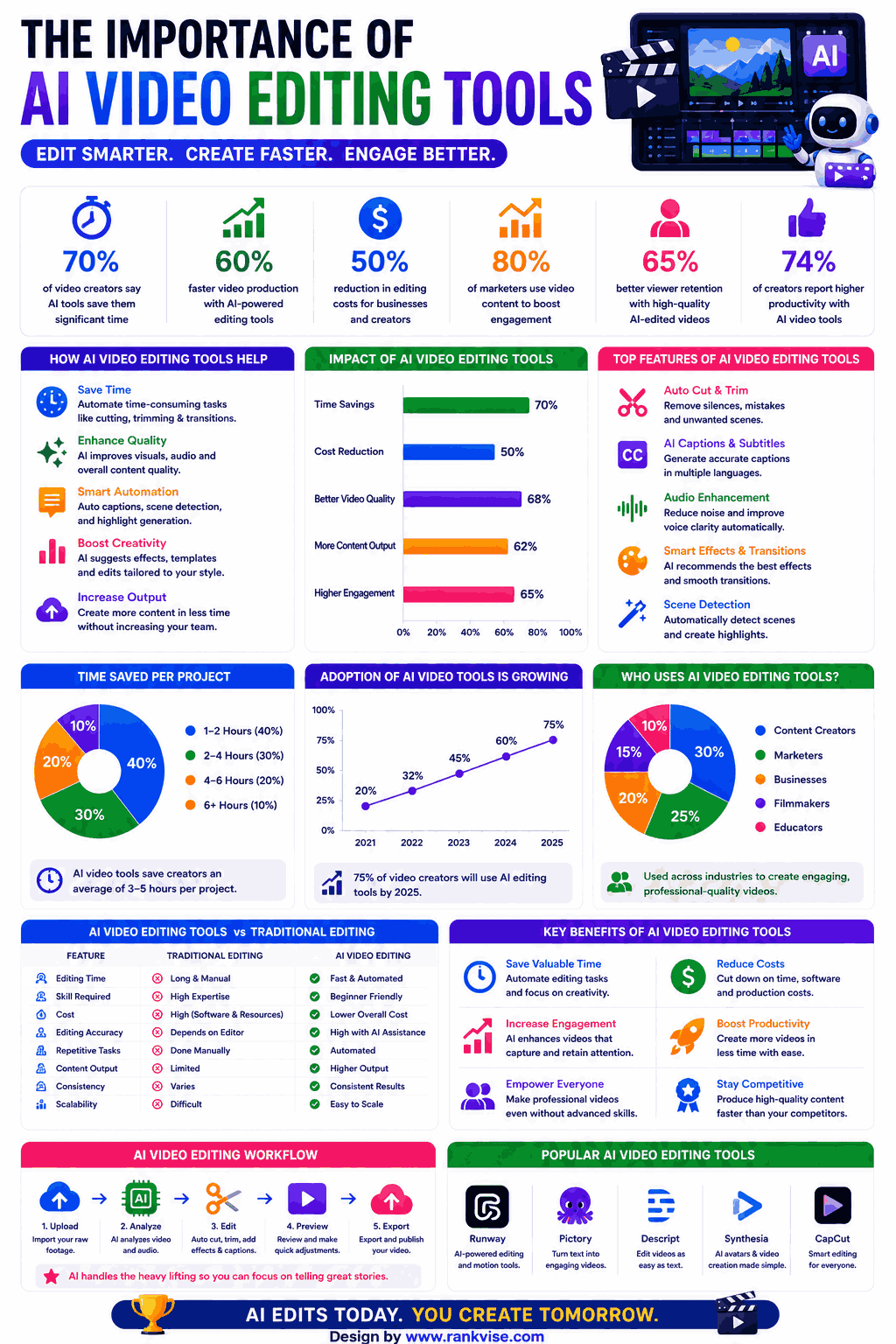
Video editing once demanded expensive software and years of training. AI video editing tools now automate the tedious parts. They add captions, cut silences, remove backgrounds, and enhance footage automatically.
- Rising video demand pushes teams to use AI tools that deliver professional-looking content quickly, often replacing the need for dedicated editors.
- Pick tools based on content type, publishing volume, skill level, budget, and platform; test free tiers to verify workflow fit.
- Real time and multimodal AI will generate polished video drafts from prompts, shifting editors' roles toward refinement, storytelling, and quality control.
Businesses produce more video content than ever before. Social media, training materials, and marketing campaigns all demand polished footage fast. These intelligent editing platforms help teams publish professional videos without hiring dedicated editors.
This guide covers 15 proven ai video editing tools across different budgets and skill levels. Each platform brings unique automation features worth considering.
Best AI Video Editing Tools for Content Creators
These ai-powered video editors serve YouTubers, social media managers, and solo creators who need speed without sacrificing quality.
1. Descript
Descript transforms video editing into a text-editing experience. It transcribes your footage automatically, then lets you edit video by editing the transcript. Delete a word from the text and the corresponding video segment disappears.
Key capabilities include filler word removal, eye contact correction, and AI green screen. The Overdub feature clones your voice for corrections without re-recording. Studio Sound removes background noise and enhances audio quality to podcast standards.
Free plan includes one hour of transcription monthly. Pro plan starts at 24 USD monthly with unlimited transcription. Teams managing podcasts and YouTube channels benefit most from this workflow.
2. CapCut
CapCut delivers professional video editing completely free across desktop and mobile. Owned by ByteDance, it integrates directly with TikTok for seamless publishing. AI features include auto-captions, background removal, and intelligent scene detection.
The auto-reframe tool adapts horizontal videos to vertical formats automatically. AI-generated transitions smooth cuts between clips. Body effects and face tracking enable creative overlays without manual keyframing. Exports in 4K resolution without watermarks on desktop.
Over 200 million creators use CapCut monthly. Best for short-form social content and quick turnaround projects.
3. Runway
Runway positions itself at the intersection of video editing and generative AI. Beyond traditional editing, it generates new video footage, extends clips, and removes objects from scenes entirely. The Gen-3 Alpha model produces realistic AI-generated footage from text or images.
Motion tracking, color grading, and background replacement run automatically. Inpainting removes unwanted objects frame-by-frame without manual masking. Green screen alternatives work without physical green screens using AI segmentation.
Free tier offers limited export credits. Pro plans start at 12 USD monthly. Film studios and creative agencies use Runway for previsualization and effects work.
4. Opus Clip
Opus Clip specializes in repurposing long-form video into short viral clips. Upload a podcast or webinar and AI identifies the most compelling moments automatically. It scores each clip based on predicted engagement and virality potential.
Auto-reframing adjusts speaker focus for vertical formats. AI adds captions with animated highlighting. Brand templates maintain visual consistency across all generated clips. Batch processing creates dozens of clips from a single source video.
Free plan processes limited videos monthly. Paid plans start at 19 USD monthly. Podcast hosts and course creators extract maximum value from existing long-form content.
5. Veed.io
Veed.io provides browser-based video editing with strong AI automation features. No software installation required. Auto-subtitles achieve 98% accuracy across 100+ languages. AI avatars present scripts without requiring on-camera talent.
Background noise removal, eye contact correction, and magic cut features streamline editing. Screen recording with webcam overlay suits tutorial creators. Collaboration tools let teams review and comment on projects together.
Free plan allows exports up to 10 minutes with watermark. Business plans start at 18 USD monthly. Marketing teams and educators appreciate the zero-learning-curve approach.
AI Video Editing Tools for Professional Production
These advanced video editing software options suit filmmakers, agencies, and production studios needing powerful AI assistance.
6. Adobe Premiere Pro (AI Features)
Adobe Premiere Pro integrates AI through its Sensei engine across the entire editing timeline. Auto-color matching ensures visual consistency between clips from different cameras. Scene edit detection identifies cuts in existing footage for instant timeline segmentation.
Text-based editing lets you edit by manipulating the transcript. Auto-tone adjusts audio levels across dialogue, music, and effects tracks. Content-aware fill removes moving objects from video backgrounds. Morph Cut smooths jump cuts in interview footage invisibly.
Subscription costs 22.99 USD monthly as part of Creative Cloud. Industry standard for broadcast, film, and professional content production.
7. DaVinci Resolve (AI Tools)
DaVinci Resolve combines Hollywood-grade editing with powerful AI features in a free package. Magic Mask isolates subjects without green screens using neural engine processing. AI-powered color grading matches looks across scenes automatically.
Face detection tracks subjects for targeted corrections. Dialogue Leveler maintains consistent audio volumes. Speed Warp uses optical flow for smooth slow-motion from standard footage. IntelliTrack follows objects for effects placement without manual keyframing.
The free version includes nearly all features professionals need. Studio version at 295 USD one-time adds additional neural engine tools. Colorists and filmmakers choose Resolve for unmatched color science.
8. Final Cut Pro (AI Features)
Apple’s professional editor leverages machine learning throughout its workflow. Smart Conform automatically reframes content for different aspect ratios. Object Tracker follows elements in footage for titles and effects attachment.
Scene removal mode isolates subjects from backgrounds in real-time. Auto-enhancement adjusts color balance, noise, and exposure per clip. Magnetic timeline uses AI-assisted organization preventing sync issues. Voice Isolation removes background noise while preserving dialogue clarity.
One-time purchase at 299.99 USD for Mac users. Optimized for Apple Silicon delivering faster renders than competitors on Mac hardware.
9. Filmora (AI Features)
Wondershare Filmora bridges consumer simplicity with AI-powered professional features. AI portrait removes backgrounds without green screens during editing. Smart cutout isolates and tracks objects across frames automatically.
AI audio denoise eliminates wind, hum, and hiss from recordings. Auto-beat sync matches footage cuts to music rhythm. AI text-to-video generates clips from scripts for quick drafts. Motion tracking follows objects for text and graphic attachment.
Subscription starts at 49.99 USD annually. Perpetual license available at 79.99 USD. Small business owners and mid-level creators find the best value here.
10. Kapwing
Kapwing operates entirely in the browser with AI tools designed for team collaboration. Smart cut removes silences from talking-head videos instantly. Auto-subtitles generate accurate captions with customizable styling.
Repurpose Studio transforms single videos into platform-specific versions automatically. AI background removal works on video clips in real-time. Clean audio removes background noise with one click. Real-time collaboration lets multiple editors work simultaneously.
Free plan includes limited exports with watermark. Pro starts at 16 USD monthly per editor. Remote marketing teams appreciate the cloud-based collaborative approach.
AI Video Editing Tools for Specific Use Cases
These specialized platforms solve particular video editing challenges better than general editors.
11. Topaz Video AI
Topaz specializes exclusively in AI-powered video enhancement and upscaling. Transforms low-resolution footage into clean 4K or 8K quality. Removes grain, noise, and compression artifacts from old recordings. Slow-motion conversion creates smooth frames between existing ones.
Stabilization fixes shaky handheld footage after recording. Face recovery enhances blurry faces in surveillance or archival video. Processes footage locally on your GPU without cloud uploads. One-time purchase at 199 USD with a year of updates.
Archivists, documentary filmmakers, and security professionals rely on Topaz for footage recovery.
12. Synthesia
Synthesia generates professional presenter videos without cameras, studios, or actors. Choose from 150+ AI avatars speaking 130+ languages naturally. Type your script and receive a finished video within minutes.
Custom avatar creation replicates real team members digitally. Brand kits maintain visual consistency across all generated videos. Multi-scene editing supports complex narratives with different backgrounds. API integration automates video creation for personalized content at scale.
Starter plan begins at 18 USD monthly. Enterprise plans add custom avatars and priority rendering. Corporate training teams and internal communications departments use Synthesia most.
13. Pictory
Pictory converts long text content into short branded videos automatically. Paste a blog post, article, or script and AI selects relevant stock footage. Auto-summarization condenses long content into digestible video formats.
AI voiceover narrates scripts in natural-sounding voices. Branding tools apply logos, colors, and fonts consistently. Blog-to-video conversion repurposes written content without filming anything. Automatic captioning and highlighting improve social media engagement.
Plans start at 19 USD monthly. Content marketers who repurpose blog posts into video see the most immediate value.
14. InVideo AI
InVideo AI generates complete videos from simple text prompts. Describe what you want and AI assembles footage, adds music, writes scripts, and applies transitions. Edit any element after generation for precise customization.
Supports 50+ languages for global content production. Clone your voice for consistent narration across videos. Stock library includes 16 million+ media assets. Workflow handles YouTube videos, ads, and social content.
Free plan includes watermarked exports. Business plan starts at 25 USD monthly. Agencies and marketers producing high volumes of video content benefit most.
15. Captions App
Captions focuses on making talking-head videos look professionally produced. AI eye contact correction makes speakers appear to look directly into the camera. Auto-zoom creates dynamic framing from static shots.
AI editing removes filler words and awkward pauses automatically. Background replacement changes environments without green screens. Split-screen layouts add visual variety to monologue content. Teleprompter feature helps speakers deliver scripts naturally on mobile.
Free plan with watermark available. Pro plan costs 9.99 USD monthly. Solo creators, coaches, and educators filming themselves benefit immediately.
How to Choose the Right AI Video Editor
Selecting among 15 ai video editing tools depends on your production needs. Consider your primary content format first. Short-form creators need different features than documentary producers.
Key decision factors include:
- Content type: talking-head, cinematic, social media, or training videos
- Volume: occasional projects versus daily publishing schedules
- Skill level: beginner-friendly interfaces versus professional-grade control
- Budget: free tools versus premium subscriptions or one-time purchases
- Platform: browser-based access versus desktop software performance
Test free tiers before committing to subscriptions. Most platforms offer enough free access to evaluate output quality and workflow fit. The fastest editor is the one matching your existing habits.
Where AI Video Editing Is Heading in 2026
Real-time AI editing during live recording is becoming standard. Tools now suggest cuts, transitions, and enhancements as you film. The gap between raw footage and finished product shrinks every month.
Expect multimodal AI to unify generation and editing within single platforms. You will describe a complete video verbally and receive a polished draft instantly. Human editors then refine rather than build from scratch. Teams producing 10x more video content with the same resources will become the competitive baseline by late 2026.
FAQs
CapCut and DaVinci Resolve offer the most powerful free AI editing features, with CapCut being easier for beginners and Resolve providing professional-grade capabilities.
AI handles repetitive tasks like captioning, cutting silences, and color matching, but creative storytelling and strategic editing decisions still require human judgment.
Descript excels for YouTube with its text-based editing, filler word removal, and studio sound features that streamline the podcast and long-form video workflow.
CapCut and Captions App offer full AI editing features on mobile, while Veed.io and Kapwing work through mobile browsers without app installation.
Prices range from completely free (CapCut, DaVinci Resolve) to 25 USD monthly for AI-first platforms, with professional suites like Premiere Pro at 22.99 USD monthly.