Removing backgrounds from images used to require advanced Photoshop skills. That is no longer the case. Today, any ai tool for removing background from image can do this in seconds. No design experience needed.
- AI background removers use machine learning to detect subjects and separate foreground from background with high precision, handling hair and semi transparent edges.
- They drastically reduce time and cost, processing images quickly and lowering per-image expense to fractions of a cent at scale.
- Select tools by image volume, budget, integrations, and required edge quality; batch processing and APIs matter for e-commerce workflows.
- Get better results with high-resolution, high-contrast source images, inspect edges at 100%, and export cutouts as PNG for transparency.
These tools use machine learning to detect subjects in photos. They separate foreground elements from backgrounds with impressive precision. E-commerce sellers, marketers, designers, and casual users all benefit from this technology daily.
Why Use an AI Background Remover?
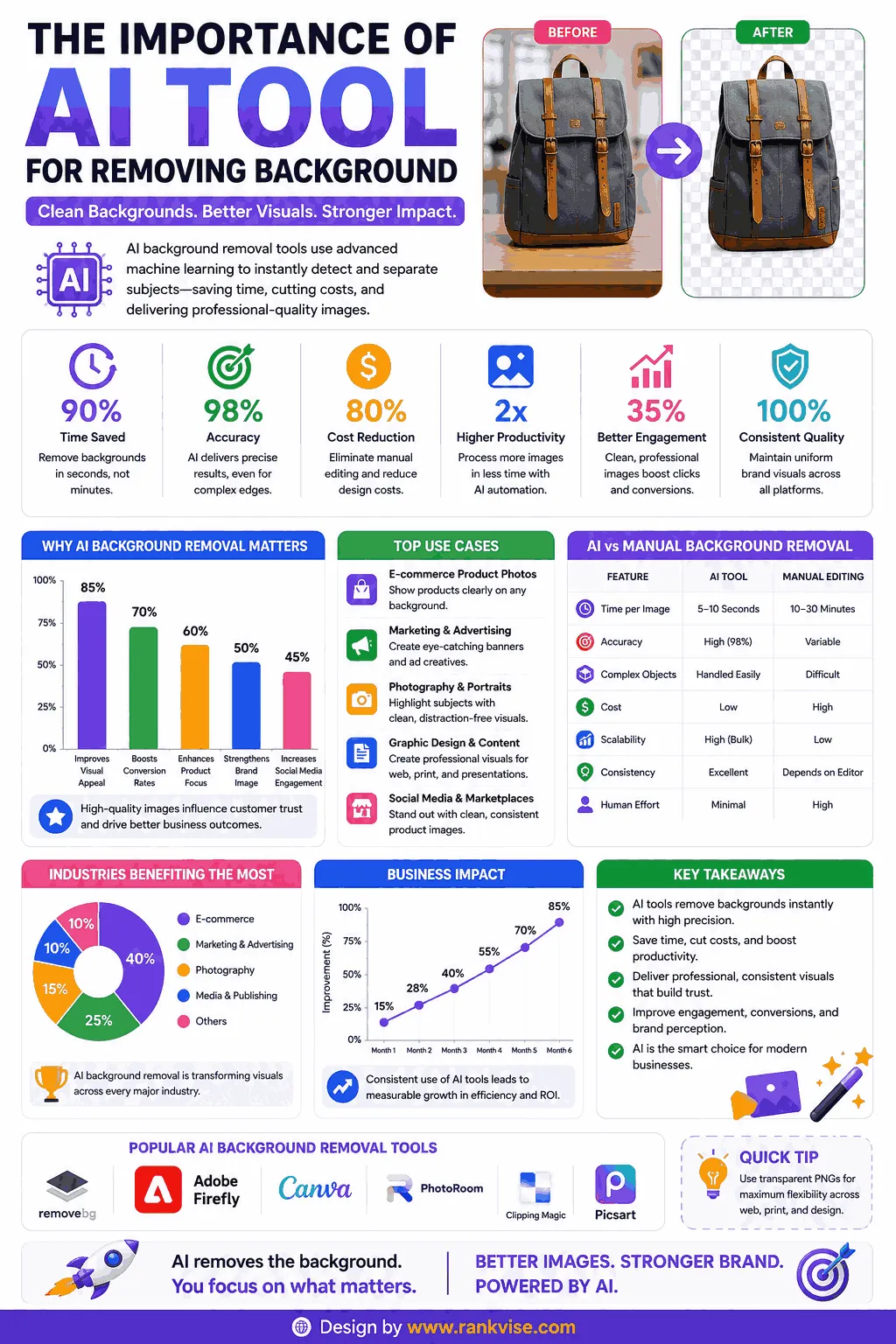
Manual background removal takes 5 to 15 minutes per image. A skilled designer charges 3 to 10 USD per edit. That adds up fast when you process hundreds of product photos.
AI-powered background erasers complete the same task in under 5 seconds. They handle hair, fur, and complex edges surprisingly well. The cost drops to fractions of a cent per image at scale.
Online stores need clean product photos on white backgrounds. Social media managers need transparent PNGs for creative compositions. Real estate agents need sky replacements for property listings. All of these use cases benefit from automatic background removal.
Top AI Tools for Removing Background From Image in 2026
Here is an in-depth look at the best tools available right now. Each one serves different workflows and budgets.
1. Remove.bg
Remove.bg pioneered automated background removal. It remains one of the most recognized tools in this space. Developed by Kaleido AI, it processes millions of images monthly.
- Website: remove.bg
- Key Features:
- Instant background removal in approximately 5 seconds
- Handles hair, fur, and semi-transparent objects accurately
- Batch processing via desktop app for bulk operations
- API available for developers and e-commerce platforms
- Offers background templates and color replacements
- Integrations with Shopify, WooCommerce, and Figma
- Output Quality: Produces high-resolution images up to 25 megapixels
- Pricing: One free preview image per session; HD downloads cost 1 credit (approximately 1.99 USD each); subscription plans from 9.99 USD/month for 40 credits
- Best For: E-commerce businesses needing consistent, high-quality product photo editing at scale
- Limitations: Free version only provides low-resolution output; credits expire monthly on subscription plans
2. Canva Background Remover
Canva integrates background removal directly into its design platform. You can remove a background and immediately use the image in your design project without switching tools.
- Website: canva.com
- Key Features:
- One-click background removal inside the Canva editor
- Seamlessly pairs with thousands of templates and design elements
- Batch editing available on Canva Pro
- Works on both uploaded images and Canva stock photos
- Mobile app support for on-the-go editing
- Eraser and restore brush for manual fine-tuning
- Output Quality: Good for web use; maintains original upload resolution
- Pricing: Background remover requires Canva Pro at 12.99 USD/month or Canva Teams at 14.99 USD/month per person
- Best For: Social media managers and small businesses already using Canva for design workflows
- Limitations: Not available on the free plan; struggles with very complex edges like wispy hair
3. Adobe Express Background Remover
Adobe brings its decades of imaging expertise into a free, browser-based background removal tool. It leverages Adobe Sensei AI technology for accurate edge detection.
- Website: adobe.com/express
- Key Features:
- Free background removal with no account required for basic use
- Powered by Adobe Sensei machine learning
- Direct integration with Adobe Creative Cloud ecosystem
- Offers instant background replacement with colors or images
- Works on mobile through the Adobe Express app
- Supports PNG download with transparency
- Output Quality: Excellent edge detection, especially on portraits and products
- Pricing: Basic background removal is free; Adobe Express Premium at 9.99 USD/month unlocks full features
- Best For: Creative professionals who already work within the Adobe ecosystem
- Limitations: Full feature set locked behind premium subscription; occasional slow processing on complex images
4. PhotoRoom
PhotoRoom is designed specifically for product photography and e-commerce. It combines background removal with studio-quality templates for marketplace listings.
- Website: photoroom.com
- Key Features:
- AI background removal optimized for product photos
- Instant studio-quality backgrounds for marketplace listings
- Batch processing for catalog-scale operations
- Shadow and reflection generation for realistic composites
- API available for automated workflows
- Templates designed for Amazon, eBay, Etsy, and Poshmark
- Output Quality: Professional-grade results tailored for commercial use
- Pricing: Free tier with watermark; Pro plan at 12.99 USD/month with unlimited exports
- Best For: Online sellers and product photographers needing marketplace-ready images quickly
- Limitations: Free version adds a PhotoRoom watermark; some advanced templates require Pro access
5. Clipdrop by Stability AI
Clipdrop offers a powerful suite of AI image tools. Its background removal feature uses the same technology behind Stable Diffusion for precise subject isolation.
- Website: clipdrop.co
- Key Features:
- HD background removal powered by Stability AI models
- Additional tools include relighting, upscaling, and object removal
- API access for bulk and automated processing
- Works via web, iOS, Android, and desktop apps
- Supports batch processing on paid plans
- Clean-up tool to remove unwanted objects after background removal
- Output Quality: High-definition output with excellent edge handling on complex subjects
- Pricing: Free tier with limited resolution; Pro at 9 USD/month for full HD and all tools
- Best For: Designers and agencies needing a complete AI image editing suite beyond just background removal
- Limitations: Free tier restricts output resolution; processing queue can slow during peak usage
6. Fotor Background Remover
Fotor combines photo editing with AI background removal in one platform. It targets users who want quick edits without learning complex software.
- Website: fotor.com
- Key Features:
- One-click AI background removal
- Built-in photo editor for further adjustments after removal
- Background replacement with custom images or solid colors
- Collage maker and batch editing capabilities
- Beauty retouching tools for portrait photography
- Cloud storage for saving projects
- Output Quality: Good for social media and web use; adequate for print at moderate sizes
- Pricing: Free basic removal with limited exports; Pro plan at 8.99 USD/month
- Best For: Casual users and small business owners wanting an all-in-one photo editor with background removal
- Limitations: Edge detection less precise than dedicated tools like Remove.bg on complex subjects
7. Pixlr Background Remover
Pixlr offers a completely free AI background removal tool. No sign-up required. It serves as a quick, accessible option for occasional use.
- Website: pixlr.com/remove-background
- Key Features:
- Completely free background removal with no account needed
- Bulk background removal (up to 50 images simultaneously)
- Supports cutout export with transparent background
- Integrated with Pixlr’s full online photo editor
- Works on any browser without downloads
- Offers basic fine-tuning with manual brush tools
- Output Quality: Solid results for web use; resolution maintained from original upload
- Pricing: Free for basic use; Pixlr Premium at 7.99 USD/month for advanced editing features
- Best For: Budget-conscious users and students who need free, quick background removal without commitments
- Limitations: Bulk processing requires premium; edge quality varies on detailed subjects
Quick Comparison Table
| Tool | Starting Price | Free Option | Best Feature | Edge Quality |
|---|---|---|---|---|
| Remove.bg | 9.99 USD/mo | Low-res only | API + batch processing | Excellent |
| Canva | 12.99 USD/mo | No | Design integration | Good |
| Adobe Express | 9.99 USD/mo | Yes | Adobe ecosystem sync | Excellent |
| PhotoRoom | 12.99 USD/mo | Watermarked | E-commerce templates | Very Good |
| Clipdrop | 9 USD/mo | Limited HD | Full AI editing suite | Excellent |
| Fotor | 8.99 USD/mo | Limited | All-in-one editor | Good |
| Pixlr | 7.99 USD/mo | Yes (full) | Free bulk processing | Good |
How to Choose the Right Background Removal Tool
Your ideal tool depends on your workflow, volume, and budget. Here are the key factors to consider.
Volume of images matters most. If you process hundreds of product photos weekly, choose tools with batch processing and API access. Remove.bg and PhotoRoom excel here.
Budget determines your starting point. Pixlr offers genuinely free background removal. Adobe Express provides free basic access. These work perfectly for occasional users.
Integration needs guide power users. Canva users benefit from its built-in remover. Adobe Creative Cloud users should stick with Adobe Express. Shopify sellers will appreciate Remove.bg’s direct plugin.
Quality requirements vary by use case. Print materials demand pixel-perfect edges. Social media posts tolerate minor imperfections. Match your tool’s precision to your actual output needs.
Tips for Getting Better Results From AI Background Removers
Even the best ai tool for removing background from image performs better with good input. Follow these practices.
Use high-resolution source images whenever possible. More pixels give the AI more data to work with. Low-resolution photos produce rougher edges.
Ensure good contrast between subject and background. A dark product on a dark background confuses AI models. Shooting against contrasting backgrounds improves removal accuracy.
Check edges carefully after processing. Zoom to 100% and inspect hair, fur, and semi-transparent areas. Use the manual touch-up brush most tools provide to fix small errors.
Save outputs as PNG files to preserve transparency. JPEG format does not support transparent backgrounds. Always export in PNG when you need a cutout for compositing.
FAQs
Pixlr offers completely free background removal without sign-up or watermarks. Adobe Express also provides free basic background removal with high-quality edge detection.
Yes, premium tools like Remove.bg and Clipdrop handle hair and fur edges well. They use specialized AI models trained on millions of complex subject images.
No, most tools work entirely in your browser. Remove.bg, Pixlr, and Adobe Express all function online without any downloads or installations required.
PhotoRoom is purpose-built for e-commerce with marketplace templates. Remove.bg also excels with its Shopify and WooCommerce integrations for automated product photo processing.
Yes, Remove.bg, PhotoRoom, Pixlr, and Clipdrop all support batch processing. Most require a paid plan for bulk operations, though Pixlr offers limited free batch removal.