Building software with AI is no longer optional. Developers who use ai developer tools ship faster, write cleaner code, and automate tedious workflows. The right tools turn hours of work into minutes.
- AI developer tools span the full development lifecycle: code generation, model orchestration, infrastructure, deployment, and monitoring.
- Choose tools by your immediate bottleneck: start with a code assistant, then add APIs and infrastructure, mastering one tool per category.
- Use free and open-source options or local models for privacy; paid tools deliver measurable productivity gains for teams.
From code generation to model deployment, these platforms cover the entire development lifecycle. This guide profiles 25 essential tools every developer should evaluate in 2026.
Why Do Developers Need AI-Powered Tools?
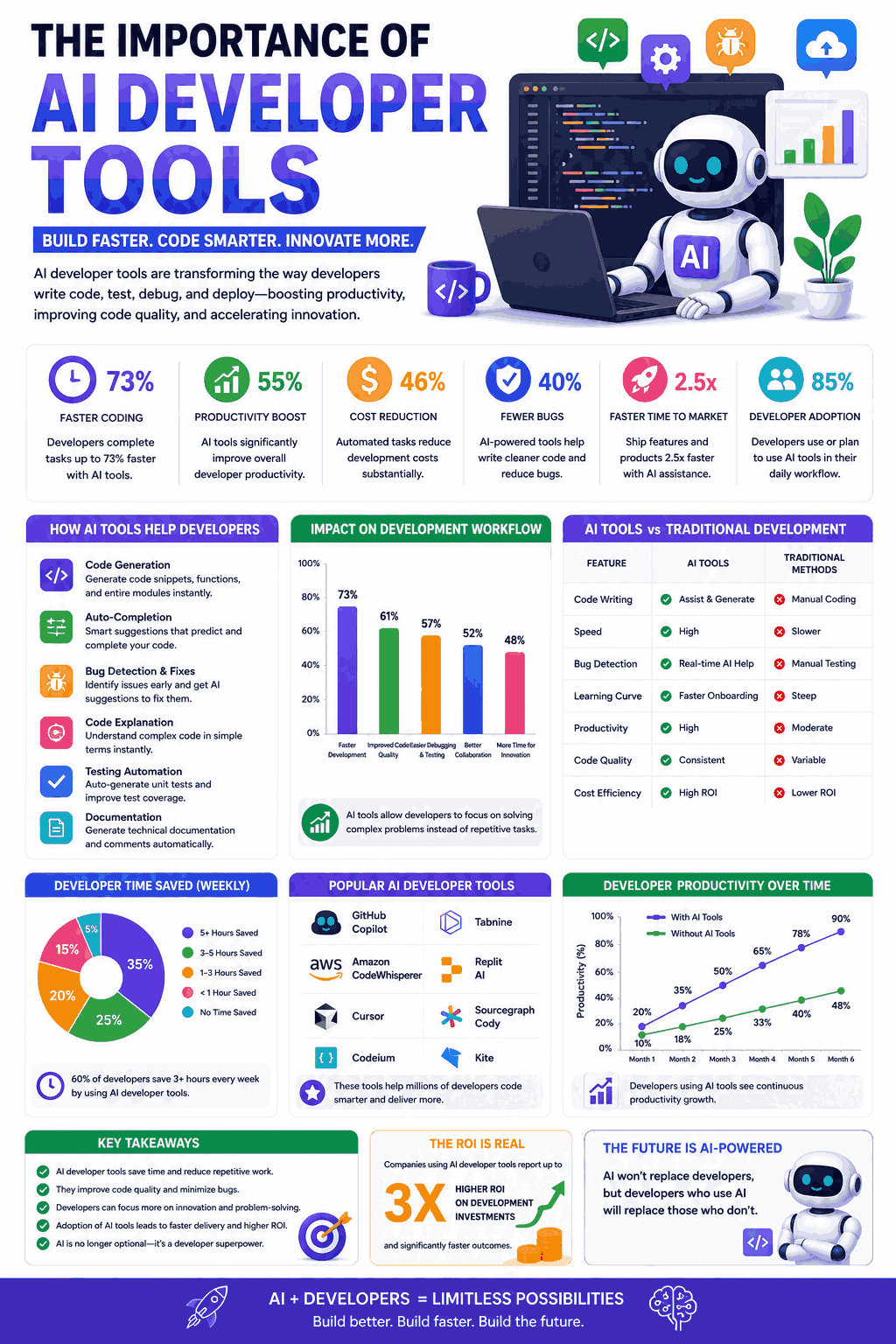
Modern software projects demand speed and precision. AI developer tools handle boilerplate code, catch bugs early, and suggest optimizations in real time. They free developers to focus on architecture and creative problem-solving.
Teams using AI coding assistants report 30% to 55% productivity gains. Code review cycles shrink. Debugging becomes faster. Documentation writes itself. These are measurable advantages that compound across projects.
The 25 Best AI Developer Tools for 2026
1. GitHub Copilot
GitHub Copilot is the most adopted AI coding assistant. It generates code suggestions directly inside your IDE as you type.
- Developer: GitHub (Microsoft)
- Key Features: Real-time code completion, multi-file context awareness, chat interface, CLI integration, pull request summaries, vulnerability detection
- Supported Languages: Python, JavaScript, TypeScript, Go, Ruby, C++, and 20+ more
- Pricing: Individual at 10 USD/month; Business at 19 USD/month per user; Enterprise at 39 USD/month
- Best For: Full-stack developers wanting inline AI assistance across any language
2. Cursor
Cursor is an AI-first code editor built on VS Code. It understands your entire codebase and generates context-aware edits.
- Developer: Anysphere
- Key Features: Codebase-wide context, multi-file editing, natural language commands, tab completion, terminal integration, custom AI model selection
- Pricing: Hobby free tier; Pro at 20 USD/month; Business at 40 USD/month per user
- Best For: Developers wanting an AI-native editor rather than a plugin added to existing tools
3. Amazon CodeWhisperer (now Amazon Q Developer)
Amazon Q Developer generates code optimized for AWS services. It understands cloud infrastructure patterns deeply.
- Developer: Amazon Web Services
- Key Features: AWS service integration, security vulnerability scanning, code completion, infrastructure-as-code generation, license attribution, 15+ language support
- Pricing: Free tier for individuals; Professional at 19 USD/month per user
- Best For: Teams building on AWS who need cloud-aware code suggestions
4. Tabnine
Tabnine runs AI models locally for privacy-first code completion. It never sends your code to external servers.
- Developer: Tabnine
- Key Features: Local model execution, zero data retention, whole-line and full-function completion, team model training, IDE-agnostic support
- Pricing: Starter free; Dev at 12 USD/month; Enterprise custom
- Best For: Security-conscious teams in regulated industries needing private AI coding assistance
5. Replit AI
Replit combines a cloud IDE with powerful AI features. It generates, explains, and debugs code in a browser-based environment.
- Developer: Replit
- Key Features: Browser-based IDE, AI code generation, instant deployment, multiplayer collaboration, Ghostwriter chat, automated testing
- Pricing: Starter free; Replit Core at 20 USD/month; Teams custom
- Best For: Rapid prototyping and developers who want code generation plus hosting in one platform
6. Cody (Sourcegraph)
Cody uses your entire codebase as context. It answers questions about your code and generates solutions aware of your architecture.
- Developer: Sourcegraph
- Key Features: Full repository context, code search integration, multi-repo awareness, custom commands, IDE extensions, explain code functionality
- Pricing: Free for individuals; Pro at 9 USD/month; Enterprise at 19 USD/month per user
- Best For: Developers working with large, complex codebases needing deep contextual understanding
7. Windsurf (formerly Codeium)
Windsurf offers fast, free AI code completion with broad IDE support. It targets developers wanting Copilot-quality without the cost.
- Developer: Exafunction
- Key Features: Fast autocomplete, chat assistant, 70+ language support, 40+ IDE integrations, fill-in-the-middle completion, search-based context
- Pricing: Free tier with generous limits; Pro at 15 USD/month
- Best For: Individual developers wanting powerful free AI code completion
8. Hugging Face
Hugging Face is the central hub for open-source AI models. Developers access, fine-tune, and deploy thousands of pre-trained models.
- Developer: Hugging Face
- Key Features: 500,000+ pre-trained models, datasets library, Spaces for demos, Inference API, model fine-tuning, AutoTrain, collaborative model development
- Pricing: Free for public models; Pro at 9 USD/month; Enterprise from 20 USD/month per user
- Best For: ML engineers and researchers building custom AI applications with open-source models
9. LangChain
LangChain is a framework for building applications powered by large language models. It handles chains, agents, and memory management.
- Developer: LangChain Inc.
- Key Features: LLM orchestration, retrieval-augmented generation, agent frameworks, memory systems, tool integration, LangSmith for observability
- Pricing: Open-source framework free; LangSmith from 39 USD/month for teams
- Best For: Developers building LLM-powered applications with complex workflows and data retrieval
10. OpenAI API
The OpenAI API gives developers access to GPT-4, DALL-E, Whisper, and embeddings. It powers thousands of AI applications globally.
- Developer: OpenAI
- Key Features: GPT-4 and GPT-4o access, function calling, fine-tuning, embeddings, vision, text-to-speech, assistants API, batch processing
- Pricing: Pay-per-token; GPT-4o approximately 5 USD per million input tokens
- Best For: Any developer integrating conversational AI, content generation, or reasoning into applications
11. Google Vertex AI
Vertex AI is Google’s unified ML platform. It covers model training, tuning, deployment, and monitoring in one managed service.
- Developer: Google Cloud
- Key Features: Gemini model access, custom model training, Model Garden with 150+ models, vector search, grounding, MLOps pipeline management
- Pricing: Pay-per-use; varies by model and compute resources
- Best For: Enterprise teams deploying production ML systems on Google Cloud infrastructure
12. TensorFlow
TensorFlow remains a leading open-source framework for building and training machine learning models from scratch.
- Developer: Google
- Key Features: Production-grade ML framework, TensorFlow Lite for mobile, TensorFlow.js for browsers, Keras integration, distributed training, TensorBoard visualization
- Pricing: Free and open-source
- Best For: ML engineers building custom models for production deployment across platforms
13. PyTorch
PyTorch dominates research and increasingly production ML. Its dynamic computation graph makes experimentation faster.
- Developer: Meta (Facebook)
- Key Features: Dynamic computation graphs, TorchServe for deployment, distributed training, ONNX export, extensive ecosystem, strong GPU optimization
- Pricing: Free and open-source
- Best For: Researchers and developers who prefer flexible, Pythonic model development
14. Weights & Biases (W&B)
W&B tracks ML experiments, visualizes results, and manages model versions. It brings order to chaotic development cycles.
- Developer: Weights & Biases
- Key Features: Experiment tracking, hyperparameter sweeps, model registry, dataset versioning, collaborative dashboards, LLM evaluation tools
- Pricing: Free for individuals; Team at 50 USD/month per user; Enterprise custom
- Best For: ML teams needing structured experiment tracking and collaboration across model iterations
15. Anthropic API (Claude)
The Anthropic API provides access to Claude models. It excels at long-context tasks, coding, and careful reasoning.
- Developer: Anthropic
- Key Features: 200K token context, tool use, vision, streaming, batch processing, fine safety controls, structured outputs
- Pricing: Pay-per-token; Claude Sonnet approximately 3 USD per million input tokens
- Best For: Developers building applications requiring nuanced reasoning, safety, and long document processing
16. Vercel AI SDK
Vercel AI SDK simplifies building AI-powered web applications. It provides React hooks and streaming utilities for LLM integration.
- Developer: Vercel
- Key Features: Streaming AI responses, React/Next.js hooks, multi-provider support (OpenAI, Anthropic, Google), edge runtime, generative UI components
- Pricing: Free and open-source SDK; Vercel hosting plans separate
- Best For: Frontend developers building AI chat interfaces and streaming applications with Next.js
17. Pinecone
Pinecone is a vector database purpose-built for AI applications. It stores and retrieves embeddings for semantic search and RAG systems.
- Developer: Pinecone
- Key Features: Serverless vector database, real-time indexing, metadata filtering, hybrid search, namespaces, high availability, simple REST API
- Pricing: Free tier with 100K vectors; Standard from 70 USD/month
- Best For: Developers building retrieval-augmented generation and semantic search applications
18. Replicate
Replicate runs open-source AI models in the cloud via simple API calls. No infrastructure management required.
- Developer: Replicate
- Key Features: One-line model deployment, thousands of community models, custom model hosting, auto-scaling, GPU selection, webhook support
- Pricing: Pay-per-second of compute; varies by GPU type
- Best For: Developers wanting quick access to open-source models without managing GPU infrastructure
19. Lightning AI
Lightning AI provides a platform for building, training, and deploying AI models. It streamlines the full ML lifecycle.
- Developer: Lightning AI
- Key Features: PyTorch Lightning framework, GPU cloud studios, collaborative notebooks, model deployment, data pipelines, auto-scaling
- Pricing: Free tier; Pay-as-you-go GPU compute; Team plans available
- Best For: PyTorch developers wanting managed infrastructure for training and deploying models efficiently
20. Ollama
Ollama lets developers run large language models locally. It simplifies local LLM deployment to a single command.
- Developer: Ollama
- Key Features: One-command local LLM setup, model library (Llama, Mistral, Gemma), API compatibility, GPU acceleration, custom model creation, offline operation
- Pricing: Free and open-source
- Best For: Developers needing private, offline LLM access for testing, privacy-sensitive applications, or air-gapped environments
21. Docker AI Tools
Docker now integrates AI assistance into container workflows. It helps developers containerize applications and debug configurations faster.
- Developer: Docker
- Key Features: AI-powered Dockerfile generation, container optimization suggestions, vulnerability remediation, Gordon AI assistant, compose file assistance
- Pricing: Docker Personal free; Pro at 9 USD/month; Team at 15 USD/month per user
- Best For: DevOps engineers and developers containerizing AI applications
22. Gradio
Gradio builds interactive ML demos and web interfaces in minutes. Data scientists share working prototypes without frontend knowledge.
- Developer: Hugging Face
- Key Features: Quick ML demo creation, drag-and-drop interface components, API auto-generation, Hugging Face Spaces hosting, sharing via public links
- Pricing: Free and open-source
- Best For: Data scientists and ML engineers wanting to quickly demo models to stakeholders
23. MLflow
MLflow manages the complete machine learning lifecycle. It tracks experiments, packages models, and handles deployment.
- Developer: Databricks
- Key Features: Experiment tracking, model registry, model packaging, deployment tools, LLM evaluation, project reproducibility
- Pricing: Free and open-source; managed version through Databricks
- Best For: ML teams needing end-to-end lifecycle management integrated with Databricks or standalone
24. Streamlit
Streamlit turns Python scripts into interactive web applications. Developers build data dashboards and AI tool interfaces without HTML or CSS.
- Developer: Snowflake
- Key Features: Python-only web app development, built-in widgets, real-time updates, Community Cloud hosting, LLM integration components, caching
- Pricing: Free and open-source; Community Cloud free hosting; Teams pricing through Snowflake
- Best For: Python developers building internal tools, dashboards, and AI application frontends
25. Ray
Ray scales Python applications from laptop to cluster. It handles distributed computing for AI training and serving workloads.
- Developer: Anyscale
- Key Features: Distributed computing framework, Ray Serve for model serving, Ray Train for distributed training, auto-scaling, multi-cloud support
- Pricing: Free and open-source; Anyscale managed platform pricing custom
- Best For: Teams scaling ML training and inference across distributed GPU clusters
Comparison by Category
| Category | Tools | Use Case |
|---|---|---|
| Code Assistants | Copilot, Cursor, Tabnine, Windsurf, Cody | Writing and completing code faster |
| LLM APIs | OpenAI, Anthropic, Vertex AI | Adding AI capabilities to applications |
| ML Frameworks | TensorFlow, PyTorch, Lightning AI | Building custom AI models |
| LLM Orchestration | LangChain, Vercel AI SDK | Building LLM-powered applications |
| Infrastructure | Pinecone, Replicate, Ollama, Ray | Deploying and scaling AI workloads |
| MLOps | W&B, MLflow, Docker AI | Managing the ML development lifecycle |
| Prototyping | Replit, Gradio, Streamlit | Building demos and interfaces quickly |
How to Choose the Right AI Developer Tools
Start with your immediate bottleneck. If coding speed limits you, pick a code assistant first. If deployment is painful, focus on infrastructure tools.
Consider your tech stack. AWS teams benefit from Amazon Q Developer. Google Cloud teams leverage Vertex AI. Framework choices (PyTorch vs TensorFlow) shape your entire toolchain.
Budget matters for teams. Many tools offer generous free tiers. Open-source options like PyTorch, LangChain, and Ollama cost nothing. Paid tools justify cost through measurable time savings.
Start small and expand. Pick one tool from each category you need. Master it before adding complexity. Most developers begin with a code assistant, then add APIs and infrastructure as projects grow.
FAQs
PyTorch, TensorFlow, LangChain, Ollama, Gradio, and Streamlit are all free and open-source. GitHub Copilot, Windsurf, and Cody also offer functional free tiers.
GitHub Copilot, Cursor, and Windsurf are the top code assistants. They provide real-time suggestions, multi-file edits, and natural language code generation inside your IDE.
No, they augment developer capabilities. These tools handle repetitive tasks and boilerplate, but humans still design architecture, make decisions, and solve novel problems.
LangChain for orchestration, OpenAI or Anthropic APIs for model access, Pinecone for vector storage, and Vercel AI SDK for frontend integration form a strong LLM application stack.
Yes, tools like Tabnine, GitHub Copilot Enterprise, and Amazon Q Developer offer private deployments, zero data retention, and SOC 2 compliance for enterprise security requirements.