AI coding tools use artificial intelligence to help developers write, debug, and optimize code faster. These tools act as intelligent assistants inside your code editor. They suggest code completions, detect bugs, and even generate entire functions from plain English prompts.
- Significant productivity gains: developers complete tasks up to 55% faster, shortening timelines and reducing development costs.
- Improved code quality and security: AI catches errors, suggests better patterns, and flags vulnerabilities before production.
- Choose tools by strengths: Copilot for IDE integration, Cursor for multi-file refactoring, Amazon Q Developer for AWS, Tabnine for on-premise privacy.
- Evaluate privacy, team size, and budget; test free tiers and try multiple tools on real projects before committing.
The rise of ai coding tools has changed how software teams work. Developers now spend less time on repetitive tasks. They focus more on solving complex problems and building features that matter.
These tools learn from millions of code repositories. They understand programming languages, frameworks, and best practices. Whether you write Python, JavaScript, or Go, there is an AI assistant ready to help.
Why Developers and Businesses Use AI Code Assistants?
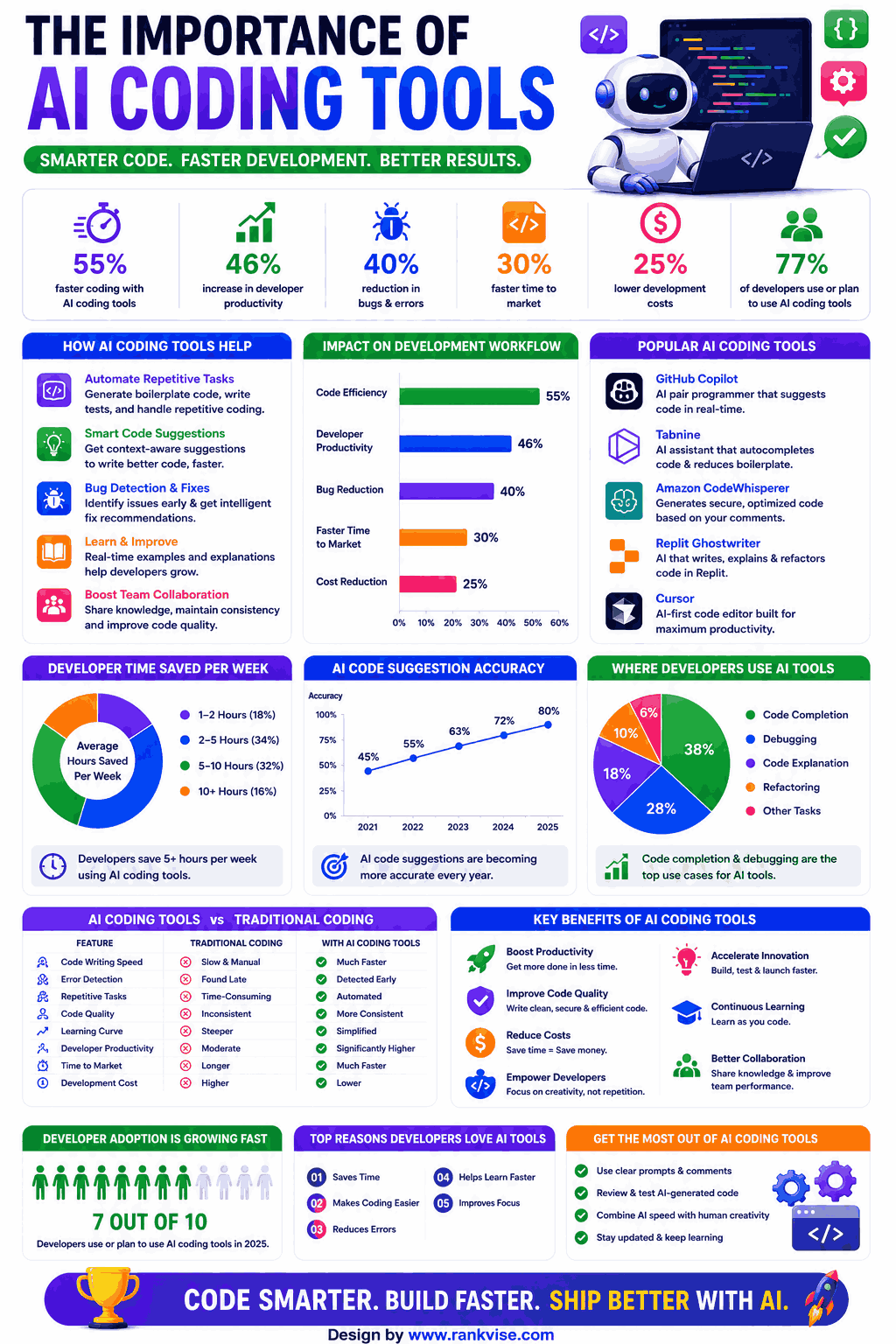
Businesses adopt ai coding tools to boost productivity and reduce development costs. Studies show developers complete tasks up to 55% faster with AI assistance. That translates directly into shorter project timelines and lower expenses.
Code quality also improves. AI tools catch errors before they reach production. They suggest better patterns and flag security vulnerabilities early. This means fewer bugs and happier end users.
Startups and enterprise teams alike benefit from these tools. Small teams punch above their weight. Large organizations standardize coding practices across hundreds of developers.
Top AI Coding Tools You Should Know in 2026
1. GitHub Copilot
GitHub Copilot remains one of the most popular ai coding tools available today. Built on OpenAI’s models, it integrates directly into VS Code, JetBrains, and Neovim.
Developer: GitHub (Microsoft) AI Model: OpenAI Codex / GPT-4 Supported Languages: Python, JavaScript, TypeScript, Ruby, Go, C#, C++, and 20+ more IDE Support: VS Code, JetBrains, Neovim, Visual Studio
Key Features:
- Real-time code suggestions as you type
- Whole function generation from comments
- Chat interface for code explanations
- Pull request summaries and review assistance
- Context-aware completions using your entire codebase
Quality: Extremely accurate for common patterns. Handles boilerplate code exceptionally well. Occasionally suggests outdated approaches for niche libraries.
Pricing:
- Individual: 10 USD/month
- Business: 19 USD/month per user
- Enterprise: 39 USD/month per user
Best For: Professional developers working in popular languages who want seamless IDE integration and reliable code suggestions daily.
2. Cursor
Cursor is a dedicated AI-first code editor that has gained massive traction among developers who want deeper AI integration than a plugin can offer.
Developer: Cursor Inc. AI Model: GPT-4, Claude, and custom models Supported Languages: All major programming languages IDE Support: Standalone editor (VS Code fork)
Key Features:
- AI-powered code editing with natural language commands
- Codebase-wide context understanding
- Multi-file editing in a single prompt
- Built-in terminal with AI assistance
- Tab completion with predictive edits
Quality: Excellent for complex, multi-file refactoring tasks. The codebase awareness sets it apart from plugin-based tools. Responses are fast and contextually relevant.
Pricing:
- Free: Limited completions
- Pro: 20 USD/month
- Business: 40 USD/month per user
Best For: Developers who want an all-in-one AI-native coding environment rather than adding plugins to existing editors.
3. Amazon CodeWhisperer (now Amazon Q Developer)
Amazon’s ai coding tool offers strong integration with AWS services. It excels at cloud-native development and infrastructure code.
Developer: Amazon Web Services AI Model: Amazon’s proprietary models Supported Languages: Python, Java, JavaScript, TypeScript, C#, Go, Rust, PHP, and more IDE Support: VS Code, JetBrains, AWS Cloud9, Visual Studio
Key Features:
- Code suggestions optimized for AWS services
- Security vulnerability scanning
- Reference tracking for open-source suggestions
- Infrastructure as Code support
- Integration with AWS documentation
Quality: Superior for AWS-related code. Security scanning is a standout feature. General-purpose suggestions are good but slightly behind Copilot.
Pricing:
- Individual Tier: Free
- Professional Tier: 19 USD/month per user
Best For: Teams building on AWS who want an AI assistant that understands cloud infrastructure and offers built-in security scanning.
4. Tabnine
Tabnine focuses on privacy and on-premise deployment. It appeals to enterprises with strict data governance requirements.
Developer: Tabnine (Codota) AI Model: Proprietary models (can run locally) Supported Languages: 30+ languages IDE Support: VS Code, JetBrains, Sublime Text, Vim, Eclipse
Key Features:
- On-premise deployment option
- Code never leaves your environment
- Team-trained models using your private codebase
- Whole-line and full-function completions
- Zero data retention policy
Quality: Completions are solid and consistent. Privacy-first approach means slightly less powerful than cloud-based alternatives. Custom models improve accuracy over time.
Pricing:
- Free: Basic completions
- Pro: 12 USD/month per user
- Enterprise: Custom pricing
Best For: Enterprises in regulated industries like finance, healthcare, or government that require data privacy and on-premise AI solutions.
5. Codeium (Windsurf)
Codeium rebranded to Windsurf and offers a generous free tier. It targets individual developers and small teams looking for AI assistance without high costs.
Developer: Exafunction (now Windsurf) AI Model: Proprietary models Supported Languages: 70+ languages IDE Support: VS Code, JetBrains, Vim, Emacs, and more
Key Features:
- Unlimited free autocomplete for individuals
- Natural language code search
- In-editor chat for code explanation
- Multi-language support across 70+ languages
- Fast response times with low latency
Quality: Impressive quality for a free tool. Autocomplete speed is excellent. Chat-based features are improving rapidly with each update.
Pricing:
- Free: Unlimited autocomplete
- Pro: 10 USD/month
- Teams: 15 USD/month per user
Best For: Individual developers, students, and small teams who want powerful AI coding assistance without paying premium prices.
6. Sourcegraph Cody
Cody by Sourcegraph stands out for its deep codebase understanding. It reads your entire repository to provide highly contextual answers.
Developer: Sourcegraph AI Model: Claude, GPT-4, and others Supported Languages: All major languages IDE Support: VS Code, JetBrains, Web
Key Features:
- Entire codebase as context for AI responses
- Intelligent code search across repositories
- Automated code explanations
- Unit test generation
- Multi-repo support for large organizations
Quality: Outstanding for understanding legacy codebases. Answers are deeply contextual. Best for teams managing large, complex repositories.
Pricing:
- Free: Limited usage
- Pro: 9 USD/month
- Enterprise: Custom pricing
Best For: Engineering teams managing large codebases who need an AI tool that truly understands their entire repository structure.
AI Coding Tools Comparison Table
| Tool | Free Tier | Starting Price | Privacy Focus | Best Feature |
|---|---|---|---|---|
| GitHub Copilot | No | 10 USD/mo | Medium | IDE integration |
| Cursor | Yes (limited) | 20 USD/mo | Medium | Multi-file editing |
| Amazon Q Developer | Yes | 19 USD/mo | High | AWS optimization |
| Tabnine | Yes | 12 USD/mo | Very High | On-premise deployment |
| Windsurf (Codeium) | Yes | 10 USD/mo | Medium | Free autocomplete |
| Sourcegraph Cody | Yes | 9 USD/mo | High | Codebase context |
How to Choose the Right AI Coding Tool
Selecting the best tool depends on your team size, budget, and technical requirements. Start by identifying your primary need. Do you want faster code completion or deeper codebase understanding?
Consider your privacy requirements next. Regulated industries should look at Tabnine or Amazon Q Developer. Smaller teams with flexible policies can choose any cloud-based option.
Test free tiers before committing. Most tools offer enough free access to evaluate quality. Try at least two or three tools on your actual projects before deciding.
FAQs
GitHub Copilot, Cursor, Amazon Q Developer, Tabnine, Windsurf, and Sourcegraph Cody are the leading ai coding tools based on features, accuracy, and user adoption.
Yes, tools like Tabnine and Amazon Q Developer offer on-premise deployment and zero data retention policies, making them suitable for regulated industries.
No, these tools assist developers by handling repetitive tasks and suggesting code. Human judgment remains essential for architecture decisions and complex problem-solving.
Most tools support 20 to 70+ languages. Popular languages like Python, JavaScript, and Java receive the best support and most accurate suggestions.
Team pricing typically ranges from 12 to 40 USD per user per month. Several tools offer free tiers with limited features suitable for individual developers.