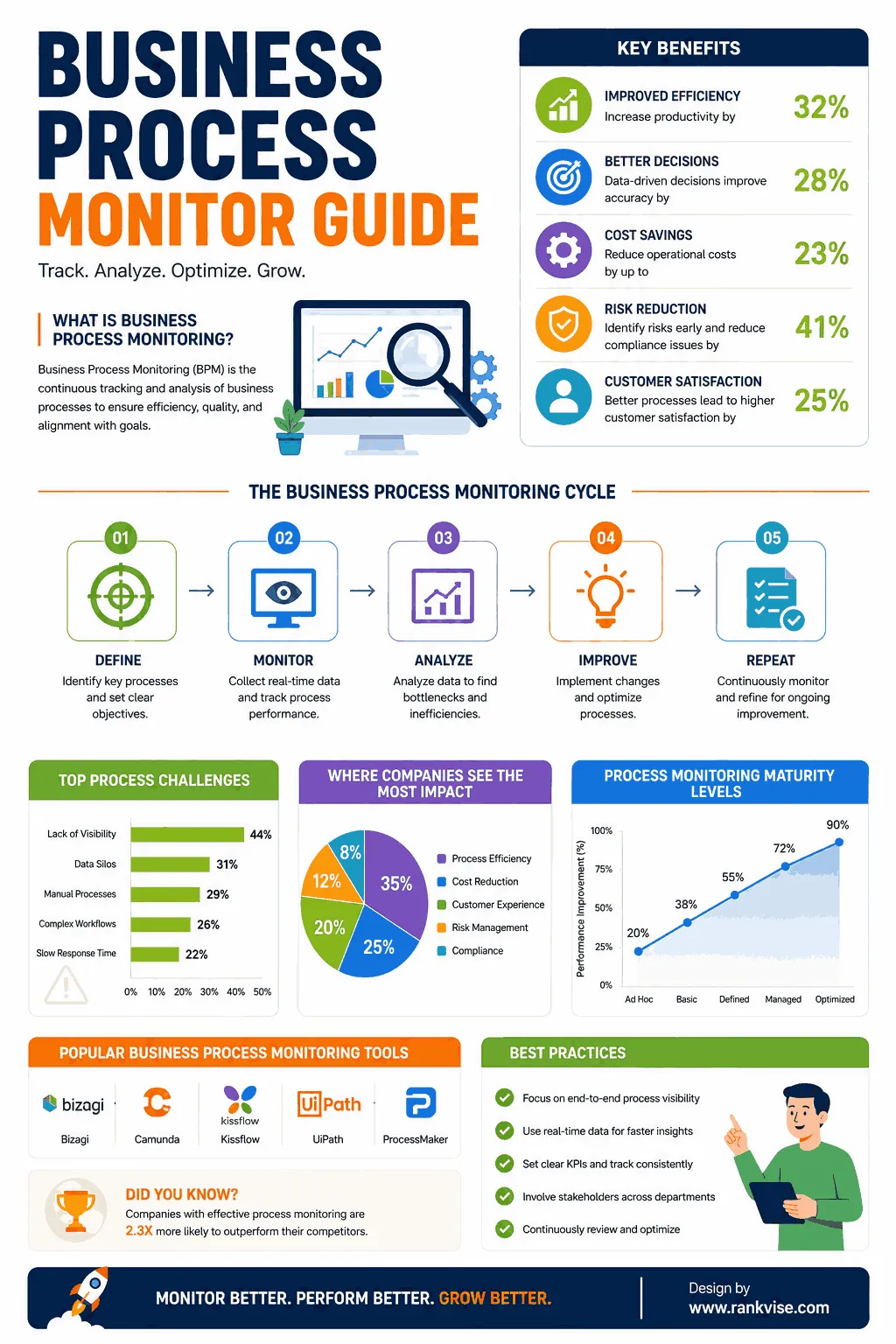
A business process monitor is a tool that tracks, measures, and visualizes how your workflows perform in real time. It watches every step of a process from start to finish. Think of it as a dashboard for your operations.
It captures data at each stage of a workflow. You see where tasks slow down, where errors occur, and where bottlenecks form. This visibility helps teams act before small issues become expensive problems.
Whether you run finance approvals, order fulfillment, or customer onboarding, monitoring gives you control. You stop guessing and start making decisions backed by live data.
Why Does Your Business Need Process Monitoring?
Most companies rely on dozens of interconnected workflows. Without monitoring, problems hide in plain sight. Delays compound silently. Costs rise without explanation.
A process monitoring solution exposes these hidden inefficiencies. It shows exactly where a workflow deviates from its expected path. Teams gain clarity on cycle times, throughput, and exception rates.
Here is what happens without process monitoring:
- Delayed order processing goes unnoticed for weeks
- Compliance violations surface only during audits
- Customer complaints spike before anyone identifies the root cause
- Manual workarounds become permanent habits
Monitoring eliminates these blind spots. It keeps your operations transparent and accountable every single day.
How Does a Business Process Monitor Work?
Process monitoring tools connect to your existing systems. They pull data from ERP platforms, CRM tools, databases, and workflow engines. No process redesign is needed.
The tool then maps each transaction or case through its lifecycle. It records timestamps, status changes, handoffs, and outcomes. This creates a digital trail for every instance.
Real-Time Dashboards and Alerts
Dashboards display key performance indicators at a glance. You see active cases, average handling times, and completion rates instantly.
Alerts trigger when a metric crosses a threshold you define. For example, if an invoice approval exceeds 48 hours, the system notifies the responsible team. This proactive approach prevents cascading delays.
Historical Analysis and Trend Detection
Beyond real-time tracking, the monitor stores historical data. You can compare performance across weeks, months, or quarters. Trends become visible. Seasonal spikes get predictable.
This historical view supports capacity planning and continuous improvement initiatives. You base your strategy on patterns, not assumptions.
Key Features to Look for in Process Monitoring Tools
Not all monitoring solutions deliver equal value. Choose a tool that matches your operational complexity and growth plans.
| Feature | Why It Matters |
|---|---|
| Real-time visibility | Spot issues as they happen, not days later |
| Automated alerts | Reduce manual oversight and response time |
| Process mining integration | Discover actual process flows from system logs |
| Customizable KPIs | Track metrics relevant to your specific workflows |
| Role-based dashboards | Show each team only what they need |
| Exception handling | Flag deviations automatically for review |
| Scalability | Handle growing transaction volumes without lag |
Prioritize tools that integrate smoothly with your current technology stack. Adoption fails when monitoring creates extra manual work.
Business Process Monitoring vs. Process Mining
People often confuse these two concepts. They are related but serve different purposes.
Process mining analyzes historical event logs. It reconstructs how processes actually run. It reveals variants, deviations, and inefficiencies after the fact.
A business process monitor watches processes as they happen. It provides live status updates and triggers immediate action. Think of mining as the investigation and monitoring as the surveillance.
The best results come from combining both. Use process mining to understand your workflows. Then deploy monitoring to keep them on track continuously.
Industries That Benefit Most from Process Monitoring
Process monitoring delivers value across virtually every sector. Some industries see especially high returns.
Manufacturing and Supply Chain
Manufacturers track production workflows, supplier deliveries, and quality checks. Monitoring reduces downtime and prevents missed shipments. A single delayed component can halt an entire production line.
Financial Services and Banking
Banks monitor loan approvals, compliance checks, and transaction processing. Regulatory requirements demand full visibility into operational workflows. Monitoring ensures nothing slips through undetected.
Healthcare Operations
Hospitals use workflow monitoring for patient admissions, lab results, and discharge processes. Faster cycle times directly improve patient outcomes and satisfaction scores.
Retail and E-Commerce
Order fulfillment, returns processing, and inventory replenishment all benefit from continuous monitoring. Customers expect speed. Monitoring helps you deliver it consistently.
Steps to Implement a Business Process Monitor
Successful implementation follows a structured approach. Rushing leads to incomplete coverage and low adoption.
- Identify critical processes – Start with workflows that impact revenue, compliance, or customer experience most directly.
- Define KPIs and thresholds – Decide what “good” looks like for each process before you begin monitoring.
- Connect data sources – Integrate the monitoring tool with your ERP, CRM, or workflow systems.
- Configure dashboards and alerts – Build views tailored to each stakeholder group.
- Train your teams – Ensure everyone understands what the data means and how to act on it.
- Iterate and expand – Start with two or three processes, then scale across the organization.
Avoid monitoring everything at once. Focused implementation builds confidence and demonstrates quick wins.
Common Challenges and How to Overcome Them
Every implementation faces obstacles. Anticipating them makes the difference between success and stalled projects.
Data quality issues surface frequently. Inconsistent timestamps or missing fields distort your metrics. Clean your source data before connecting it to the monitor.
Resistance from teams happens when people feel watched rather than supported. Frame monitoring as a tool that removes frustration, not one that assigns blame.
Alert fatigue occurs when thresholds are too sensitive. Start conservatively. Refine your alert rules based on actual operational patterns over the first few weeks.
Measuring ROI from Process Monitoring
Quantifying the return on your monitoring investment keeps stakeholders engaged. Track these outcomes:
- Reduction in average cycle time per process
- Decrease in SLA breaches or compliance violations
- Fewer customer escalations tied to operational delays
- Lower manual effort spent on status updates and reporting
- Faster identification and resolution of process exceptions
Organizations typically see measurable improvements within the first quarter. The visibility alone changes behavior. Teams self-correct when they see their performance in real time.
The Future of Business Process Monitoring in 2026 and Beyond
Monitoring tools are evolving rapidly. Artificial intelligence now predicts bottlenecks before they form. Machine learning models identify anomaly patterns humans would miss.
Expect deeper integration with robotic process automation. When monitoring detects a deviation, automated workflows can correct it without human intervention. This closes the loop between detection and resolution.
Low-code platforms also make monitoring accessible to non-technical teams. Business analysts configure dashboards and rules without developer support. This democratizes operational intelligence across the organization.
FAQs
A business process monitor tracks live workflows, measures performance against KPIs, and alerts teams when processes deviate from expected behavior.
Process monitoring observes and reports on workflow performance. Process automation executes tasks without human input. Monitoring tells you what is happening; automation does the work.
Yes. Small businesses use monitoring to eliminate bottlenecks in order processing, invoicing, and customer service workflows without hiring additional staff.
Start with high-volume, customer-facing, or compliance-sensitive processes. These deliver the fastest and most visible return on your monitoring investment.
Modern tools offer low-code interfaces. Business users can configure dashboards and alerts with minimal IT involvement, though initial system integration may need technical support.