Business process optimization is the practice of improving existing workflows to increase efficiency, reduce costs, and deliver better results. It focuses on making your current operations work harder without adding more resources.
- Map existing workflows with frontline input to reveal hidden steps, handoffs, and decision points using simple flowcharts.
- Analyze maps to identify bottlenecks, waste, and manual tasks; prioritize high-impact, low-effort fixes for quick wins.
- Roll out changes in controlled phases, pilot small groups, document procedures, train staff, then measure KPIs and adjust.
- Make continuous improvement cultural: empower suggestions, display process metrics, assign clear ownership, and schedule regular reviews.
Every business runs on processes. Order fulfillment, employee onboarding, invoice approvals, customer support—these all follow repeatable steps. When those steps contain waste or friction, performance suffers. Optimization identifies and eliminates those problems systematically.
This is not about dramatic overhauls or expensive technology upgrades. It is about finding smarter ways to accomplish what you already do. Small improvements compound into significant competitive advantages over time.
Why Does Business Process Optimization Matter?
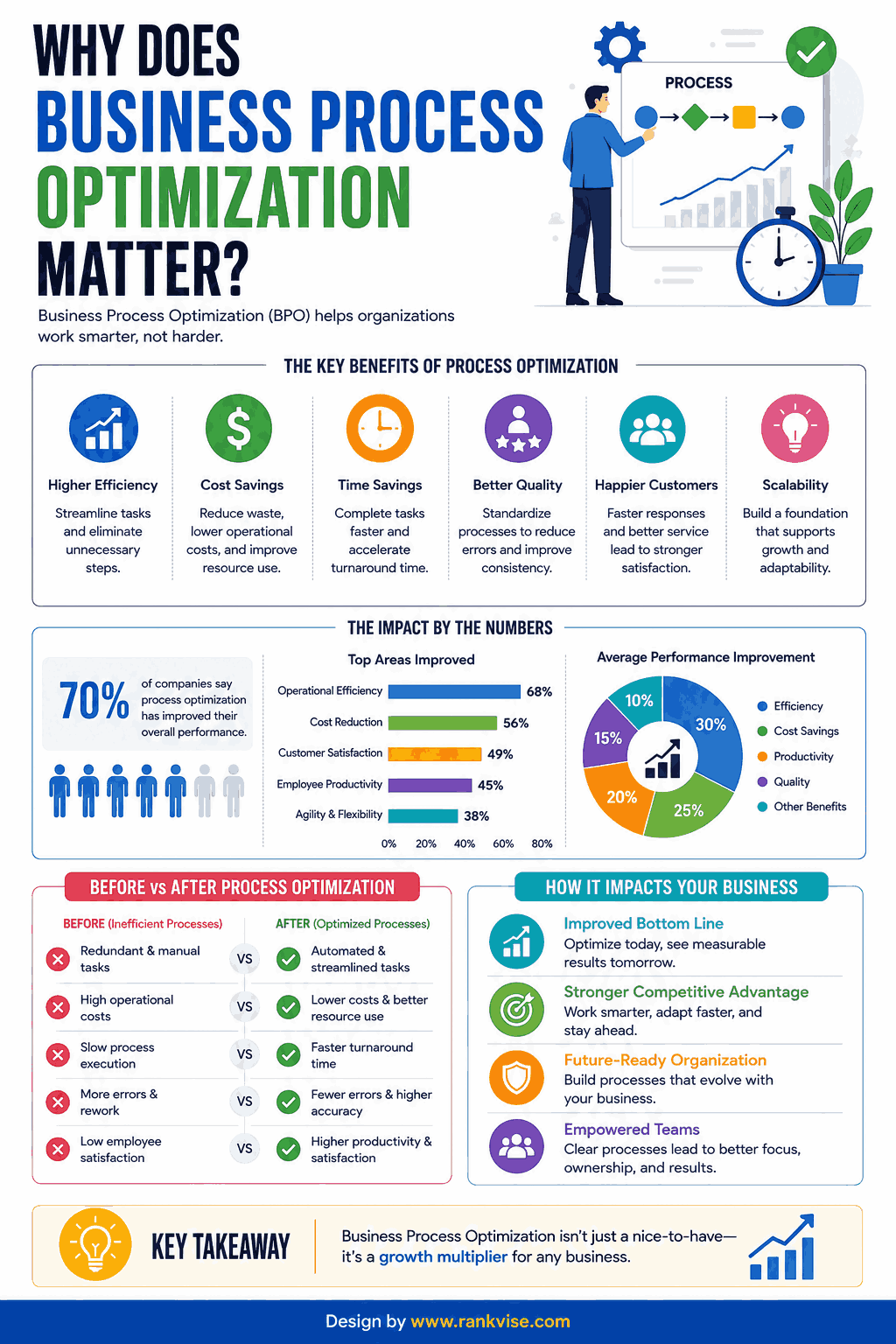
Inefficient processes cost more than most leaders realize. Studies consistently show that organizations lose 20–30% of revenue annually to operational inefficiencies. That represents real money leaving your business every single day.
Beyond cost savings, optimized workflows improve employee satisfaction. People dislike repetitive, manual tasks that add no value. When you streamline operations, your team focuses on meaningful work instead of fighting broken systems.
Customer experience improves simultaneously. Faster response times, fewer errors, and consistent delivery build trust. Companies that optimize their internal processes outperform competitors who tolerate waste.
Common Signs Your Processes Need Optimization
Not sure whether your workflows need attention? Watch for these warning signals:
- Frequent bottlenecks that delay project completion
- High error rates requiring constant rework
- Employees spending hours on manual data entry
- Customer complaints about slow response times
- Duplicated effort across departments
- Unclear ownership of tasks and decisions
- Rising operational costs without corresponding growth
If three or more of these sound familiar, your processes are overdue for improvement. Most organizations experience at least some of these symptoms as they scale.
The Business Process Optimization Framework
Effective process improvement follows a structured approach. Random changes create chaos. A clear methodology produces measurable, sustainable results.
Step 1: Map Your Current Processes
Start by documenting how work actually flows today. Talk to the people who perform each task daily. Avoid assumptions based on how you think things work.
Process mapping reveals hidden steps, handoffs, and decision points. Use simple flowcharts or workflow diagrams. Visual documentation makes inefficiencies obvious to everyone involved.
Step 2: Identify Bottlenecks and Waste
Analyze your process maps for common types of waste. Look for waiting times between steps, unnecessary approvals, redundant data entry, and manual tasks that technology could handle.
Ask your team where they feel frustrated. Frontline employees know exactly which steps slow them down. Their insights often reveal problems that leadership cannot see from above.
Step 3: Prioritize Improvements
You cannot fix everything simultaneously. Rank opportunities by impact and effort. High-impact, low-effort changes deliver quick wins that build momentum for larger initiatives.
Use a simple priority matrix:
| Category | Impact | Effort | Action |
|---|---|---|---|
| Quick wins | High | Low | Implement immediately |
| Major projects | High | High | Plan and schedule |
| Fill-ins | Low | Low | Delegate or batch |
| Time sinks | Low | High | Avoid or defer |
Step 4: Implement Changes
Roll out improvements in controlled phases. Test changes with a small team before scaling across the organization. Collect feedback during every phase and adjust accordingly.
Document new procedures clearly. Train affected employees thoroughly. Change fails when people do not understand what to do differently or why it matters.
Step 5: Measure and Iterate
Define key performance indicators before implementing changes. Track cycle time, error rates, cost per transaction, and employee productivity. Compare post-optimization metrics against your baseline.
Continuous improvement never truly ends. Business conditions evolve. Customer expectations shift. Revisit optimized processes quarterly to ensure they still perform well.
Tools and Technologies That Support Process Improvement
Technology accelerates optimization efforts significantly. The right tools automate repetitive tasks, improve visibility, and enable data-driven decisions.
Workflow Automation Platforms
Tools like Zapier, Microsoft Power Automate, and Make eliminate manual handoffs between systems. They connect your existing software and trigger actions automatically. A simple automation can save hours of manual work weekly.
Business Process Management Software
Dedicated BPM platforms model, execute, and monitor workflows in one system. Solutions like Monday.com, Kissflow, and ProcessMaker provide visibility into every process stage. They highlight delays and exceptions in real time.
Data Analytics and Reporting
You cannot optimize what you cannot measure. Analytics tools track process performance over time. Dashboards reveal trends, outliers, and improvement opportunities that intuition alone would miss.
Robotic Process Automation
RPA handles high-volume, rule-based tasks that humans currently perform manually. Invoice processing, data migration, and report generation are prime candidates. RPA bots work 24/7 without errors or fatigue.
Real-World Examples of Process Optimization
Abstract concepts become clearer through practical scenarios. These examples show optimization in action across different business functions.
Example 1: Accounts Payable
A mid-sized company processed invoices manually. Each invoice required three email approvals, manual data entry, and physical filing. Average processing time was 12 days.
After optimization, they implemented automated invoice capture, digital approval routing, and electronic storage. Processing time dropped to 3 days. Error rates fell by 85%. The finance team redirected 20 hours weekly toward strategic analysis.
Example 2: Customer Onboarding
A SaaS company lost 30% of new customers during onboarding. The process involved seven emails, four phone calls, and manual account setup taking five business days.
They redesigned the workflow with automated welcome sequences, self-service setup wizards, and triggered check-ins. Onboarding time decreased to one day. Customer retention in the first 90 days improved by 40%.
Common Mistakes to Avoid
Process optimization fails when organizations approach it carelessly. Avoid these frequent pitfalls:
- Automating broken processes instead of fixing them first
- Ignoring employee input during the redesign phase
- Optimizing for speed while sacrificing quality
- Skipping measurement and assuming improvements worked
- Treating optimization as a one-time project rather than ongoing practice
The biggest mistake is optimizing in isolation. Processes connect across departments. Improving one workflow without considering upstream and downstream effects creates new problems elsewhere.
How to Build a Culture of Continuous Improvement
Sustainable operational excellence requires more than occasional projects. It demands a mindset shift across your entire organization.
Empower employees to suggest improvements without bureaucratic approval processes. Celebrate small wins publicly. Make process performance visible through shared dashboards and regular reviews.
Train team leaders in basic process analysis techniques. When every manager thinks critically about workflow efficiency, improvements happen organically. You do not need a dedicated team to maintain momentum.
Set quarterly review cycles for critical processes. Assign clear ownership so someone remains accountable for ongoing performance. Without ownership, optimized processes gradually decay back toward inefficiency.
FAQs
Optimization improves how work flows by eliminating waste and redesigning steps. Automation uses technology to execute tasks without human intervention. You should optimize first, then automate the improved process.
Quick wins typically deliver measurable results within two to four weeks. Larger optimization initiatives show significant impact within three to six months depending on complexity and organizational readiness.
Start with high-volume, repetitive processes that directly affect revenue or customer experience. Accounts payable, order fulfillment, and customer onboarding are common high-impact starting points for most organizations.
Absolutely. Small businesses benefit even more because they operate with tighter margins and fewer resources. Eliminating waste in a five-person team frees significant capacity for growth without hiring.
Core skills include analytical thinking, process mapping, stakeholder communication, and basic data analysis. Technical skills in automation tools help but are not mandatory for identifying and implementing improvements.