The average professional loses nearly 3 hours daily to distractions, context switching, and disorganized workflows. The best productivity apps help you reclaim that time by creating structure around your tasks, communication, and focus.
But here is the real challenge. Thousands of apps promise to boost your output. Most add complexity instead of removing it. Choosing the wrong tools actually decreases productivity by fragmenting your attention across too many platforms.
This guide cuts through the noise. We evaluate top productivity tools across categories that matter—task management, note-taking, time tracking, focus, and team collaboration. Each recommendation earns its place through real-world usefulness, not marketing hype.
What Makes a Productivity App Truly Effective?
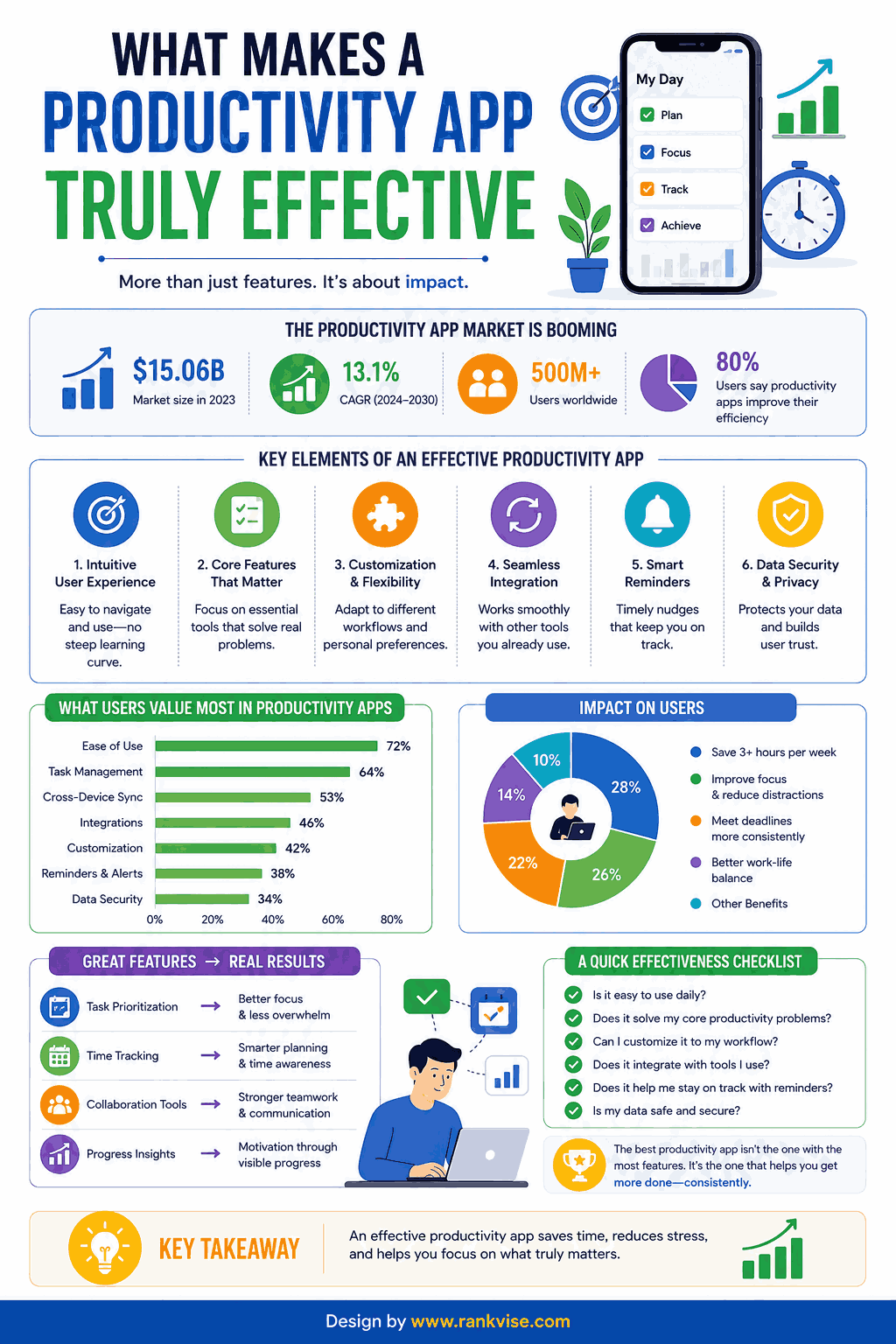
Not every popular app deserves a spot in your workflow. The best productivity apps share specific characteristics that separate them from mediocre alternatives.
- Simple onboarding that takes minutes, not hours
- Clean interface that reduces cognitive load
- Cross-platform availability (desktop, mobile, web)
- Reliable sync across all your devices
- Integrations with tools you already use
- Flexible enough to adapt to your working style
An app fails the productivity test if it requires more time to manage than it saves. The goal is friction reduction, not feature accumulation.
Best Task Management Apps
Task management forms the foundation of personal productivity. These apps organize your to-do lists, projects, and deadlines in one accessible location.
Todoist
Todoist remains one of the most intuitive task management apps available. Its natural language input lets you type “Submit report every Friday at 3pm” and it creates the recurring task automatically. The interface stays clean regardless of how many projects you manage.
Best for: Individuals and small teams wanting simple, powerful task organization without overwhelming features.
Pricing: Free plan available. Pro plan costs 4 USD monthly.
Notion
Notion combines task management with notes, databases, and wikis in a single workspace. It replaces multiple apps with one flexible platform. Teams use it for project tracking, documentation, and knowledge management simultaneously.
Best for: Teams and individuals who want an all-in-one workspace that adapts to complex workflows.
Pricing: Free for personal use. Team plans start at 8 USD per user monthly.
TickTick
TickTick blends task management with built-in calendar views, habit tracking, and a Pomodoro timer. It offers more built-in features than Todoist while maintaining a clean experience. The calendar integration makes scheduling tasks alongside meetings effortless.
Best for: Users who want task management and time management combined in one application.
Pricing: Free plan available. Premium costs 36 USD annually.
Best Note-Taking and Knowledge Management Apps
Capturing ideas, meeting notes, and research efficiently prevents valuable information from slipping away. These apps serve as your external brain.
Obsidian
Obsidian stores notes as plain markdown files on your device. Its linking system connects related ideas into a personal knowledge network. You own your data completely—no vendor lock-in or cloud dependency required.
Best for: Researchers, writers, and knowledge workers who value data ownership and interconnected thinking.
Pricing: Free for personal use. Sync costs 4 USD monthly.
Apple Notes / Google Keep
Sometimes simplicity wins. Both apps launch instantly, sync reliably, and capture thoughts with zero friction. They lack advanced features but excel at quick capture—the most important note-taking function.
Best for: Anyone needing fast, reliable note capture without learning a new system.
Pricing: Completely free with your existing account.
Best Time Tracking and Focus Apps
Understanding where your time goes reveals surprising productivity leaks. These tools bring awareness and structure to your working hours.
Toggl Track
Toggl Track makes time tracking painless with one-click timers and automatic detection. It generates clear reports showing exactly how you spend your working hours. Many freelancers use it for client billing alongside personal productivity analysis.
Best for: Freelancers, consultants, and anyone billing by the hour or analyzing time allocation.
Pricing: Free for up to 5 users. Paid plans start at 9 USD per user monthly.
Forest
Forest gamifies focus by growing virtual trees when you avoid your phone. Leave the app and your tree dies. It sounds simple, but the visual accountability works remarkably well for building sustained focus habits.
Best for: Anyone struggling with phone distractions during deep work sessions.
Pricing: Around 4 USD one-time purchase on mobile.
Best Team Collaboration Apps
Remote and hybrid work demands reliable communication tools. These platforms keep distributed teams aligned without drowning everyone in notifications.
Slack
Slack organizes team communication into searchable channels by topic, project, or department. It reduces email volume dramatically while keeping conversations accessible. Integrations with hundreds of other tools make it a central hub for work.
Best for: Teams of any size needing organized, real-time communication beyond email.
Pricing: Free plan available. Pro plan costs 7.25 USD per user monthly.
Asana
Asana handles project management and team coordination with visual timelines, task dependencies, and workload views. It shows who is doing what by when—eliminating confusion about responsibilities and deadlines.
Best for: Teams managing multiple projects with dependencies and cross-functional collaboration needs.
Pricing: Free for up to 10 users. Premium starts at 10.99 USD per user monthly.
How to Choose the Best Productivity Apps for Your Needs
The perfect productivity stack depends on your role, workflow, and pain points. Use this framework to narrow your choices.
| Your Primary Need | Recommended Category | Top Pick |
|---|---|---|
| Organizing daily tasks | Task management | Todoist |
| Managing team projects | Collaboration | Asana |
| Capturing ideas and notes | Note-taking | Obsidian |
| Tracking billable hours | Time tracking | Toggl Track |
| Reducing phone distractions | Focus | Forest |
| All-in-one workspace | Multi-purpose | Notion |
Start with one app that solves your biggest pain point. Master it before adding another tool. Stacking too many apps simultaneously creates the very fragmentation you are trying to eliminate.
Mistakes to Avoid When Choosing Productivity Tools
Even the best productivity apps fail when adopted poorly. Watch for these common traps:
- Downloading ten apps simultaneously and mastering none
- Choosing complex tools when simple ones solve the problem
- Switching apps every few weeks chasing the “perfect” system
- Ignoring free tiers that often provide more than enough functionality
- Picking tools your team will not actually adopt consistently
The most productive professionals use fewer tools, not more. They choose deliberately and commit fully. A basic app used consistently outperforms an advanced app used sporadically.
Tips for Building Your Ideal Productivity System
A collection of apps does not equal a system. You need intentional structure connecting your tools into a coherent workflow.
Define your workflow first. Decide where new tasks enter your system. Clarify where notes live permanently. Establish when you review and plan. Then select apps that support those decisions.
Limit your core stack to three or four tools maximum. One for tasks, one for notes, one for communication, and optionally one for time awareness. Everything else creates diminishing returns.
Review your system monthly. Remove apps you stopped using. Replace tools that frustrate you. Your productivity stack should evolve as your work changes, but it should never grow unchecked.
FAQs
Todoist offers the best balance of simplicity and power for newcomers. Its free plan handles most personal productivity needs, and the natural language input requires almost no learning curve to start.
Yes, many free tiers provide excellent functionality. Todoist, Notion, Slack, and Google Keep all offer robust free plans that satisfy most individual professionals without requiring paid upgrades.
Absolutely. Using too many tools fragments your attention and creates maintenance overhead. Limit your stack to three or four core apps and resist adding new ones unless they solve a specific, proven problem.
Slack for communication, Asana for project management, and Notion for documentation form a powerful remote team stack. Together they cover real-time messaging, task coordination, and shared knowledge management.
Give any new app at least 30 days before evaluating it. Switching tools frequently wastes time on setup and learning. Only change when a tool consistently fails to meet a clearly defined need in your workflow.