Most marketers launch campaigns and hope for the best. They check vanity metrics occasionally but never build a real tracking system. This approach wastes budget and hides what actually works.
A step by step way to track campaigns gives you clarity at every stage. You see which channels drive revenue. You identify what to scale and what to cut. Every dollar spent becomes accountable.
Without structured campaign tracking, you make decisions based on gut feeling instead of data. Gut feelings are expensive. They lead to repeated mistakes and missed opportunities that compound over time.
What Does Campaign Tracking Actually Mean?
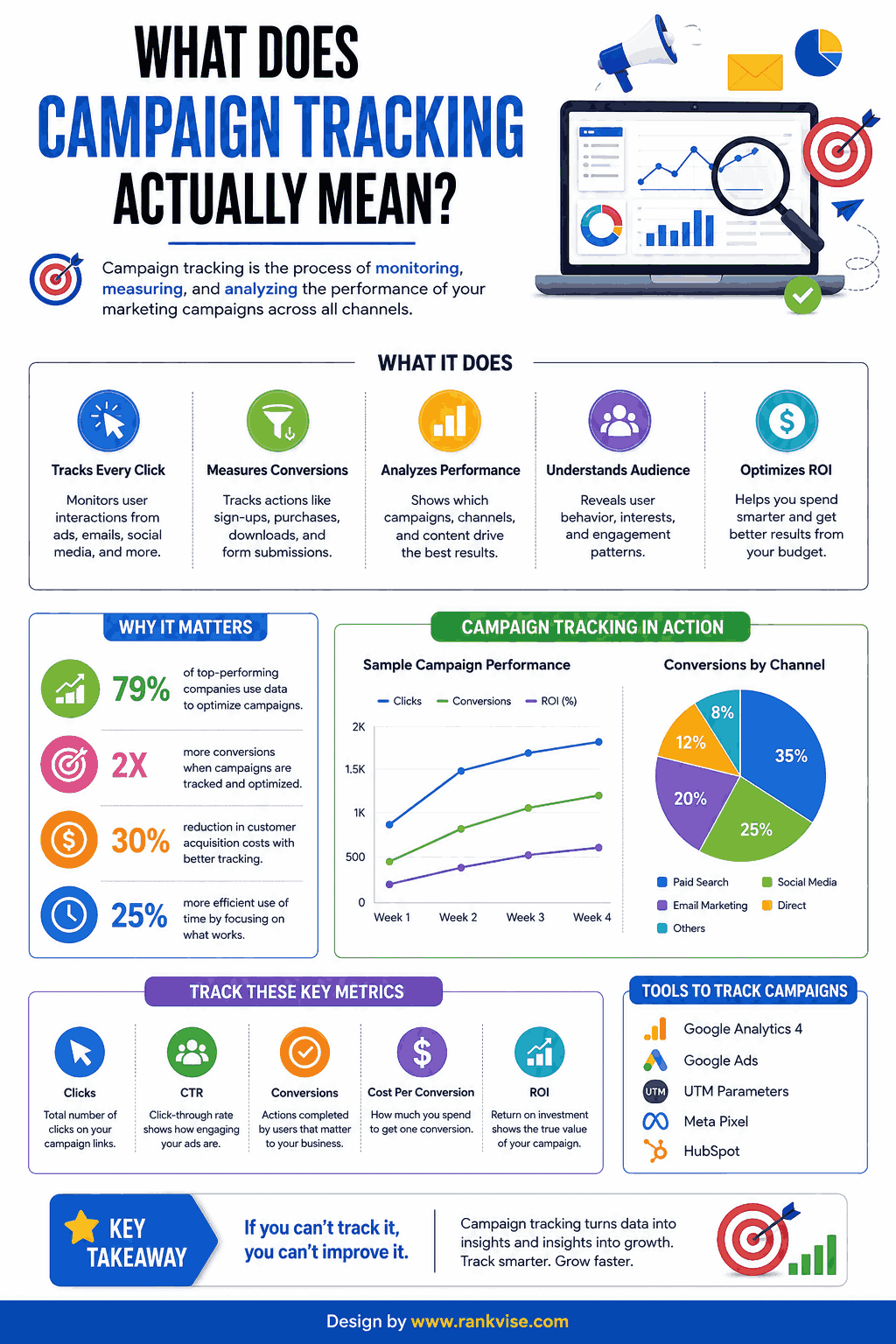
Campaign tracking is the process of monitoring marketing performance across every channel and touchpoint. It connects your spending to measurable outcomes like leads, sales, and revenue.
Effective tracking answers three fundamental questions. Where did this customer come from? What convinced them to act? How much did acquiring them cost? When you answer these consistently, marketing becomes predictable instead of chaotic.
This applies to every campaign type—email marketing, paid ads, social media, content marketing, and offline efforts. The tools and methods differ slightly, but the underlying framework remains the same.
Step 1: Define Clear Campaign Goals and KPIs
Every tracking system starts with knowing what success looks like. Vague goals produce vague results. Specific goals produce actionable data.
Before launching anything, define your primary objective:
- Brand awareness (impressions, reach, share of voice)
- Lead generation (form submissions, email signups, demo requests)
- Direct sales (purchases, revenue, average order value)
- Engagement (clicks, comments, shares, time on page)
- Retention (repeat purchases, churn rate, lifetime value)
Choose one primary goal per campaign. Supporting metrics matter, but a single north star prevents confusion during analysis. Your tracking setup revolves entirely around measuring this goal accurately.
Setting Measurable KPIs
Attach specific numbers to your goals. “Increase leads” is not a KPI. “Generate 200 qualified leads at under 45 USD cost per lead within 30 days” is a KPI. This precision makes tracking meaningful.
| Goal Type | Example KPI | Tracking Method |
|---|---|---|
| Awareness | 500,000 impressions | Platform analytics |
| Leads | 200 signups at under 45 USD CPL | CRM + UTM tracking |
| Sales | 50,000 USD revenue at 4x ROAS | Conversion tracking pixels |
| Engagement | 5% click-through rate | Email/ad platform data |
Step 2: Set Up UTM Parameters for Every Link
UTM parameters are tags you add to URLs. They tell your analytics platform exactly where each visitor originated. Without them, traffic sources blur together into an unhelpful mess.
Every campaign link needs five UTM tags:
- utm_source – The platform (google, facebook, newsletter)
- utm_medium – The channel type (cpc, email, social, organic)
- utm_campaign – The specific campaign name
- utm_content – The ad variation or content piece
- utm_term – The keyword (for paid search)
Use Google’s Campaign URL Builder or a similar tool to generate tagged links. Maintain a consistent naming convention across your entire team. Inconsistent naming creates fragmented data that is impossible to analyze cleanly.
UTM Naming Best Practices
Establish rules before your first campaign launches. Use lowercase letters only. Separate words with hyphens or underscores—pick one and stick with it. Document your conventions in a shared spreadsheet.
A well-structured UTM looks like this: utm_source=facebook&utm_medium=paid-social&utm_campaign=summer-sale-2026&utm_content=video-ad-v2
Step 3: Install Tracking Pixels and Conversion Tags
Pixels and tags fire when visitors take specific actions on your website. They report conversions back to your advertising platforms and analytics tools. Without them, you cannot attribute results to specific campaigns.
Install these essential tracking elements:
- Google Analytics 4 tag on every page
- Meta (Facebook) pixel for social campaign tracking
- Google Ads conversion tag for paid search campaigns
- LinkedIn Insight Tag if running B2B campaigns
- Email platform tracking for click and conversion monitoring
Use Google Tag Manager to deploy all tags from one interface. It simplifies installation and reduces reliance on developers for every tracking update.
Verifying Your Tracking Setup
Never assume pixels work correctly after installation. Test every conversion action manually before spending budget. Use browser extensions like Meta Pixel Helper and Google Tag Assistant to confirm tags fire properly.
A broken pixel means your campaign data is incomplete or wrong. Decisions based on faulty data are worse than no data at all. Verify tracking weekly during active campaigns.
Step 4: Build a Centralized Campaign Dashboard
Data scattered across six platforms tells you nothing useful. A centralized dashboard pulls all campaign metrics into one view. This single source of truth enables fast, confident decisions.
Choosing Your Dashboard Tool
| Tool | Best For | Cost |
|---|---|---|
| Google Looker Studio | Free reporting with Google data sources | Free |
| HubSpot | Inbound marketing and CRM-connected reporting | Starts at 800 USD/month |
| Databox | Multi-platform dashboards with mobile access | Free tier available |
| Supermetrics | Pulling ad platform data into spreadsheets | Starts at 69 USD/month |
Your dashboard should display campaign performance by channel, cost metrics, conversion rates, and progress toward your KPIs. Update it daily during active campaigns and weekly during quieter periods.
What to Include on Your Dashboard
Focus on metrics that connect to revenue. Impressions and clicks matter only when tied to downstream conversions. Structure your dashboard in a funnel format—awareness metrics at top, revenue metrics at bottom.
Include spend-to-date alongside performance data. Seeing cost and results together reveals efficiency immediately. A campaign generating leads at 80 USD each when your target is 45 USD needs attention today, not next week.
Step 5: Track Attribution Across Multiple Touchpoints
Customers rarely convert after a single interaction. They see an ad, read a blog post, open an email, then finally purchase. Attribution modeling determines which touchpoints receive credit for the conversion.
Common attribution models include:
- Last-click: 100% credit to the final touchpoint before conversion
- First-click: 100% credit to the initial discovery touchpoint
- Linear: Equal credit distributed across all touchpoints
- Time-decay: More credit to touchpoints closer to conversion
- Data-driven: Algorithm assigns credit based on actual influence patterns
No model is perfect. Start with last-click for simplicity, then graduate to data-driven attribution as your tracking matures. Google Analytics 4 offers data-driven attribution by default for accounts with sufficient conversion volume.
Step 6: Analyze Results and Optimize Continuously
Tracking without action is just record-keeping. Schedule weekly reviews during active campaigns. Monthly reviews work for ongoing evergreen efforts.
During each review, ask these questions:
- Which channels deliver the lowest cost per acquisition?
- Which ad creatives or content pieces drive the most conversions?
- Where are prospects dropping off in the funnel?
- Is overall spend on pace with budget projections?
- Are we hitting our primary KPI targets?
Shift budget toward what works. Pause what underperforms. Test new variations of your best performers. This continuous optimization cycle separates high-performing marketing teams from everyone else.
Creating a Campaign Performance Report
Document findings after every campaign concludes. Include total spend, results by channel, cost per conversion, return on ad spend, and key learnings. This historical record prevents repeating mistakes and accelerates future planning.
Share reports with stakeholders in plain language. Executives care about revenue impact and ROI—not click-through rates or impression share. Translate your data into business outcomes they understand immediately.
Common Campaign Tracking Mistakes to Avoid
Even experienced marketers make tracking errors that corrupt their data. Watch for these pitfalls:
- Launching campaigns without UTM parameters on every link
- Forgetting to exclude internal traffic from analytics
- Using inconsistent naming conventions across team members
- Ignoring cross-device tracking gaps in attribution
- Waiting until campaign end to check performance data
- Trusting platform-reported conversions without independent verification
Platforms like Meta and Google sometimes over-report conversions. Always cross-reference platform data with your own analytics and CRM records. Discrepancies of 10–20% are common and expected.
FAQs
Start with UTM parameters on every link and Google Analytics 4 as your reporting platform. This free combination provides solid campaign tracking without complex setup or paid tools.
Review active paid campaigns daily to catch budget issues early. Check organic and email campaigns weekly. Run comprehensive performance analysis monthly to identify trends and optimization opportunities.
Focus on cost per acquisition, conversion rate, and return on ad spend. These three metrics directly connect marketing activity to business revenue rather than measuring vanity metrics like impressions alone.
Yes. Use unique promo codes, dedicated phone numbers, or custom landing pages for offline campaigns. QR codes on print materials also bridge offline exposure to trackable digital interactions effectively.
Campaign tracking monitors performance metrics for individual campaigns. Marketing attribution determines which specific touchpoints across multiple campaigns deserve credit for driving each conversion or sale.