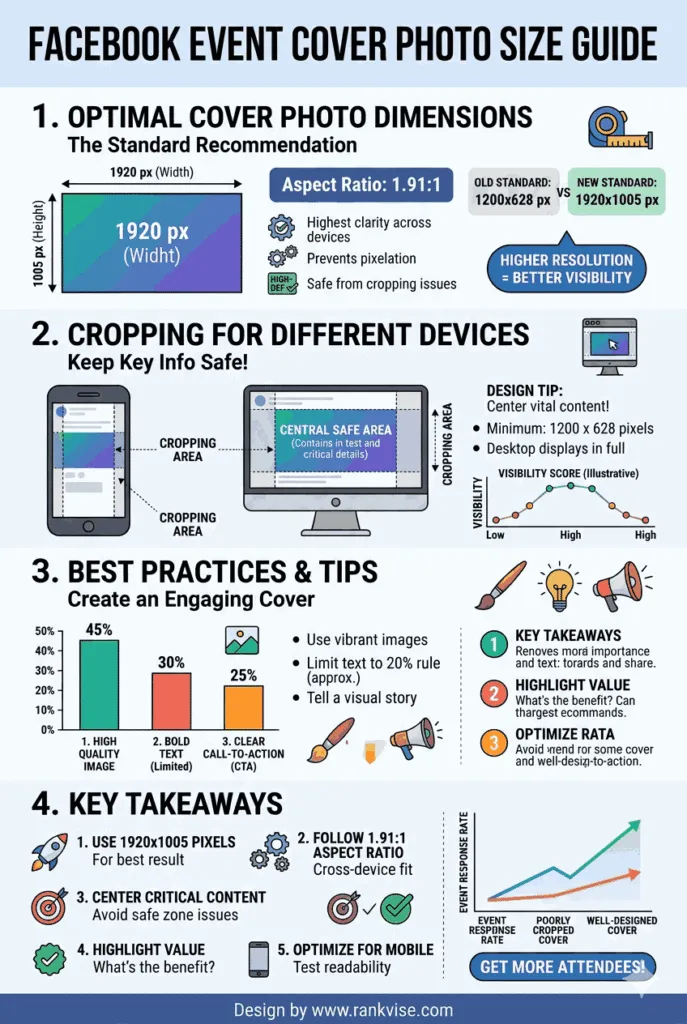
The recommended facebook event cover photo size is 1920 x 1005 pixels. This dimension uses an approximate 1.91:1 aspect ratio, which is close to the standard 16:9 widescreen format. Facebook previously recommended 1920 x 1080 pixels, but updated the guidelines to reduce cropping issues on mobile devices.
- Design at full recommended resolution to prevent blurriness and ensure crisp display across desktop and mobile.
- Place all critical text and logos inside the center safe zone (1200 x 628 pixels) to avoid mobile and news feed cropping.
- Use PNG for graphics and JPG for photos, export in sRGB, and keep file size under 100 KB for fastest loading and minimal compression artifacts.
- Design with bold, legible fonts, limit to two styles, and use high contrast or overlays so text stays readable when scaled down.
- Preview your cover on desktop and mobile, adjust vertical composition, and avoid placing important elements near image edges.
The minimum accepted size is 1200 x 628 pixels. However, uploading at the minimum resolution produces a blurry, unprofessional result on larger screens. Always design at the full 1920 x 1005 pixels for the sharpest display across all devices.
Getting the facebook event image size right matters more than most people realize. A poorly cropped or pixelated cover photo makes your event look amateur before anyone reads a single detail. First impressions happen in seconds, and your event banner is the first thing potential attendees see.
Why Does the Right Event Cover Photo Size Matter?
It Affects How Your Event Appears on Every Device
Facebook displays event cover photos differently on desktop, mobile, and tablet. Desktop browsers show the full image width. Mobile screens crop the top and bottom edges slightly. If your design places text or logos near the edges, mobile users may see a cut-off version.
Designing at 1920 x 1005 pixels gives Facebook enough resolution to display your image cleanly everywhere. It also provides a safe margin for the slight cropping that happens on smaller screens. Testing your image on both desktop and mobile before publishing prevents embarrassing display issues.
It Impacts Event Engagement
A sharp, well-designed event cover photo increases clicks and RSVPs. Facebook events compete for attention in crowded news feeds. A blurry or awkwardly cropped banner signals low effort. A clean, properly sized image signals professionalism and builds trust with potential attendees.
Event organizers who invest in quality visuals consistently see higher engagement rates. The cover photo is your event’s billboard. Treat it with the same care you would give a paid advertisement.
Facebook Event Cover Photo Dimensions at a Glance
This table summarizes every specification you need for creating a perfect facebook event banner.
| Specification | Recommended Value |
|---|---|
| Recommended size | 1920 x 1005 pixels |
| Minimum size | 1200 x 628 pixels |
| Aspect ratio | 1.91:1 (approximately 16:9) |
| File format | PNG for graphics, JPG for photographs |
| Maximum file size | Under 100 KB for fastest loading |
| Color profile | sRGB |
| Safe zone for text | Center 1200 x 628 pixels of the image |
Keep these dimensions bookmarked for every event you create. They apply to both personal events and business page events on Facebook.
How Does Facebook Crop Event Cover Photos?
Desktop Display
On desktop, Facebook displays the event cover photo at its full width with minimal cropping. The image appears prominently at the top of the event page. Visitors see nearly the entire 1920 x 1005 pixel canvas. This is where your design will look its best.
Mobile Display
Mobile devices introduce the most significant cropping. Facebook trims portions from the top and bottom of the image to fit smaller screens. The left and right sides remain mostly intact. This means vertical space is your biggest risk area on mobile.
News Feed Preview
When your event appears in someone’s news feed, Facebook generates a smaller preview thumbnail. This thumbnail crops the image further, focusing on the center portion. Any critical text, logos, or visual elements should sit within the center safe zone to remain visible in feed previews.
Understanding these cropping behaviors helps you design a cover photo that looks great everywhere. Always place your most important content in the center of the canvas.
How to Design a Facebook Event Cover Photo That Stands Out
Keep the Layout Simple and Focused
A cluttered cover photo confuses viewers and reduces readability. Limit your design to three key elements — the event name, the date, and one strong visual. Resist the urge to include every detail on the cover. The event description handles the rest.
White space improves readability, especially on small screens. Give each element room to breathe. A minimalist cover photo communicates professionalism and confidence far better than a crowded one.
Choose Fonts That Read at Any Size
Select bold, clean fonts that remain legible even when Facebook scales the image down. Avoid thin, decorative, or script fonts for primary text. They become unreadable on mobile devices quickly. Sans-serif fonts like Montserrat, Open Sans, or Helvetica work consistently well.
Use a maximum of two font styles per design. One for the headline and one for supporting details. Too many fonts create visual chaos and weaken the design’s impact.
Use High-Contrast Colors
Your event cover photo competes with an entire feed of content. High contrast between text and background ensures your message pops immediately. Dark text on light backgrounds or white text on dark backgrounds both work reliably.
Avoid placing text over busy photograph areas without a color overlay. A semi-transparent dark overlay behind text dramatically improves readability. This technique works for virtually any background image.
Center Critical Content in the Safe Zone
The safe zone for a facebook event cover photo sits roughly in the center 1200 x 628 pixels of the full canvas. Place your event name, date, and any logos within this area. Content outside the safe zone risks being cropped on mobile or in news feed previews.
Design your cover photo from the center outward. Start with the essential elements in the safe zone, then add decorative or supporting elements toward the edges. This approach guarantees your key message survives every display scenario.
Best File Format and Export Settings
PNG vs JPG for Event Cover Photos
Choose PNG format when your design features text, logos, sharp lines, or graphic illustrations. PNG preserves crisp edges without compression artifacts. Choose JPG format when your cover photo is primarily a photograph without overlaid text.
Facebook compresses all uploaded images. Starting with a high-quality file minimizes the visible quality loss after compression. Export at the highest quality setting your design tool allows while keeping the file under 100 KB for optimal loading speed.
Color Profile Matters
Always export your facebook event image using the sRGB color profile. Facebook converts all images to sRGB during upload. If you export in a different color profile like CMYK or Adobe RGB, colors may shift noticeably after upload. Designing in sRGB from the start prevents unexpected color changes.
Free Tools to Create Facebook Event Cover Photos
You do not need expensive software to create professional event banners. Several free tools offer templates pre-sized to the correct facebook event cover photo dimensions.
- Canva – offers hundreds of free event cover templates at the correct 1920 x 1005 pixel size with drag-and-drop editing
- Adobe Express – provides free templates and an intuitive editor for quick event banner creation
- Snappa – includes pre-set Facebook event dimensions so you never have to guess the correct size
- Figma – ideal for designers who want precise control over layout and typography at no cost
- Crello (now VistaCreate) – features animated and static event cover templates for various event types
Each tool lets you start with a correctly sized canvas. Pick one that matches your skill level and design needs. Templates save significant time when you need to create event graphics frequently.
Common Facebook Event Cover Photo Mistakes to Avoid
Even small errors can undermine an otherwise well-planned event. Watch for these common mistakes when creating your facebook event banner.
- Using the wrong dimensions – uploading an image sized for a Facebook page cover instead of an event cover causes awkward cropping and stretching
- Placing text near edges – critical information near the borders gets cut off on mobile devices and in feed previews
- Using low-resolution images – anything below 1200 x 628 pixels appears blurry and pixelated on high-resolution screens
- Overloading with information – the cover photo should tease the event, not replace the description with wall-to-wall text
- Forgetting to test on mobile – always preview your uploaded cover photo on a phone before publishing the event
Avoiding these mistakes takes only a few extra minutes. That small investment protects the first impression your event makes on every potential attendee.
How Often Does Facebook Change Event Cover Photo Dimensions?
Facebook updates its image specifications periodically without major announcements. The shift from 1920 x 1080 to 1920 x 1005 pixels happened to better accommodate mobile display ratios. These changes typically roll out gradually across the platform.
Check the current recommended dimensions before creating cover photos for major events. Bookmarking a reliable reference source saves you from designing with outdated specifications. A quick verification takes less time than redesigning a cropped cover photo after upload.
FAQs
The recommended size is 1920 x 1005 pixels with an aspect ratio of approximately 1.91:1. This ensures the best display quality across desktop and mobile devices.
No, Facebook page covers and event covers use different dimensions. A page cover is 851 x 315 pixels, while an event cover is 1920 x 1005 pixels. Using the wrong size causes cropping.
Use PNG for designs with text, logos, or graphics. Use JPG for photo-only covers. Export in sRGB color profile and keep the file size under 100 KB for fastest loading.
Place all important text within the center safe zone, roughly 1200 x 628 pixels in the middle of the canvas. This prevents cropping on mobile devices and news feed previews.
Yes, Facebook crops the top and bottom edges of event cover photos on mobile devices. Designing at 1920 x 1005 pixels and centering key content minimizes the impact of this cropping.