Clear internal communication drives productivity. When teams struggle to share information, projects stall and morale drops. An employee communication app solves this by centralizing conversations, updates, and collaboration in one accessible platform.
Remote and hybrid work models make these tools essential. Scattered teams need reliable channels to stay aligned. Email alone cannot handle the speed and volume of modern workplace communication. The right team messaging app keeps everyone connected regardless of location.
Choosing the best internal communication tool depends on your team size, workflow, and budget. This list covers 21 options that serve different needs across industries.
What Makes a Great Employee Communication App?
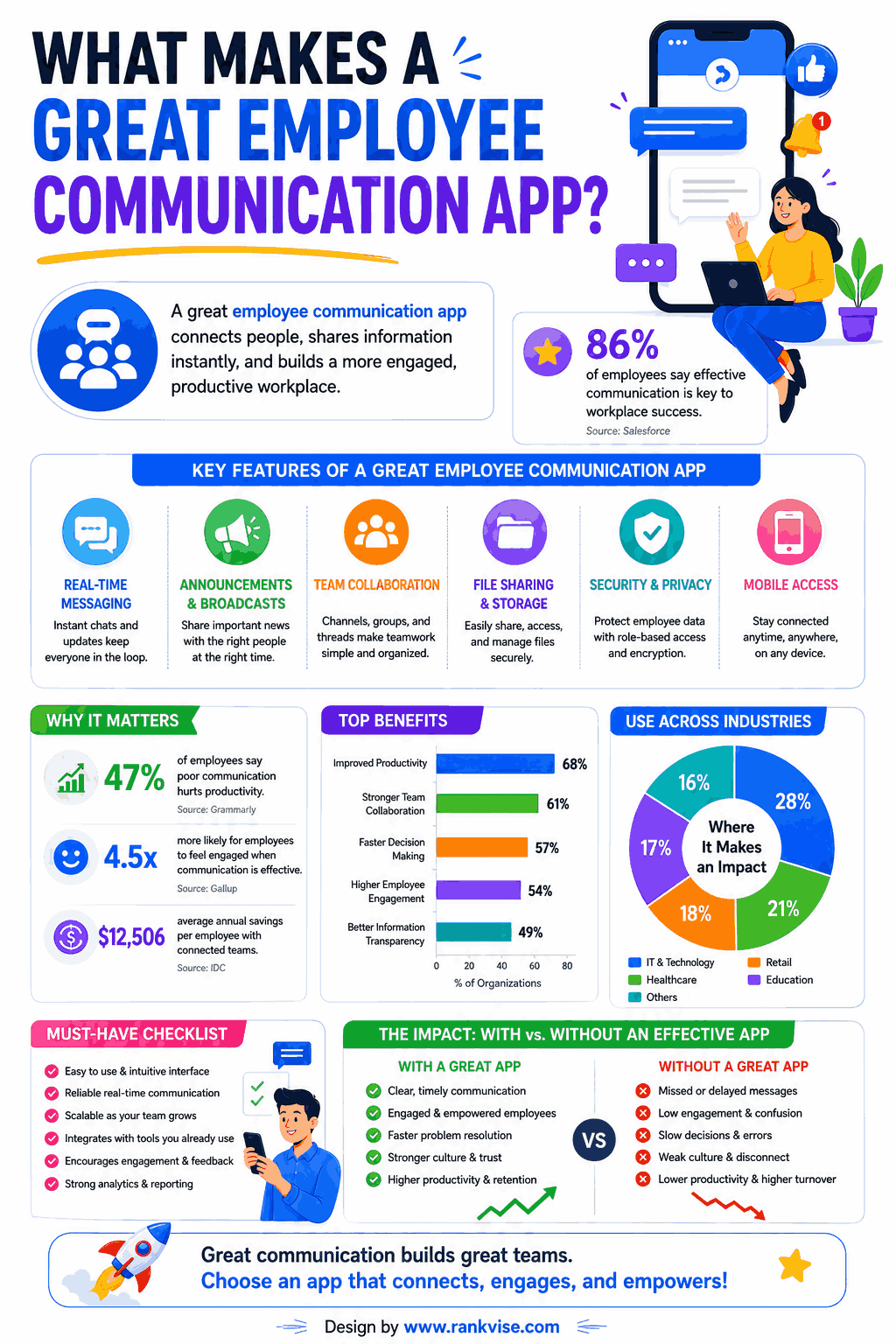
Before exploring specific tools, understand what separates good platforms from great ones. The best workplace communication tools share certain qualities.
Key features to evaluate:
- Real-time messaging with group and private channels
- File sharing and document collaboration
- Mobile accessibility for frontline and remote workers
- Integration with existing business tools
- Search functionality for finding past conversations
- Admin controls and security compliance
- Push notifications without overwhelming users
The ideal app fits naturally into your team’s daily routine. If adoption feels forced, the tool will fail regardless of its features.
21 Employee Communication Apps Worth Considering
1. Slack
Slack remains the most recognized team messaging platform. It organizes conversations into channels by topic, project, or department. Thousands of integrations connect it to nearly every business tool. Best suited for tech-forward teams needing flexible, fast communication.
2. Microsoft Teams
Microsoft Teams combines chat, video calls, and file collaboration within the Microsoft 365 ecosystem. Organizations already using Outlook and SharePoint find seamless integration here. It handles both internal messaging and external meetings effectively.
3. Google Chat
Google Chat works natively within Google Workspace. Teams using Gmail, Drive, and Docs benefit from tight integration. It offers spaces for group conversations and direct messages for quick exchanges. Ideal for businesses committed to the Google ecosystem.
4. Zoom Workplace
Zoom expanded beyond video meetings into a full workplace communication platform. It now includes team chat, whiteboarding, and scheduling tools. Companies already paying for Zoom meetings get chat functionality included.
5. Connecteam
Connecteam targets deskless and frontline workers specifically. It provides communication, scheduling, and task management in one mobile-first app. Retail, construction, and healthcare teams benefit most from its design.
6. Staffbase
Staffbase functions as an internal communications platform for large enterprises. It offers a branded employee app, intranet capabilities, and newsletter tools. Communications teams managing thousands of employees find it particularly valuable.
7. Workvivo
Workvivo blends social media-style engagement with corporate communication. Employees post updates, recognize colleagues, and consume company news in a familiar social feed. It drives engagement by making internal communication feel less formal.
8. Simpplr
Simpplr delivers an AI-powered intranet and employee communication experience. It personalizes content delivery based on role, location, and interests. Large organizations use it to cut through information overload effectively.
9. Beekeeper
Beekeeper serves industries with large frontline workforces. Manufacturing plants, hotels, and retail chains use it to reach employees without desktop access. Its mobile-first design ensures critical updates reach everyone instantly.
10. Chanty
Chanty offers a simple, affordable team messaging alternative to Slack. Small teams get unlimited message history even on the free plan. It includes task management features directly within the chat interface.
11. Flock
Flock combines messaging with built-in productivity tools like to-dos, polls, and shared notes. It positions itself as an all-in-one collaboration platform for small and midsize teams. Pricing stays competitive compared to larger platforms.
12. Rocket.Chat
Rocket.Chat provides an open-source communication platform with full customization control. Organizations with strict data privacy requirements can host it on their own servers. It offers chat, video, and file sharing with complete data ownership.
13. Pumble
Pumble delivers free team messaging with unlimited users and message history. Budget-conscious teams get core communication features without subscription costs. It mirrors Slack’s interface, making adoption straightforward for new users.
14. Jostle
Jostle creates a people-focused intranet that emphasizes culture and connection. It combines news, discussions, events, and org charts in one platform. Midsize companies use it to maintain culture as they scale.
15. Haiilo
Haiilo focuses on employee engagement and advocacy alongside internal communication. It helps organizations turn employees into brand ambassadors on social media. Communications and HR teams find value in its combined approach.
16. LumApps
LumApps integrates deeply with Google Workspace and Microsoft 365 as an intranet layer. It delivers targeted communications based on employee profiles. Enterprise organizations managing complex internal communication structures benefit most.
17. Homebase
Homebase combines team messaging with scheduling and time tracking. Small businesses in retail and hospitality use it to manage shift-based workforces. Communication stays connected to scheduling context, reducing confusion.
18. When I Work
When I Work pairs employee scheduling with built-in team messaging. Managers broadcast updates to specific shifts or departments easily. Frontline teams stay informed without needing separate communication tools.
19. Workplace from Meta (Legacy)
Though Meta announced sunsetting Workplace, some organizations still use it during transition periods. Its familiar social interface drove high adoption rates. Teams currently on Workplace should evaluate migration options now.
20. Troop Messenger
Troop Messenger provides secure team communication with self-hosting options. It includes chat, video calls, and screen sharing. Organizations prioritizing data security and compliance choose it for on-premise deployment.
21. Udext
Udext reaches employees through SMS-based communication. Not every worker downloads another app. Udext sends critical updates via text message, ensuring delivery regardless of smartphone access or app adoption challenges.
How to Choose the Right Internal Communication Tool
Selecting from 21 options feels overwhelming. Narrow your decision using these criteria:
| Factor | Questions to Ask |
|---|---|
| Team type | Are employees desk-based, frontline, or hybrid? |
| Company size | Do you need enterprise-grade features or startup simplicity? |
| Existing tools | Which platforms must the app integrate with? |
| Budget | What is your per-user monthly budget? |
| Security needs | Do you require on-premise hosting or specific compliance? |
| Primary use case | Is this for quick chat, company-wide announcements, or both? |
Start with a pilot group before rolling out company-wide. Test adoption rates and gather feedback. The best employee communication app is the one your team actually uses daily.
Common Features Across Top Workplace Communication Tools
Most platforms on this list share foundational capabilities. Understanding standard features helps you focus on differentiators during evaluation.
Standard features include:
- One-on-one and group messaging
- Channel or space-based organization
- File and image sharing
- Read receipts or delivery confirmation
- Mobile and desktop applications
- Notification customization
- Admin and moderation controls
Premium features that vary significantly include AI-powered search, advanced analytics, compliance archiving, and employee engagement measurement. Prioritize features that address your specific communication gaps.
Mistakes to Avoid When Implementing a Team Messaging App
Deploying a new communication platform requires planning. These common mistakes derail adoption:
- Launching without clear usage guidelines or communication policies
- Choosing a tool based on features alone while ignoring user experience
- Failing to migrate important conversations from previous platforms
- Not training employees on core functionality and best practices
- Allowing too many channels, creating noise instead of clarity
- Ignoring feedback from frontline workers during the selection process
Successful implementation combines the right technology with change management. Communicate why you are switching, train your team thoroughly, and assign internal champions to drive adoption.
FAQs
Slack, Pumble, and Chanty work well for small teams. Pumble offers free unlimited messaging, while Slack and Chanty provide simple interfaces with essential collaboration features.
Most enterprise apps offer encryption, compliance certifications, and admin controls. Self-hosted options like Rocket.Chat and Troop Messenger give organizations full data ownership and maximum security.
Not completely. These apps handle quick conversations and real-time updates best. Formal communications, external correspondence, and documentation-heavy exchanges still benefit from email.
Connecteam, Beekeeper, and Homebase specialize in reaching deskless employees. Their mobile-first designs ensure frontline teams receive updates without needing desktop access.
Pricing ranges from free (Pumble, Google Chat) to 6–12 USD per user monthly for premium platforms. Enterprise solutions like Staffbase and Simpplr often require custom pricing based on organization size.