Google builds AI into nearly everything it touches. From search to cloud infrastructure, google ai tools now power workflows for billions of users. These platforms handle writing, coding, image generation, data analysis, and creative tasks seamlessly.
- Gemini embeds in Workspace, offering multimodal conversational AI, web access, image generation, and extensions that integrate Gmail, Drive, Maps, and YouTube.
- NotebookLM turns uploaded documents, PDFs, and videos into a source-grounded research assistant with citations, summaries, and audio overviews for accurate Q&A.
- AI Studio and Vertex AI let developers prototype with Gemini, fine-tune models, generate API keys, and scale production ML with MLOps, governance, and vector search.
- Google creative and search tools like Imagen, Veo, and AI Overviews speed image and video generation and synthesize web results with source attribution.
What makes Google’s approach unique is integration. Each tool connects with the broader ecosystem. Your Gmail, Docs, Drive, and Calendar work together through shared AI intelligence. This guide covers 15 google ai products worth using in 2026.
Google AI Tools for Everyday Productivity
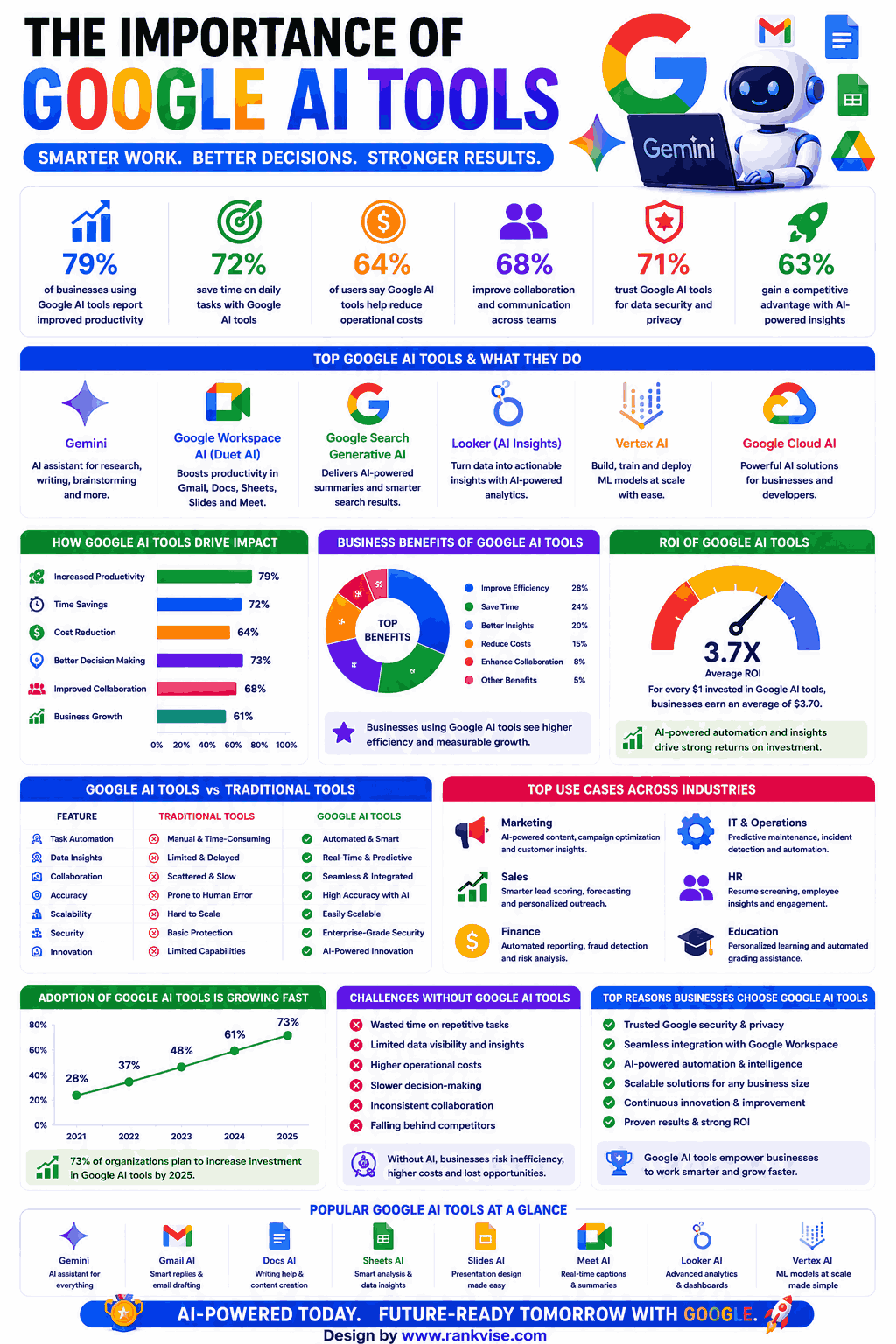
These artificial intelligence tools from Google enhance daily work across writing, communication, and organization.
1. Google Gemini
Gemini is Google’s flagship conversational AI competing directly with ChatGPT. It processes text, images, audio, and video in a single conversation. Access it through gemini.google.com or the mobile app for free.
- Key Features: Multimodal input, real-time web access, Google Workspace integration, extensions for Maps/YouTube/Flights, image generation, code execution
- Quality: Excellent at factual responses with source citations; strong reasoning capabilities
- Pricing: Free tier with Gemini 1.5 Flash; Advanced at 19.99 USD monthly includes Gemini 1.5 Pro and 2TB storage
- Best For: Professionals wanting an AI assistant deeply connected to Google’s search index and productivity suite
- Integration: Connects with Gmail, Drive, Docs, Maps, YouTube, Hotels, and Flights through extensions
2. Gemini in Google Workspace
Gemini embeds directly inside Gmail, Docs, Sheets, Slides, and Meet. It drafts emails, generates documents, creates presentations, and summarizes meeting recordings without leaving your workflow.
- Key Features: Email drafting in Gmail, document generation in Docs, formula creation in Sheets, slide building, meeting summaries
- Quality: Contextually aware of your files and communications for personalized assistance
- Pricing: Included with Google Workspace Business Standard (14 USD/user/month) and higher tiers
- Best For: Teams already using Google Workspace who want AI embedded directly into existing tools without switching platforms
- Unique Value: AI understands your organizational context including past emails, documents, and calendar events
3. Google NotebookLM
NotebookLM transforms your documents into an interactive AI research assistant. Upload PDFs, Google Docs, websites, or YouTube videos. AI answers questions exclusively from your uploaded sources, reducing hallucination risks.
- Key Features: Source-grounded Q&A, automatic summarization, audio overview generation, citation tracking, multi-source analysis
- Quality: Highly accurate because responses reference only your uploaded materials
- Pricing: Completely free for individual use
- Best For: Students, researchers, and analysts needing to interrogate large document collections with verified, source-cited answers
- Standout Feature: Audio Overview creates podcast-style discussions about your documents using AI voices
4. Google Lens
Google Lens uses AI to understand the visual world through your phone camera. Point at text to translate it instantly. Photograph a plant for identification. Scan a math problem for step-by-step solutions.
- Key Features: Visual search, real-time translation, text extraction, homework help, product identification, AR directions
- Quality: Industry-leading visual recognition accuracy across diverse subjects
- Pricing: Completely free on Android and iOS
- Best For: Anyone needing instant information from the physical world including travelers, students, and shoppers
Google AI Tools for Developers and Technical Teams
These google cloud ai services help developers build, deploy, and scale AI applications.
5. Google AI Studio
Google AI Studio provides free access to Gemini models through a browser-based development environment. Test prompts, fine-tune models, and generate API keys without complex setup. It serves as the fastest path to prototyping AI applications.
- Key Features: Prompt testing, model fine-tuning, API key generation, structured output, system instructions, multimodal input testing
- Quality: Professional-grade model access with consumer-friendly interface
- Pricing: Free tier with generous rate limits; pay-as-you-go for production scale
- Best For: Developers and entrepreneurs prototyping AI features before committing to full infrastructure deployment
- Advantage: Direct access to Gemini 1.5 Pro and Flash models without complex cloud configuration
6. Vertex AI
Vertex AI is Google Cloud’s enterprise machine learning platform for building production AI systems. It offers model training, deployment, monitoring, and management in one place. Supports both Google models and open-source options.
- Key Features: Model Garden with 100+ models, AutoML, custom training, MLOps pipelines, responsible AI tools, vector search
- Quality: Enterprise-grade reliability with SLA guarantees and compliance certifications
- Pricing: Pay-per-use based on compute, storage, and prediction resources consumed
- Best For: Enterprise engineering teams deploying AI at scale who need governance, monitoring, and production-ready infrastructure
- Scale: Handles millions of predictions daily with automatic scaling
7. Google Colab
Google Colab provides free cloud-based Jupyter notebooks with GPU access for AI development. Write Python code, train models, and analyze data without local hardware investment. Sharing works like Google Docs.
- Key Features: Free GPU/TPU access, collaborative editing, GitHub integration, pre-installed ML libraries, one-click sharing
- Quality: Sufficient compute for learning, prototyping, and medium-scale experiments
- Pricing: Free tier with limited GPU hours; Pro at 11.58 USD monthly for faster GPUs and longer runtimes
- Best For: Students, researchers, and data scientists needing GPU access for machine learning without purchasing expensive hardware
8. TensorFlow
Google’s open-source machine learning framework powers AI applications from mobile apps to production servers. TensorFlow handles everything from simple predictions to complex neural networks across platforms.
- Key Features: Cross-platform deployment, TensorFlow Lite for mobile, TensorFlow.js for web, pre-trained model hub, visualization tools
- Quality: Battle-tested in production at Google scale; massive community support
- Pricing: Completely free and open-source
- Best For: ML engineers building custom models needing deployment flexibility across web, mobile, edge devices, and servers
Google AI Tools for Creative and Media Work
These google ai creative tools generate images, enhance photos, and produce media content.
9. Google Veo
Veo is Google’s AI video generation model creating high-quality footage from text prompts. It understands cinematography concepts like camera angles, lighting styles, and scene compositions. Available through Vertex AI and select consumer products.
- Key Features: Text-to-video generation, cinematic understanding, 1080p output, style control, scene composition
- Quality: Competitive with leading video generation models for realism and coherence
- Pricing: Available through Vertex AI pay-per-use; limited free access in select products
- Best For: Creative professionals and marketers needing AI-generated video clips for campaigns and presentations
10. Google Imagen
Imagen generates photorealistic images and artwork from text descriptions. Integrated into Gemini and available through Vertex AI for developers. Strong at text rendering within images and brand-consistent visual generation.
- Key Features: Text-to-image generation, image editing, visual Q&A, brand customization, safety filters
- Quality: Photorealistic output with accurate text rendering surpassing many competitors
- Pricing: Free through Gemini; pay-per-image through Vertex AI
- Best For: Marketing teams generating product visuals, social graphics, and campaign imagery at scale
11. Google Photos AI
Google Photos uses AI to organize, enhance, and edit your entire photo library automatically. Magic Eraser removes unwanted objects. Photo Unblur sharpens old images. Best Take combines group photos for ideal expressions.
- Key Features: Magic Eraser, Photo Unblur, Best Take, auto-organization, face grouping, intelligent search, memory creation
- Quality: Consumer-leading photo enhancement with one-tap improvements
- Pricing: Free with 15GB storage; Google One from 1.99 USD monthly for expanded storage
- Best For: Everyone managing personal photo libraries who wants automatic organization and professional-quality edits without manual skill
Google AI Tools for Search and Information
These ai-powered search and knowledge tools help you find and understand information faster.
12. AI Overviews in Google Search
Google Search now generates AI-powered summaries directly in search results. These overviews synthesize information from multiple sources into concise answers. They appear above traditional links for complex queries.
- Key Features: Multi-source synthesis, follow-up questions, visual explanations, direct action links
- Quality: Reliable for factual queries with source attribution for verification
- Pricing: Completely free as part of standard Google Search
- Best For: Anyone searching for information who wants quick synthesized answers without clicking through multiple websites
13. Google Translate (Neural AI)
Google Translate uses neural machine translation AI for 130+ languages. Context-aware translations understand idioms, tone, and cultural nuances. Camera mode translates text in real-time through your phone lens.
- Key Features: 130+ languages, camera translation, conversation mode, offline support, document translation
- Quality: Near-human accuracy for major language pairs; improving rapidly for less common languages
- Pricing: Free for consumers; paid API for developers at volume-based pricing
- Best For: International teams, travelers, and businesses communicating across language barriers daily
Google AI Tools for Business and Data
These platforms apply AI to business intelligence and operational efficiency.
14. Google Cloud Natural Language AI
This API analyzes text for sentiment, entities, syntax, and content classification. Businesses process customer reviews, support tickets, and social mentions at scale. It understands meaning and emotion behind written text.
- Key Features: Sentiment analysis, entity recognition, syntax parsing, content classification, custom model training
- Quality: High accuracy for English sentiment with strong multilingual support
- Pricing: First 5,000 units free monthly; pay-per-request beyond that
- Best For: Businesses needing automated analysis of customer feedback, reviews, and support communications at scale
15. Google Bard Extensions / Gemini Extensions
Gemini extensions connect AI directly to Google services for action-based assistance. Ask Gemini to find flights, check email, retrieve Drive files, or get directions. AI executes tasks rather than just answering questions.
- Key Features: Gmail reading, Drive file search, Maps directions, YouTube summaries, Hotels search, Flights comparison
- Quality: Seamless when working within Google ecosystem; limited for non-Google services
- Pricing: Free with Gemini access
- Best For: Google ecosystem users wanting a single AI interface to interact with all their Google services through natural conversation
How to Get the Most From Google AI Tools
Google’s AI ecosystem rewards depth over breadth. Start with tools matching your existing Google usage. If you live in Gmail and Docs, Gemini in Workspace delivers immediate value. Developers should begin with AI Studio before scaling to Vertex AI.
Consider these adoption strategies:
- Enable Gemini extensions to connect your existing Google data sources
- Use NotebookLM for any research involving multiple documents
- Start with free tiers before evaluating paid upgrades
- Connect tools together since Google AI improves with more context about your work
The compounding advantage comes from interconnection. Each Google AI tool learns from your broader usage patterns within the ecosystem.
What Makes Google’s AI Approach Different in 2026
Google uniquely combines search index knowledge with AI capabilities. While competitors train on static datasets, Google AI accesses real-time information. This means fewer outdated answers and more current responses.
The integration depth also separates Google from standalone AI tools. Gemini reads your actual emails, documents, and calendar. It provides suggestions based on your real context rather than generic responses. For teams already invested in Google Workspace, no competitor matches this contextual awareness.
Privacy controls let you manage what AI accesses. Disable specific extensions or limit data sharing per your comfort level. Enterprise customers receive additional data governance guarantees through Google Cloud agreements.
FAQs
Most consumer-facing google ai tools including Gemini, NotebookLM, Lens, Translate, and Photos are free, with premium tiers adding advanced features and higher usage limits.
Gemini in Google Workspace offers the best writing assistance by drafting emails in Gmail, generating documents in Docs, and creating presentations in Slides contextually.
Yes, tools like Gemini, AI Studio, and Cloud APIs work independently, but maximum value comes from Workspace integration where AI understands your organizational context.
NotebookLM answers only from your uploaded sources ensuring accuracy, while Gemini draws from its general training data and web access for broader knowledge.
Google Cloud AI tools offer enterprise-grade security, compliance certifications, and data processing agreements, though consumer tools have different privacy terms worth reviewing.