Cloud based productivity apps are software tools that run entirely through the internet. You access them from any device with a browser. No installation or local storage required.
These applications handle tasks like document creation, project management, communication, file storage, and team collaboration. Everything saves automatically to remote servers. Your work stays accessible whether you use a laptop, tablet, or phone.
The shift to online work tools accelerated dramatically over the past five years. Teams now expect real-time collaboration as a default feature, not a luxury. Cloud based productivity apps deliver exactly this capability without complex IT infrastructure.
Why Are Businesses Choosing Cloud Productivity Software?
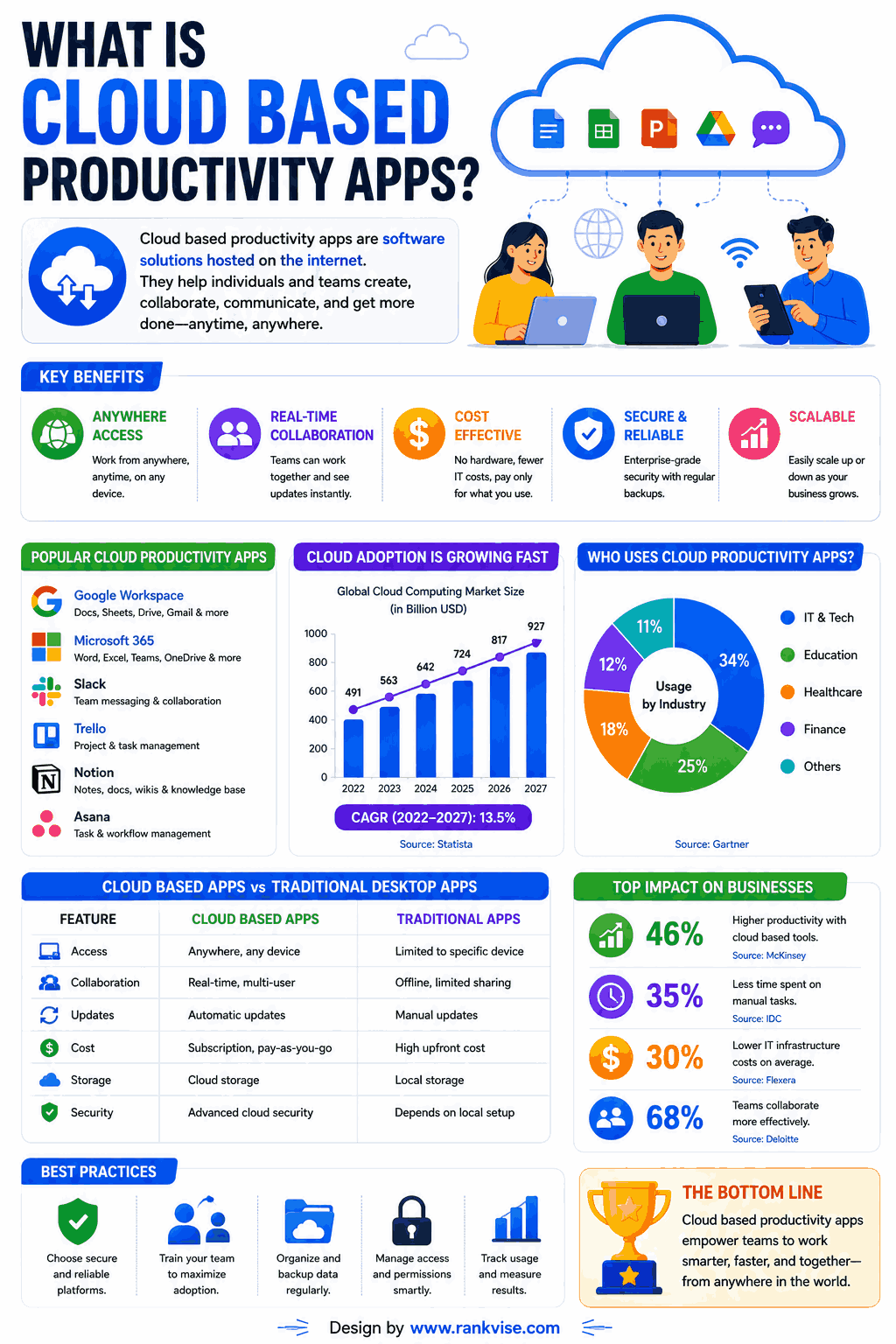
Traditional desktop software created friction. Files lived on individual machines. Sharing meant email attachments. Version control was a nightmare. Updates required manual installations across every device.
Cloud based productivity apps eliminate these problems entirely. They offer benefits that desktop alternatives simply cannot match.
- Real-time collaboration lets multiple people edit the same document simultaneously
- Automatic saving prevents lost work from crashes or forgotten saves
- Access from any device removes location dependency for your team
- Automatic updates mean everyone always uses the latest version
- Lower upfront costs replace expensive software licenses with affordable subscriptions
- Built-in security and backup protect data without separate IT investments
These advantages compound as teams grow. A five-person startup and a 5,000-person enterprise both benefit from the same core capabilities at different scales.
How Do Cloud Based Productivity Apps Improve Team Collaboration?
Collaboration sits at the heart of every cloud productivity platform. These tools assume teams work together, not in isolation. Every feature supports shared effort.
Real-Time Editing and Co-Authoring
Multiple team members work inside the same document, spreadsheet, or presentation at once. You see their cursors moving. Changes appear instantly. No more emailing files back and forth or merging conflicting versions manually.
This real-time capability transforms how teams produce work. Brainstorming happens inside shared documents. Feedback integrates immediately rather than accumulating in email threads nobody reads.
Centralized Communication and Context
Cloud workspace tools keep conversations attached to relevant projects and files. Comments live inside documents. Task discussions happen within project boards. Context never separates from the work it references.
Teams waste less time searching for information. Everything connects. New team members find historical decisions and their reasoning without asking colleagues to repeat explanations.
Top Cloud Based Productivity Apps to Consider in 2026
The market offers hundreds of options. These platforms consistently earn praise from teams across industries and sizes.
| App | Best For | Key Strength |
|---|---|---|
| Google Workspace | Document collaboration and email | Seamless real-time co-editing across all file types |
| Microsoft 365 | Enterprise teams needing Office compatibility | Deep integration with familiar Word, Excel, PowerPoint |
| Notion | Knowledge management and flexible workflows | Combines docs, databases, and project tracking in one tool |
| Slack | Team communication and quick coordination | Channel-based messaging with powerful integrations |
| Asana | Project and task management | Visual workflows that keep complex projects on track |
| Dropbox | File storage and sharing | Simple, reliable file sync across all devices |
| Monday.com | Customizable work management | Adapts to virtually any workflow with visual boards |
No single app covers every need. Most teams combine three to five tools that integrate well together. The goal is a connected ecosystem, not one tool that does everything poorly.
How to Choose the Right Cloud Productivity Tools for Your Team
Selecting tools without a clear framework leads to bloated subscriptions and confused teams. Use these criteria to evaluate options systematically.
Match Tools to Your Actual Workflows
Observe how your team works today. Where do bottlenecks occur? What tasks consume disproportionate time? Choose tools that address real pain points rather than hypothetical needs.
A design team needs visual collaboration features. A sales team needs CRM integration. A content team needs editorial workflow management. Generic “best of” lists cannot make these decisions for you.
Prioritize Integration Capabilities
Your tools must talk to each other. Check whether platforms connect natively or through services like Zapier. Disconnected tools create information silos that defeat the purpose of cloud software.
The best remote work software fits into your existing stack without forcing you to abandon tools your team already loves. Evaluate each new addition by how well it connects to what you already use.
Evaluate Security and Compliance Features
Cloud software stores sensitive business data on external servers. Verify that platforms offer encryption, access controls, two-factor authentication, and compliance certifications relevant to your industry.
Ask vendors about data residency options if regulations require information storage in specific regions. Enterprise-grade cloud applications provide admin controls that small business tools often lack.
Cloud Productivity Apps for Different Team Sizes
Team size influences which tools work best. A freelancer’s needs differ fundamentally from a 500-person organization.
Solo Professionals and Freelancers
Keep your stack minimal. Google Workspace or Microsoft 365 handles documents and email. Add one task management tool like Todoist or Trello. Use cloud storage for file backup and client sharing.
Total monthly cost stays under 30 USD. You get professional capabilities without enterprise complexity. Scale up only when collaboration demands increase. For freelancers working across regions, staying connected is often handled with a global eSIM, which simplifies mobile data access when moving between countries.
Small Teams of 5 to 25 People
Communication becomes critical at this size. Add Slack or Microsoft Teams for daily coordination. Implement a shared project management platform so everyone sees priorities and deadlines clearly.
Establish naming conventions and folder structures early. Organization habits built now prevent chaos later as files and projects multiply.
Growing Organizations of 50 or More
Governance matters at scale. Choose platforms with admin controls, user provisioning, and audit logs. Standardize your tool stack across departments to prevent fragmentation.
IT oversight becomes necessary. Someone must manage licenses, permissions, onboarding, and security policies. Cloud-based digital tools at this scale require intentional management rather than organic adoption.
Common Mistakes Teams Make With Cloud Productivity Apps
Adopting cloud tools poorly creates new problems instead of solving existing ones. Avoid these patterns that derail productivity gains.
- Adopting too many overlapping tools that confuse teams about where to work
- Skipping onboarding and training, leaving teams using 10% of available features
- Ignoring permission settings, exposing sensitive files to everyone by default
- Failing to establish usage norms, creating inconsistent practices across groups
- Never auditing subscriptions, paying for unused seats and forgotten trials
The most productive teams treat their tool stack as infrastructure. They maintain it intentionally, train new members thoroughly, and review effectiveness quarterly.
Security Considerations for Cloud Based Productivity Apps
Moving work to the cloud raises legitimate security questions. Responsible adoption requires understanding both risks and safeguards.
Reputable providers invest more in security than most individual companies can afford. Google, Microsoft, and other major platforms employ thousands of security engineers. Their infrastructure undergoes continuous testing and monitoring.
Your responsibilities include managing access controls, enforcing strong passwords, enabling two-factor authentication, and training employees on phishing awareness. The platform secures the infrastructure. You secure the human behavior.
Review sharing settings regularly. Teams often over-share files during collaborative phases and forget to restrict access afterward. Quarterly permission audits prevent unintended data exposure.
Trends Shaping Cloud Productivity Tools in 2026
The category evolves rapidly. Several developments reshape what teams should expect from their productivity stack.
AI assistants now embed directly within productivity platforms. They draft emails, summarize documents, generate presentations, and automate repetitive tasks. Adoption of AI-enhanced workflow tools accelerates across every industry.
Asynchronous collaboration features grow more sophisticated. Teams spanning multiple time zones need tools that support thoughtful responses rather than demanding immediate availability. Video messages, threaded discussions, and recorded walkthroughs replace excessive meetings.
Consolidation continues as platforms expand their capabilities. Notion adds project management. Slack adds document features. Teams add workflow automation. The boundaries between categories blur as vendors pursue all-in-one positioning.
FAQs
Google Workspace, Slack, Asana, and Dropbox form an excellent foundation for small teams. They offer affordable plans, easy setup, and strong integration with each other.
Yes, when you choose reputable providers and configure security settings properly. Enable two-factor authentication, manage permissions carefully, and train your team on security best practices.
Google Workspace and other cloud suites handle most document needs effectively. However, teams with complex Excel models or advanced PowerPoint requirements may still prefer Microsoft 365’s cloud version.
Most platforms charge 6 to 25 USD per user per month. Free tiers exist for basic needs. Enterprise plans with advanced security and admin features range from 20 to 40 USD monthly.
Many apps offer offline modes that sync changes when connectivity returns. Google Docs, Notion, and Microsoft 365 all support offline editing with automatic synchronization afterward.