Digital files multiply faster than ever before. Photos, videos, documents, and backups consume gigabytes daily. Running out of storage space disrupts workflows and forces difficult decisions about what to delete.
- Prefer end-to-end client-side encryption and zero-knowledge key management so only you can decrypt files.
- Confirm unlimited claims by reading fair use policies, file size caps, minimum user requirements, and transfer speed throttling.
- Match provider strengths to needs: privacy-first, continuous backups, lifetime storage, EU residency, or enterprise collaboration.
- Evaluate sync speed, native desktop and mobile apps, collaboration features, versioning, retention, and relevant compliance certifications.
- Test with trial accounts, calculate total cost of ownership, and choose encryption level appropriate to data sensitivity.
Unlimited cloud storage eliminates these concerns entirely. You store everything without monitoring usage limits or paying overage fees. Businesses scale operations freely while individuals preserve every memory and file indefinitely.
The challenge lies in finding secure providers that truly deliver unlimited storage. Many advertise unlimited plans but hide restrictions in fine print. This guide identifies legitimate cloud storage alternatives with genuine unlimited options and strong security measures.
What Makes Cloud Storage Truly Secure
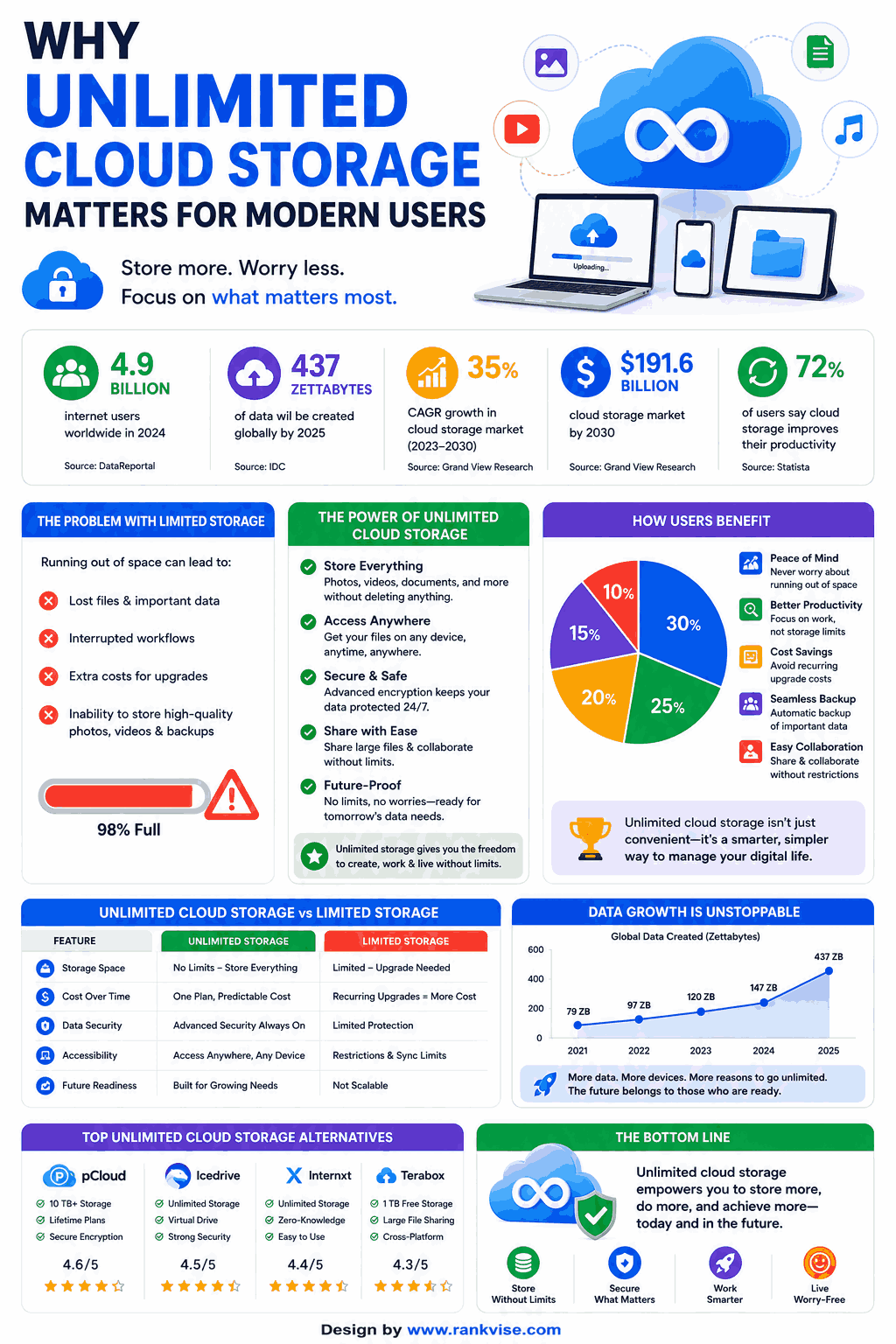
Security goes far beyond basic password protection. Enterprise-grade cloud storage requires multiple layers of defense against unauthorized access, data breaches, and privacy violations.
End-to-end encryption represents the gold standard for data protection. Your files get encrypted on your device before uploading. Only you hold the decryption keys. Even the storage provider cannot access your content. This zero-knowledge architecture prevents data breaches from exposing your files.
Other critical security features include two-factor authentication, compliance certifications, data residency controls, and private key management. Providers should undergo regular security audits and maintain transparent privacy policies. Geographic location matters too since different countries enforce varying data protection laws.
Seven Cloud Storage Alternatives With Unlimited Plans
Here are verified providers offering genuine unlimited storage options with robust security features. Each brings unique strengths for different user needs.
1. Sync.com – Privacy-First Cloud Storage
Sync.com operates from Canada with strict data residency in Canadian and US facilities. The platform uses end-to-end encryption as standard across all plans. No one except you can decrypt your files, including Sync employees.
The unlimited plan accommodates teams and businesses needing expandable storage. File versioning keeps previous document versions for recovery. Advanced sharing controls let you password-protect links and set expiration dates.
| Feature | Details |
|---|---|
| Encryption | End-to-end, zero-knowledge |
| Unlimited Plan | Teams Pro (5+ users) |
| Free Tier | 5 GB |
| Platforms | Windows, Mac, Linux, iOS, Android |
Sync.com excels for privacy-conscious users and organizations handling sensitive data. The interface remains intuitive despite advanced security features. Customer support responds quickly to technical questions.
2. Backblaze – Unlimited Computer Backup
Backblaze focuses specifically on comprehensive computer backup rather than file sync. Their personal backup plan offers truly unlimited storage for one computer at a flat monthly rate.
File encryption uses private key management. You control the encryption key, ensuring zero-knowledge security. Backblaze cannot access your backed-up files without your private key. The system runs continuously in the background, automatically backing up new and changed files.
Restoration options include downloading files, shipping physical hard drives, or restoring specific folders. The service preserves files for 30 days after deletion, providing safety against accidental removals.
3. pCloud – Lifetime Unlimited Options
pCloud offers lifetime subscriptions with massive storage capacity up to 10 TB. While not technically infinite, 10 TB exceeds most individual and small business needs for years.
The platform splits between standard encryption and optional crypto add-on. The crypto feature provides client-side encryption for maximum security. Files encrypted with pCloud Crypto remain unreadable to pCloud servers and employees.
Features include file versioning, media playback, document preview, and robust sharing tools. The European-based company maintains servers in both US and EU locations. Users choose their preferred data residency during account creation.
4. Jottacloud – European Unlimited Storage
Jottacloud provides genuine unlimited personal storage from Norway. Their infrastructure delivers fast speeds across European markets. The service emphasizes simplicity without sacrificing security or functionality.
All data transmits through encrypted connections and gets stored on Norwegian servers. Norway’s strict privacy laws offer additional protection compared to many jurisdictions. The unlimited plan covers one user but supports unlimited devices under that account.
Automatic backup runs continuously across computers and mobile devices. Version history extends back indefinitely for recovering old file versions. Family plans scale to six users with unlimited storage for each member.
5. Google Workspace – Business Unlimited Tiers
Google Workspace includes unlimited storage on Business Plus and Enterprise plans. These tiers target organizations rather than individual consumers. Three-user minimum requirements apply for guaranteed unlimited access.
Security features include advanced admin controls, data loss prevention, vault for retention, and enterprise-grade encryption. Files integrate seamlessly with Google’s productivity suite including Docs, Sheets, and Slides.
The platform shines for collaborative teams already embedded in Google’s ecosystem. However, Google can access unencrypted files for service functionality. Users requiring zero-knowledge encryption should explore alternatives.
6. Microsoft OneDrive – Enterprise Unlimited Options
OneDrive for Business offers unlimited storage through Microsoft 365 enterprise subscriptions. Organizations exceeding the initial 1 TB per user allocation request unlimited expansion from Microsoft support.
Integration with Microsoft 365 applications creates seamless workflows. Files sync across Windows, Mac, iOS, and Android devices. Advanced threat protection scans files for malware before download.
Ransomware detection and recovery features protect against crypto-locking attacks. Version history spans 30 days with optional extensions. The platform works best for businesses already using Microsoft’s productivity tools.
7. Dropbox Advanced – Unlimited for Teams
Dropbox Advanced plans provide unlimited storage for teams of three or more users. The platform combines cloud storage with sophisticated collaboration tools and workflow automation.
Security features include two-factor authentication, remote device wipe, and detailed activity monitoring. Admins control sharing permissions and external collaboration rules. File recovery extends 180 days for deleted and previous versions.
Smart Sync technology saves local drive space by keeping files cloud-only until needed. The platform integrates with thousands of business applications through Dropbox Extensions. Teams collaborating on creative projects particularly benefit from native preview and annotation tools.
Comparing Unlimited Storage Providers
Different providers suit different needs. This comparison highlights key decision factors across major unlimited storage options.
| Provider | Best For | Starting Price | Encryption Level |
|---|---|---|---|
| Sync.com | Privacy-focused teams | 8 USD/user/month | End-to-end |
| Backblaze | Computer backup | 9 USD/month | Private key option |
| pCloud | Lifetime purchase | 199 USD once (2 TB) | Optional client-side |
| Jottacloud | European users | 10 USD/month | In-transit & at-rest |
| Google Workspace | Google ecosystem | 18 USD/user/month | Server-side |
| OneDrive | Microsoft users | 22 USD/user/month | Server-side |
| Dropbox | Creative teams | 20 USD/user/month | Server-side |
Price represents approximate starting costs for plans offering unlimited or near-unlimited storage. Actual pricing varies by region, billing frequency, and user count. Verify current rates on provider websites before purchasing.
Key Features to Evaluate Before Choosing
Beyond unlimited storage capacity, several factors determine long-term satisfaction with cloud storage solutions. Consider these elements carefully during your evaluation process.
Sync speed and bandwidth – Upload and download speeds affect daily productivity. Test providers during trial periods with your typical file sizes. Some throttle bandwidth during peak hours.
Desktop and mobile apps – Native applications provide better performance than web-only access. Check whether apps support your specific operating systems and devices.
Collaboration tools – Sharing, commenting, and co-editing capabilities matter for team environments. Evaluate permission controls and external sharing restrictions.
File recovery and versioning – Accidents happen. Strong version history and trash retention prevent permanent data loss. Understand retention limits before committing.
Compliance certifications – Industries like healthcare and finance require specific compliance standards. Verify providers hold relevant certifications such as HIPAA, GDPR, or ISO 27001.
Security Considerations for Business Users
Organizations face stricter security requirements than individuals. Business cloud storage must protect both data and meet regulatory compliance obligations.
Admin controls let IT teams manage user permissions centrally. Activity logs track who accessed which files when. These audit trails prove essential during security investigations and compliance reviews.
Data loss prevention scans files for sensitive information like credit cards or social security numbers. Automated policies prevent users from accidentally sharing protected data externally. Some platforms integrate with enterprise identity management systems for single sign-on.
Geographic data residency matters for companies operating under regional privacy laws. European firms often require EU-based servers. Healthcare organizations need HIPAA-compliant infrastructure. Verify where providers physically store data before migrating.
Common Misconceptions About Unlimited Storage
Marketing claims sometimes mislead users about what unlimited actually means. Understanding common restrictions helps set realistic expectations.
Fair use policies – Most unlimited plans include acceptable use clauses. These prevent abuse like operating file-sharing services or excessive API automation. Normal business usage rarely triggers violations.
File size limits – Individual file uploads may have maximum size caps even with unlimited total storage. Large video files might require splitting or compression.
Minimum user requirements – Business unlimited plans often require multiple user licenses. Single individuals cannot access unlimited tiers designed for teams.
Speed throttling – Some providers reduce transfer speeds after exceeding certain thresholds. This doesn’t limit storage capacity but affects how quickly you access files.
Read terms of service carefully before purchasing. Ask sales representatives about specific use cases that concern you. Legitimate providers answer these questions transparently.
Making Your Final Decision
Choosing between cloud storage alternatives requires matching features to your specific needs. Start by defining your priorities clearly.
Budget constraints matter significantly. Lifetime plans offer long-term savings versus subscription fatigue. However, monthly plans include ongoing updates and support. Calculate total cost of ownership over your expected usage period.
Security requirements vary by use case. Personal photo backups need less protection than confidential business documents. Match encryption levels to your actual sensitivity needs. Overcomplicating simple use cases wastes time and money.
Trial periods let you test performance with real workflows. Most providers offer free tiers or money-back guarantees. Experiment with multiple options before fully migrating. Pay attention to sync reliability, speed, and interface usability during trials.
FAQs
Sync.com and Backblaze offer end-to-end encryption with unlimited storage options. Both use zero-knowledge architecture where only you control decryption keys.
Most legitimate providers offer genuine unlimited storage but include fair use policies preventing abuse. Normal business and personal usage rarely encounters restrictions.
Prices range from 8 to 22 USD per user monthly for business plans. Personal unlimited backup starts around 9 USD monthly. Lifetime options exist for upfront payments.
Yes, providers like Google Workspace and Microsoft OneDrive include compliance certifications for HIPAA, GDPR, and industry regulations. Verify specific certifications match your needs.
Backblaze and Dropbox Advanced handle large media files effectively. Check individual file size limits as some providers cap uploads at 50-100 GB per file.