The internet holds billions of images. Finding the exact visual you need feels like searching for a needle in a digital haystack. Traditional text-based queries often fall short when you need something specific.
- Use precise, descriptive text queries and combine adjectives, context, and orientation to dramatically improve image search relevance.
- Run reverse image searches (Google Images, Bing, TinEye) to find sources, higher resolutions, copyright owners, and unauthorized uses.
- Leverage AI visual search (Google Lens, Clarifai, Amazon Rekognition) to identify objects, context, logos, and discover images without reliable metadata.
- Optimize product images with high quality photos, descriptive alt text, structured data, and proper filenames to boost visual search discoverability and conversions.
That is where image search techniques become essential. Whether you are a marketer sourcing visuals, a researcher verifying photos, or a business owner protecting brand assets, knowing how to search for images effectively saves hours of frustration. Visual search technology has evolved dramatically, and most professionals only scratch the surface of what is possible.
This guide walks you through every major method available today. You will learn practical approaches that deliver precise results, fast.
How Text-Based Image Search Works
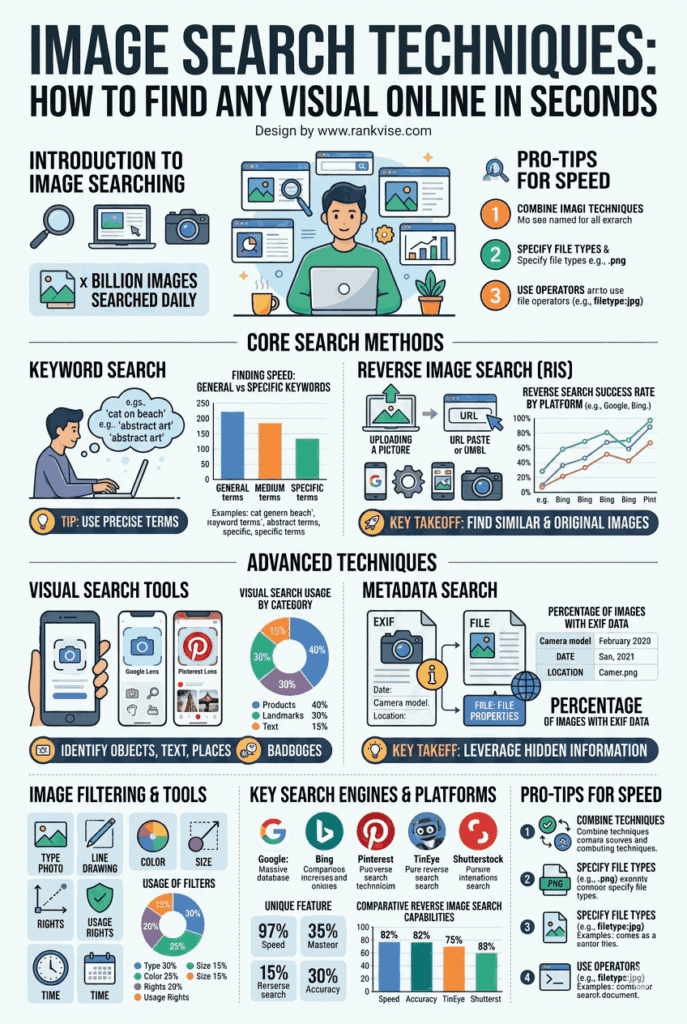
Most people start their visual research with a simple keyword query. You type a description into a search engine, and it returns matching images. This method relies on metadata, alt text, file names, and surrounding page content.
Text-based searching works best when you can clearly describe what you need. Specific phrases outperform vague ones every time. For example, searching “red Victorian brick house with white trim” returns far better results than just “nice house.”
Tips to Improve Text-Based Visual Queries
Small adjustments to your search terms can dramatically improve results. Here are proven strategies:
- Use descriptive adjectives like color, style, size, and material
- Add context words such as “illustration,” “photograph,” or “3D render”
- Include the intended use, like “banner,” “icon,” or “background”
- Combine the subject with a setting or environment description
- Specify orientation using terms like “vertical,” “landscape,” or “square”
Search engines index images based on the words surrounding them on web pages. The more precise your language, the more relevant your visual results become.
Reverse Image Search: Finding the Source
Reverse image search flips the traditional process entirely. Instead of typing words, you upload a picture. The search engine then finds visually similar images, original sources, and different sizes of that same visual across the web.
Google Images, Bing Visual Search, and TinEye are the most popular tools for this. Each platform uses different algorithms, so results vary between them. Running the same image through multiple engines often uncovers sources that a single tool misses.
When to Use Reverse Image Search
This technique solves several common business problems quickly:
- Verifying image authenticity before using visuals in campaigns
- Finding higher resolution versions of images you already have
- Identifying copyright owners to avoid legal issues
- Tracking unauthorized use of your original photos or graphics
- Locating product sources when you only have a screenshot
Reverse visual lookup has become a critical tool for content teams, legal departments, and e-commerce businesses alike. It turns an unknown image into actionable information within seconds.
AI-Powered Visual Search Tools
Artificial intelligence has transformed how we find images online. Modern AI visual search tools analyze the actual content of pictures, not just their metadata. They recognize objects, scenes, colors, textures, and even emotions within photographs.
Google Lens leads this category for everyday consumers. Point your camera at anything, and it identifies the object and finds related images instantly. Pinterest Lens serves a similar function with a focus on lifestyle and design inspiration.
For professional use, platforms like Clarifai and Amazon Rekognition offer advanced visual recognition capabilities. These tools can search through private image databases using custom-trained models. They identify specific products, logos, faces, and scenes with remarkable accuracy.
How AI Image Recognition Improves Search Results
AI does not rely on someone manually tagging an image correctly. It reads the visual content directly. This means you find relevant results even when images have poor metadata or no descriptions at all.
The technology understands context too. It distinguishes between a jaguar the animal and a Jaguar the car. This contextual intelligence makes AI-driven visual discovery far more reliable than older methods.
Advanced Search Filters and Operators
Every major search engine offers filtering options that most users ignore completely. These filters narrow results by size, color, type, usage rights, upload date, and region. Using them consistently improves the quality of every image search you perform.
Google Images provides filters directly below the search bar after your initial query. You can specify exact dimensions, choose transparent backgrounds, or limit results to creative commons licensed visuals only.
| Filter Type | What It Does | Best For |
|---|---|---|
| Size | Returns images matching specific dimensions | Print projects, banners |
| Color | Filters by dominant color or transparency | Brand-aligned visuals |
| Type | Separates photos, illustrations, clip art, GIFs | Content-specific needs |
| Usage Rights | Shows Creative Commons or commercially licensed images | Legal compliance |
| Time | Limits results to recent uploads | Trending or current visuals |
| Region | Returns images from specific countries | Localized marketing |
Combining multiple filters simultaneously produces highly targeted results. A marketer searching for “recent, large, commercially licensed food photography” gets exactly what they need in one step.
Image Search for E-Commerce and Product Discovery
Visual product search has reshaped online shopping entirely. Consumers now photograph items they like and search for them online to find purchasing options. Retailers who optimize for visual search gain a significant competitive advantage.
Platforms like Google Shopping, Amazon, and eBay all support photo-based product search. A customer sees a pair of shoes on the street, snaps a photo, and finds identical or similar products available for purchase within moments.
How Businesses Can Optimize for Visual Search
If you sell products online, your images need to be discoverable. Follow these optimization practices:
- Use high-quality, well-lit product photos on clean backgrounds
- Add descriptive alt text that accurately reflects the image content
- Include structured data markup for product images on your website
- Compress images for fast loading without sacrificing quality
- Name image files with relevant, descriptive keywords
Visual commerce continues growing rapidly year over year. Businesses that invest in image search optimization today position themselves ahead of slower competitors.
Using Browser Extensions and Specialized Tools
Beyond standard search engines, several specialized tools enhance your visual research capabilities. Browser extensions bring powerful image search techniques directly into your workflow without switching between platforms.
TinEye’s browser extension lets you right-click any image and instantly run a reverse search. Search by Image extensions for Chrome and Firefox support multiple search engines simultaneously. These tools eliminate extra steps and speed up your research process significantly.
Niche Tools Worth Exploring
Different industries benefit from specialized visual search platforms:
- Stock photo searchers use platforms like Everypixel to scan across 50+ stock sites at once
- Design professionals rely on Dribbble and Behance for creative inspiration searches
- Photographers use IPTC metadata readers to analyze embedded image information
- Brand managers use tools like Brandwatch for visual brand mention tracking
- Journalists use InVID and FotoForensics to verify image manipulation
Choosing the right tool for your specific use case makes the entire search process faster and more productive.
Image Search and Copyright: What You Must Know
Finding an image online does not mean you can use it freely. Copyright law protects most photographs and illustrations automatically. Using someone else’s work without permission can lead to legal action and financial penalties.
Creative Commons licenses offer a middle ground. Some creators allow free use with attribution. Others permit commercial use without restrictions. Always verify the specific license before downloading and using any image.
Google’s usage rights filter helps, but it is not foolproof. Cross-reference licensing information on the source website directly. When in doubt, purchase a proper license or use verified royalty-free platforms. Protecting your business from copyright claims costs far less than defending against them.
The Future of Visual Search Technology
Visual search technology continues advancing at a remarkable pace. Multimodal search, where users combine text and images in a single query, is becoming mainstream. Google’s multisearch feature already allows this, and competitors are following quickly.
Augmented reality integration brings image search into the physical world. Point your phone at a restaurant menu, landmark, or product, and receive instant information overlays. This blends the digital and physical search experiences seamlessly.
Generative AI also plays an expanding role. Users now describe images they imagine, and AI creates reference visuals. These generated images then serve as search inputs to find similar real photographs or products. This creative loop between generation and search is opening entirely new workflows for professionals across industries.
FAQs
Google Images offers the broadest index, but TinEye excels at finding exact matches and tracking image origins across the web over time.
Yes. Google Lens and Pinterest Lens let you photograph any object and instantly find similar images, products, or information related to it.
Upload the image to TinEye or Google Images using reverse search. Sort results by oldest upload date to identify the likely original source.
No. Most images found through search engines are copyrighted. Always check licensing terms before using any visual in your projects or marketing.
Use specific descriptive keywords, apply search filters for size and type, combine text with reverse image search, and try multiple search engines for broader coverage.