Skip to content
If you have ever seen a segment labeled “101% match” inside your translation editor, you probably paused. How can anything exceed a perfect score? That number is not a glitch. It represents a context match, and understanding it can reshape how you price projects, allocate resources, and deliver translations faster.
- Context match requires exact source text plus identical document structure and preceding segment, ensuring translation fits precisely in its original position.
- Tools often auto accept or lightly review these matches, reducing QA time and lowering per-word translation costs on repetitive projects.
- Maximize context matches by keeping document templates consistent, cleaning translation memories, enforcing terminology, and locking verified segments during pre-translation.
Whether you manage localization projects or translate content daily, match types directly influence your bottom line. This guide breaks down what a context match actually means, how it compares to other CAT tool matches, and why it matters for every professional in the translation industry.
What Is a Context Match in Translation?
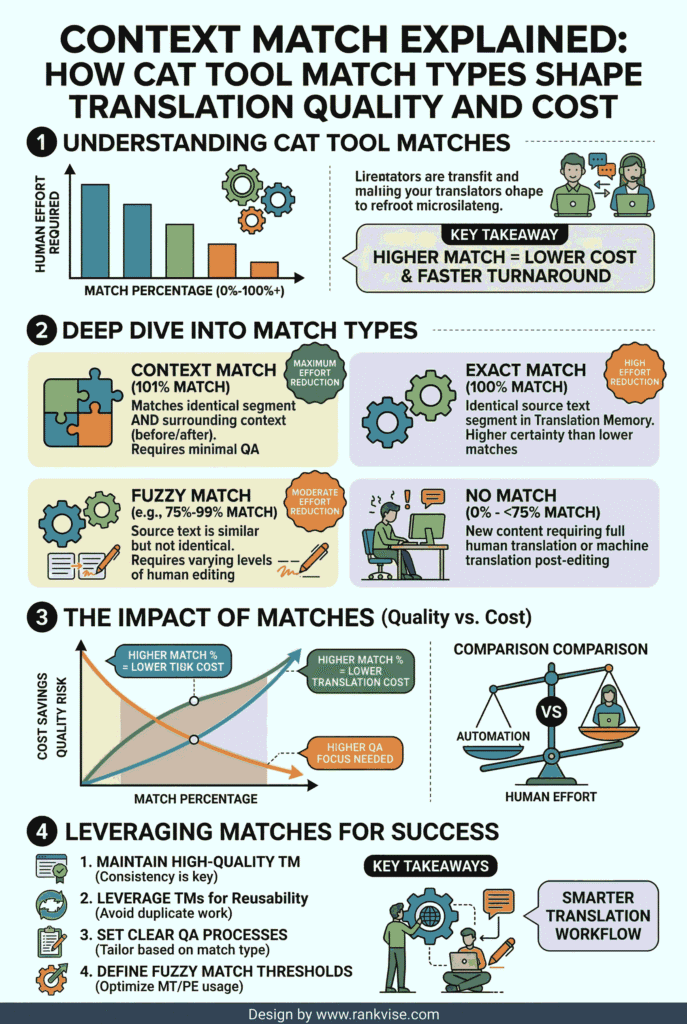
A context match occurs when a CAT tool finds a segment in the translation memory that matches the current source text exactly and confirms the surrounding content is also identical. The tool checks the words, the document structure, and the segment that appears immediately before it.
This triple verification earns it the label of a 101% match. Some platforms, like memoQ, call it an ICE match, which stands for In-Context Exact match. The core idea remains the same across all tools. The segment is not just textually identical. It sits in the same linguistic and structural environment as the original stored translation.
Think of it this way. A 100% match tells you the sentence is correct. A context match tells you the sentence is correct and it belongs in exactly this spot within the document.
How Does a CAT Tool Verify Context?
Computer-assisted translation tools store every confirmed translation as a segment inside a translation memory. Each entry includes the source text, the target translation, and metadata about the surrounding content.
When you open a new file, the CAT tool scans each segment against the translation memory. To qualify as a context match, the segment must pass three checks:
- The source text must be a character-for-character match with a stored entry.
- The document structure, such as whether the text appears in a heading, list item, or table cell, must match the original context.
- The preceding source segment must also be identical to the one stored alongside the translation memory entry.
This preceding segment verification is the critical difference. It eliminates ambiguity in cases where identical phrases carry different meanings depending on their position. For example, the word “Run” preceded by “Start the program to” means something entirely different from “Run” preceded by “I went for a morning.” The context match catches that distinction automatically.
Why a 100% Match Is Not Enough
A standard 100% match confirms that the source text is identical to a stored segment. That sounds reliable, but it carries a hidden risk. The match ignores where the segment appears in the document.
Consider the phrase “Check the balance.” In a banking document, it refers to an account balance. In an engineering manual, it could refer to mechanical equilibrium. A 100% match treats both identically, even though the correct translation may differ entirely.
This ambiguity forces quality assurance teams to manually review every 100% match for contextual accuracy. That review process costs time and money. It also introduces the possibility of human error during high-volume projects where thousands of segments require attention.
Context-sensitive analysis solves this problem at the technology level. By verifying the surrounding content, the CAT tool filters out false positives before a human translator ever sees them.
Context Match vs. Perfect Match vs. Fuzzy Match
Translation professionals encounter several match types daily. Each carries a different level of confidence, pricing, and review requirements. Here is how they compare:
| Criteria | 100% Match | Context Match (101%) | Perfect Match (102%) |
|---|---|---|---|
| Text verification | Exact segment match | Exact segment plus surrounding context | Exact segment verified against a prior bilingual file |
| Context check | None | Preceding segment and document structure | Surrounding segments in both source and target files |
| Common names | Exact match | ICE match, Trados context match | Perfect match (Trados-specific) |
| Confidence level | Moderate | High | Maximum |
| Typical pricing | 25–50% of new word rate | 0–10% of new word rate | 0% (often no charge) |
| Review effort | Standard QA review | Light review or auto-accepted | Minimal spot-checking |
A perfect match takes verification one step further. It compares the current source file against a previously finalized bilingual file, not just the translation memory. This makes it especially valuable for version-controlled content like software interfaces, legal contracts, and technical manuals where small updates happen across document revisions.
Fuzzy matches occupy the range below 100%. They indicate partial similarity between the source text and a stored segment. The translation memory found something close but not identical. These matches still accelerate work by giving translators a starting point instead of a blank segment.
| Fuzzy Range | What It Means | Typical Editing Required |
|---|---|---|
| 85–99% | One or two words differ from the stored segment | Minor terminology adjustments |
| 75–84% | Several words vary in average-length segments | Moderate revision work |
| 50–74% | Multiple differences requiring significant changes | Substantial translator input |
Fuzzy matches below 50% are generally treated as new segments because the stored content offers little reusable value.
How Context Matching Reduces Translation Costs
The financial impact of context matches is significant. When a segment qualifies as a 101% match, it carries near-guaranteed accuracy. Most localization workflows either auto-accept these segments or require only a quick visual scan.
This dramatically reduces quality assurance time. On large-scale projects with thousands of repetitive segments, the savings compound quickly. A project with a high ratio of context matches can see turnaround times improve by 30 to 50 percent compared to projects dominated by standard 100% matches.
For project managers, this translates directly into better budget forecasting. You can confidently estimate lower per-word costs for returning clients whose content produces consistent context matches from well-maintained translation memories.
For translators working under net rate pricing models, context matches represent segments that require virtually no manual intervention. The technology confirms the translation, freeing the linguist to focus on genuinely new or complex content that demands human expertise.
Best Practices for Maximizing Context Match Rates
Achieving high context match rates does not happen by accident. It requires deliberate planning across content creation, translation memory management, and project setup.
Maintain consistent document structures. Use standardized templates for recurring content types. When the heading order, list formatting, and paragraph flow remain consistent across document versions, context match rates climb. Even small structural changes can break the preceding segment check and downgrade a 101% match to 100%.
Clean your translation memory regularly. Outdated, incorrect, or duplicate entries degrade match quality over time. Schedule periodic TM maintenance to remove obsolete translations and consolidate overlapping entries. A lean, accurate translation memory produces more reliable context matches than a bloated one filled with conflicting suggestions.
Lock context-matched segments during pre-translation. Configure your CAT tool to automatically lock 101% and 102% matches before the translator opens the file. This prevents accidental edits to already-verified content and keeps the focus on segments that genuinely need human attention.
Use consistent terminology across projects. Pair your translation memory with a termbase to ensure key terms remain uniform. Terminology consistency strengthens the translation memory entries that feed context matching.
Leverage version control for iterative content. If you regularly update manuals, help files, or software strings, use the perfect match function to compare new files against previous bilingual deliverables. This captures unchanged blocks with maximum confidence and reserves translator effort for genuinely modified content.
The Role of AI and NLP in Future Context Matching
Current context matching in CAT tools relies on deterministic, rule-based logic. The preceding segment either matches or it does not. There is no interpretation or inference involved.
Emerging research in natural language processing introduces a different approach called semantic context matching. Instead of checking whether the previous sentence is character-identical, NLP models analyze the meaning of surrounding text. This could eventually allow CAT tools to recognize contextual equivalence even when the wording changes slightly.
For now, this technology remains in the research stage. The billable match types you see in project analysis reports, such as 101% and ICE matches, still depend entirely on the rule-based verification protocol. However, organizations that build strong translation memory practices today will be well positioned to benefit when AI-enhanced matching becomes commercially available.
The trajectory is clear. Context-sensitive analysis will grow more sophisticated, blending traditional rule-based checks with semantic understanding to deliver even higher confidence and lower review costs.
How to Check Context Match Settings in Popular CAT Tools
Different platforms handle context matching with slightly different terminology and configuration options. Here is a quick reference:
- In Trados Studio, context matching is enabled by default when you use a translation memory. You can view match details in the Translation Results window. Perfect Match requires a reference bilingual file uploaded during project setup.
- In memoQ, the equivalent feature is called ICE match. It activates when you run pre-translation with a translation memory that contains context information. You can lock ICE segments automatically in the pre-translation settings.
- In Memsource (now Phrase), context matches appear in the analysis report. The platform supports context keys that store metadata about segment positioning.
Regardless of your tool, always verify that context information storage is enabled in your translation memory settings. Without it, the tool cannot perform the preceding segment check that elevates a 100% match to a context match.
FAQs
A 101% match means the segment text is identical to a translation memory entry and the surrounding context, including the preceding segment and document structure, also matches perfectly.
Yes. ICE stands for In-Context Exact match. It is the term memoQ uses for what Trados Studio calls a context match. Both refer to the same verification process.
Context matches are typically billed at 0 to 10 percent of the new word rate because they require minimal or no human review, making them the most cost-effective match type.
Yes. Use consistent document templates, maintain a clean translation memory, apply standardized terminology, and avoid unnecessary structural changes between document versions.