Box scheduling refers to the process of organizing class times, coach assignments, and member bookings at a fitness studio or gym. The term originates from CrossFit, where gyms are called “boxes.” However, the concept applies to any fitness business managing group classes, appointments, and facility resources.
Effective box scheduling ensures classes run smoothly without overcrowding. It balances member demand with available coaches and equipment. It also gives members a simple way to reserve spots, check availability, and manage their training week.
Whether you run a CrossFit box, boutique fitness studio, or martial arts gym, scheduling impacts every part of your operation. Poor scheduling frustrates members and burns out coaches. Smart scheduling maximizes capacity and keeps everyone happy.
Why Does Box Scheduling Matter for Your Gym?
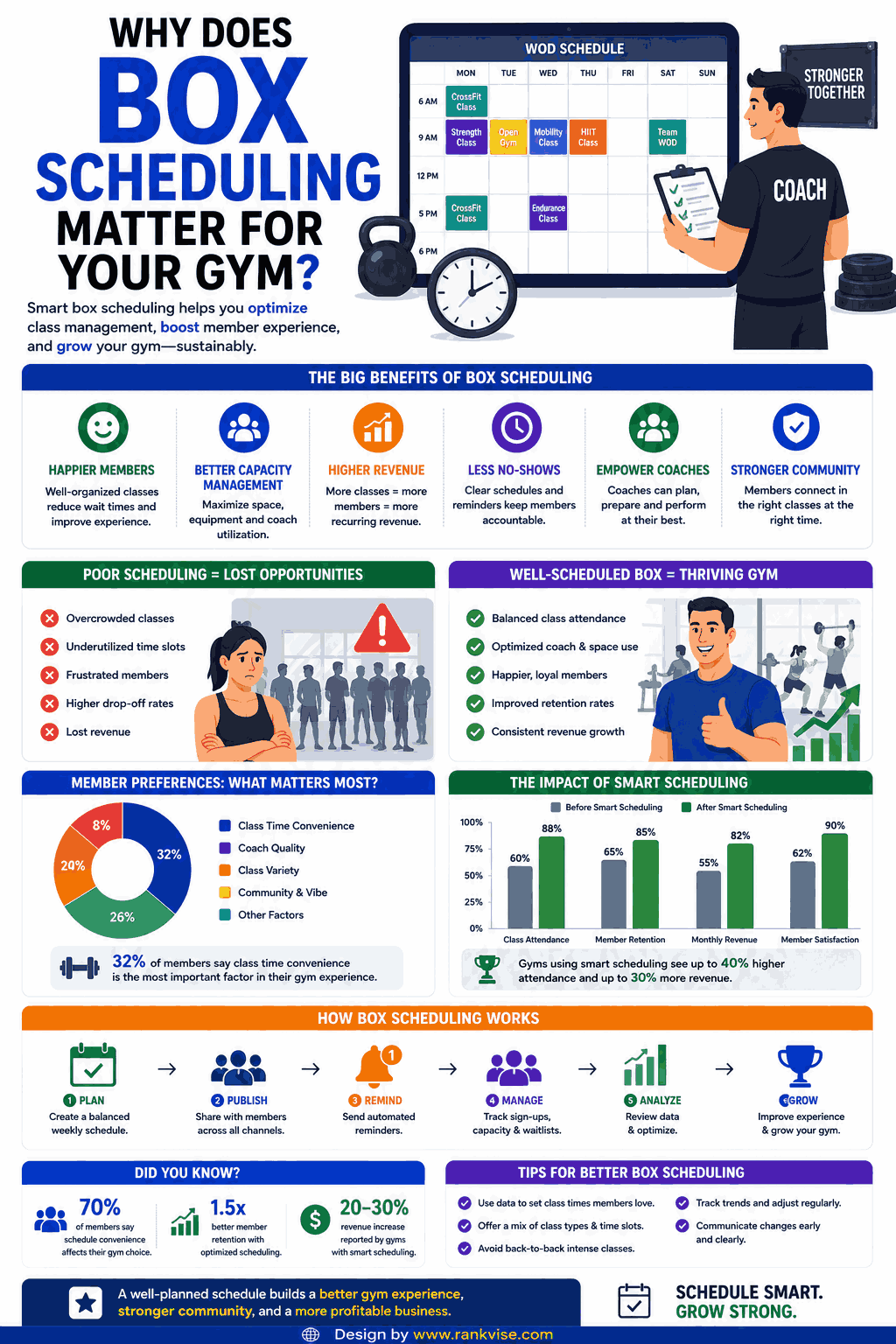
Maximizes Class Capacity and Revenue
Empty spots in classes represent lost revenue. A well-designed class schedule fills sessions consistently. Box scheduling tools track attendance patterns and reveal which time slots underperform. You adjust based on real data rather than guesswork.
Improves Member Experience
Members want convenience. They expect to book classes from their phone in seconds. They want waitlist options when sessions fill up. They need easy cancellation without calling or emailing. Modern gym scheduling software delivers all of this automatically.
Reduces Administrative Workload
Managing bookings manually consumes hours every week. Phone calls, text messages, and spreadsheets create chaos as your membership grows. Automated class scheduling software handles reservations, confirmations, reminders, and cancellations without staff intervention.
Prevents Overcrowding and Safety Issues
Every class has a safe maximum capacity based on space and equipment. Box scheduling enforces these limits automatically. When a class reaches capacity, the system closes bookings or adds members to a waitlist. This protects safety and maintains workout quality.
How Box Scheduling Software Works
A gym scheduling system operates through several connected functions. Members interact with one side. Gym owners and coaches manage the other.
| Function | Member Side | Admin Side |
|---|---|---|
| Class viewing | Browse available sessions and times | Create and publish class schedules |
| Booking | Reserve spots instantly via app or website | Set capacity limits per class |
| Waitlists | Join automatically when classes fill | Manage waitlist priority and notifications |
| Cancellations | Cancel or reschedule with defined notice | Enforce cancellation policies and late fees |
| Reminders | Receive automated notifications before class | Track no-shows and attendance trends |
| Payments | Pay per class or use membership credits | Monitor revenue per class and time slot |
The system syncs everything in real time. When one member cancels, the next person on the waitlist gets notified immediately. Coaches see updated rosters before walking into class.
Key Features to Look for in Box Scheduling Tools
Not all fitness scheduling platforms offer the same capabilities. Prioritize features that match your gym’s specific operations.
Essential features include:
- Mobile app access for members to book anytime, anywhere
- Recurring class templates that repeat weekly without manual recreation
- Waitlist management with automatic promotion when spots open
- Coach assignment and availability tracking
- Attendance tracking with check-in options (app, kiosk, or manual)
- Cancellation policy enforcement with customizable time windows
- Integration with payment processing and membership management
- Reporting dashboards showing class utilization and trends
Advanced features for growing gyms:
- Multi-location scheduling from a single dashboard
- Personal training and appointment booking alongside group classes
- Automated member communication via email or SMS
- Workout tracking integration for programming visibility
- Website widget embedding for public-facing schedules
Top Box Scheduling Platforms for Fitness Studios in 2026
Several platforms specialize in gym and fitness studio scheduling. Each serves slightly different business models.
Wodify
Wodify built its platform specifically for CrossFit boxes and functional fitness gyms. It combines class scheduling with performance tracking and billing. Coaches program workouts directly within the system. Members see their scheduled class and the planned workout together.
PushPress
PushPress offers gym management with strong scheduling capabilities. It focuses on simplicity and affordability for independent gym owners. The booking experience stays clean on both member and admin sides. It also handles memberships, payments, and retail sales.
SugarWOD
SugarWOD emphasizes workout programming alongside class scheduling. Coaches publish daily workouts. Members log results and track progress over time. The scheduling component integrates naturally with the training experience.
Mindbody
Mindbody serves a broad fitness market including yoga studios, pilates, and boutique gyms. Its scheduling features work well for studios offering diverse class types. It also provides a consumer marketplace that helps new members discover your business.
TeamUp
TeamUp delivers straightforward class management for independent gyms. It handles scheduling, memberships, and payments without unnecessary complexity. Gym owners appreciate its clean interface and responsive customer support.
Zen Planner
Zen Planner targets CrossFit boxes and martial arts studios specifically. It combines scheduling with member management, billing, and retention tools. Automated communications help reduce no-shows and improve class attendance rates.
Best Practices for Creating an Effective Class Schedule
Building your box schedule requires balancing multiple factors. These practices help you design a timetable that works for both members and staff.
Analyze Peak Demand Times
Review your attendance data to identify when members prefer training. Most gyms see peaks early morning before work, at lunchtime, and in the early evening. Schedule your most popular class formats during these windows. Offer specialty or smaller classes during off-peak hours.
Avoid Coach Burnout
Spreading coaching loads evenly prevents exhaustion and turnover. No single coach should run back-to-back classes for hours without breaks. Rotate assignments fairly. Build buffer time between sessions for setup, cleanup, and brief recovery.
Leave Room for Growth
Do not fill every available hour with classes immediately. Start with your highest-demand time slots. Add sessions only when existing classes consistently reach 80% capacity or higher. Expanding too quickly spreads your membership thin across too many options.
Set Clear Booking and Cancellation Policies
Define rules that protect your business while respecting members:
- Require bookings at least 1 to 2 hours before class starts
- Set cancellation windows (typically 2 to 12 hours before class)
- Charge late-cancel or no-show fees to discourage wasted spots
- Limit advance booking to prevent members from hoarding spots weeks ahead
- Allow waitlisted members automatic promotion when spots open
Communicate these policies clearly during onboarding. Consistency builds respect for the system.
Common Box Scheduling Mistakes to Avoid
Even experienced gym owners make scheduling errors that hurt retention and revenue.
- Offering too many class times with too few members, creating empty-feeling sessions
- Ignoring data and scheduling based on assumptions rather than actual attendance patterns
- Failing to enforce cancellation policies, letting chronic no-shows waste capacity
- Not communicating schedule changes early enough for members to adjust plans
- Scheduling the same coach for every popular slot, creating single points of failure
- Neglecting to collect member feedback about preferred times and formats
Review your schedule quarterly. Member habits shift with seasons, work patterns, and life changes. Stay responsive to what your data reveals.
How Box Scheduling Impacts Member Retention
Scheduling directly affects whether members stay or leave. Inconvenient class times rank among the top reasons people cancel gym memberships. When members cannot find sessions that fit their lives, they drift away.
A thoughtfully designed schedule removes friction. Members who easily book preferred times attend more consistently. Higher attendance builds habit and community. Both factors drive long-term retention. Track your attendance frequency per member alongside retention rates to see this connection clearly.
Waitlist features also improve retention. Members who get promoted from a waitlist feel valued. They attend at higher rates than those who booked days in advance. The urgency of a freed spot creates commitment.
FAQs
Wodify, PushPress, and Zen Planner are purpose-built for CrossFit boxes. They combine class scheduling with WOD programming, attendance tracking, and membership management in one platform.
Most gyms allow booking 24 to 72 hours in advance. This window balances planning convenience for members while preventing spot-hoarding that blocks others from attending.
Implement automated reminders, enforce cancellation fees for late cancels, and use waitlists. Members who know their spot will be given away are less likely to skip without canceling.
Yes. Most platforms like Mindbody, PushPress, and Zen Planner support both group class scheduling and one-on-one appointment booking within the same system.
Start with 4 to 6 classes at peak times. Expand only when existing sessions consistently hit 75% to 80% capacity. Offering too many classes too early fragments attendance and weakens community energy.