You cannot make a page load faster than the network allows. You can start loading it earlier.
- Know the three speculation types: prefetch (HTML), prerender until script (HTML plus resources, pause before scripts), full prerender (complete load).
- Tune eagerness to balance wasted fetches and saved time: conservative triggers late, eager fires early and wastes more.
- Avoid script side effects: use prerender until script or defer analytics by checking document.prerendering and initializing on activation.
- Respect browser limits and user settings: concurrency caps, disabled under Save Data, Energy Saver, or if preload turned off.
- Roll out progressively: start conservative prefetch, escalate to moderate and eager, add prerender only for high intent pages; use resource hints too.
That is the entire idea behind speculative loading: guess where the user is going next, fetch it before they click, and make the navigation feel instant. Get the guess right and the page appears with no perceptible wait. Get it wrong and you have spent someone’s bandwidth on a page they never visited.
This guide covers how to make those predictions well — the Speculation Rules API, the settings that control how aggressively it guesses, and the side effects that catch teams out in production.
Three Kinds of Speculation
The Speculation Rules API gives you three levels of work-done-in-advance, each with a different cost.
| Type | What it does | Cost |
|---|---|---|
| Prefetch | Fetches the HTML document only | Low |
| Prerender until script | Fetches HTML, starts rendering and subresource loading, pauses at the first blocking script | Medium |
| Prerender | Fully loads and renders the page in a hidden tab, including all subresources and JavaScript | High |
Prefetch gets the critical first resource out of the way. Prerender does essentially everything, so activation is close to instantaneous — the browser simply swaps the hidden tab into the foreground.
Prerender until script is the newest option, arriving in Chrome 144 in January 2026 as an origin trial. It exists specifically to solve the problem described later in this article.
The Prediction Dial: Eagerness
Eagerness is where you actually tune the prediction. It controls what user behaviour triggers a speculation.
| Setting | Triggers on |
|---|---|
immediate | As soon as the rules are parsed |
eager | Desktop: hovering a link for 10ms. Mobile: 50ms after a link enters the viewport |
moderate | Hovering for 200ms, or pointerdown if sooner |
conservative | Pointer or touch down |
The trade-off is straightforward. conservative almost never wastes a fetch, but by the time it fires the user has already started clicking, so you win less time. eager starts work much earlier and will sometimes be wrong.
Note the mobile behaviour, which changed in January 2026: without hover events, eager now uses a viewport-based heuristic instead.
Basic Implementation
Speculation rules go in a script tag with a specific type, or in a Speculation-Rules HTTP header.
html
<script type="speculationrules">
{
  "prefetch": [{
    "where": { "href_matches": "/*" },
    "eagerness": "moderate"
  }],
  "prerender": [{
    "where": { "href_matches": "/pricing" },
    "eagerness": "moderate"
  }]
}
</script>
That prefetches any same-origin link on a 200ms hover, and fully prerenders the pricing page under the same condition. The where clause supports URL patterns and CSS selectors, so you can target or exclude specific link groups precisely.
What It Actually Buys You
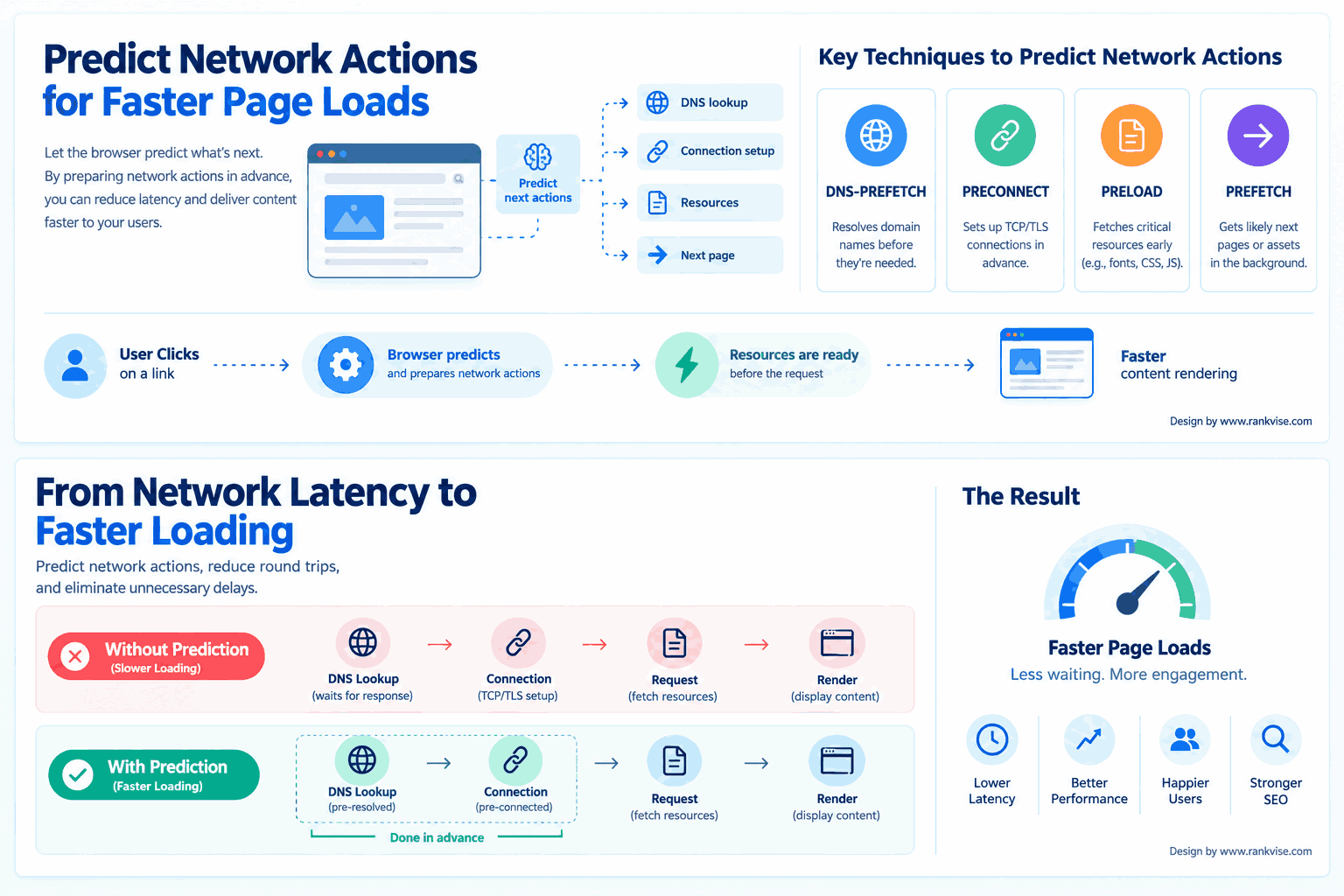
Independent testing using the Navigation Timing API found prerendering reduced perceived load time — measured as loadEventEnd minus activationStart — by roughly 47%, with prefetch landing around 23% faster than an unassisted navigation.
Those figures came from a localhost test, which understates the real-world gain: on a remote server, prerendering drives time to first byte close to zero because the response has already arrived.
Two things worth knowing about activation. If a user clicks before the prerender finishes, the page activates in whatever state it has reached and continues loading, so you still gain. And cached prerenders are discarded when the user navigates away from the page that created them.
The JavaScript Side-Effect Problem
This is the issue that turns a performance win into a data problem.
A full prerender runs everything: all subresources, all JavaScript, and any data fetches that JavaScript initiates. So when you prerender a page:
- Analytics pageviews fire for visits that never happened
- Ad impressions may be counted
- A/B test frameworks bucket users into experiments they never saw
- Any script with a side effect executes
Teams typically discover this when their pageview count inflates and conversion rates appear to fall.
There are two fixes.
Use prerender until script. The Chrome 144 addition fetches the HTML and begins rendering and subresource loading, but pauses JavaScript execution at the first blocking script tag. You get the CSS, images, and fonts preloaded without the script side effects. Pages with no JavaScript, or with scripts only in the footer, can prerender almost completely this way.
Or make your scripts prerender-aware. Check document.prerendering and defer anything with a side effect until the page is actually activated:
javascript
if (document.prerendering) {
  document.addEventListener('prerenderingchange', initAnalytics, { once: true });
} else {
  initAnalytics();
}
Do this before enabling prerender in production, not after the numbers look wrong.
Chrome’s Limits and Refusals
The browser will not let you speculate without bound.
Concurrency limits:
immediateandeager: up to 50 prefetches and 10 prerendersmoderateandconservative: up to 2 prefetches and 2 prerenders
The interaction-based settings work first in, first out. Once at the limit, a new speculation cancels the oldest. A cancelled speculation can be re-triggered — hovering the same link again re-speculates it and pushes out whatever is now oldest.
Chrome disables speculation entirely when:
- Save Data mode is enabled
- The device is in Energy Saver mode with a low battery
- The user has turned off the “Preload pages” setting
That last group matters. Speculative loading is an enhancement, not something to depend on. The page must work correctly without it.
Complementary Hints
Speculation rules operate at the document level. Several older mechanisms work at the resource level and remain useful alongside them.
dns-prefetchresolves DNS for a third-party origin in advancepreconnectgoes further, completing the TCP and TLS handshakepreloadfetches a specific resource needed for the current page, such as a hero image or web font- 103 Early Hints lets the server tell the browser what to start fetching before the full response is ready
Use these for cross-origin resources and for the current page. Use speculation rules for the next page.
A Progressive Rollout Plan
Chrome’s own guidance is to start cautiously and escalate.
- Start with prefetch at
conservative. Lowest risk, smallest reward, but it validates that nothing breaks. - Move to
moderate. Hover-based prefetching covers most real navigation intent with modest waste. - Advance to
eagerfor prefetch. More benefit, more speculative fetches. - Add prerender selectively, starting at
moderateon your highest-intent pages — pricing, checkout, the top article from a listing page. - Broaden prerender only where the data justifies it. Prerendering is expensive on both client memory and your server.
The prerender decision should be page-specific rather than site-wide. Some links are far more likely to be clicked than others, and those are the candidates.
Where This Does Not Apply
- Single-page applications. The API targets document URLs, so it suits multi-page sites. An SPA already handles this through its own router.
- Cross-origin destinations. Prerendering is same-origin by default. Cross-origin same-site prerendering is possible but has extra requirements.
- Low-memory devices. If a large share of your traffic is on constrained hardware, prefer prefetch over prerender.
- Pages with heavy server cost. Every speculation is a real request. Prerendering an expensive, uncached page multiplies load for navigations that may not happen.
Browser Support Reality
The Speculation Rules API is not yet Baseline — it works in Chromium browsers and is unavailable in some widely used ones. Treat it as a progressive enhancement that a substantial share of your users will benefit from and the rest will not notice.
You can inspect what is actually happening in Chrome DevTools, under the Application panel’s speculative loads section, which lists each speculated URL and its status. Check this during implementation rather than assuming your rules matched.
Final Thoughts
Predicting network actions is a trade between latency and waste. The skill is not in enabling the feature — it is in choosing how confidently to guess.
Start with conservative prefetch, verify nothing breaks, then escalate. Reserve prerendering for the small number of destinations you can genuinely predict, and handle the JavaScript side effects before you turn it on rather than after your analytics stop making sense.
FAQs
What is the Speculation Rules API?
A browser API that prefetches or prerenders pages a user is likely to visit next, so the eventual navigation is faster or effectively instant.
What is the difference between prefetch and prerender?
Prefetch retrieves only the HTML document. Prerender fully loads and renders the page, including subresources and JavaScript, in a hidden tab.
Does prerendering break analytics?
It can. A full prerender runs your scripts, inflating pageviews. Use prerender until script, or gate side effects behind the document.prerendering check.
How much faster does this make page loads?
Testing has shown roughly 47% lower perceived load time with prerender and around 23% with prefetch, with larger gains on remote servers.
Does it work in every browser?
No. Support is currently Chromium-centered, so treat speculative loading as a progressive enhancement rather than a dependency.