Error code 502 is an HTTP status code that means “Bad Gateway.” It tells you that one server received an invalid response from another server. In simple terms, two servers failed to communicate properly while processing your request.
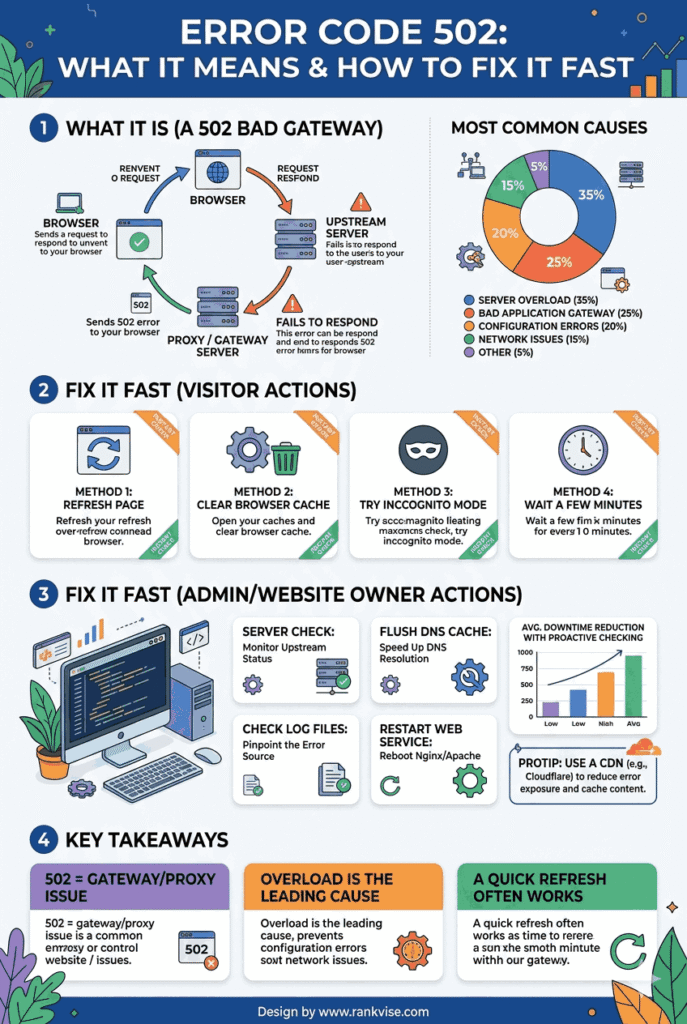
- Common causes: server overload, misconfigured reverse proxies or load balancers, DNS problems, origin server crashes, or firewall blocking.
- Quick visitor fixes: refresh, clear browser cache, try another device, check site status tools, or change DNS to 8.8.8.8 or 1.1.1.1.
- Owner troubleshooting: check gateway and origin logs, restart servers, inspect proxy timeouts and upstream settings, scale resources, contact hosting support.
- Prevent recurrence: implement health checks, use a CDN, enable uptime monitoring, automate scaling, schedule maintenance, and keep server software updated.
This error does not mean your device is broken. It signals a problem happening between servers on the internet. The website you tried to visit relies on a chain of servers. When one link in that chain breaks or responds incorrectly, you see a 502 bad gateway error on your screen.
How Does a 502 Bad Gateway Error Appear?
The 502 error message looks different depending on the browser, server, or platform you use. Recognizing its variations helps you identify the problem faster.
Common ways this error appears include:
- 502 Bad Gateway
- HTTP Error 502
- Error 502
- 502 Service Temporarily Overloaded
- 502 Proxy Error
- 502 Server Error — The server encountered a temporary error and could not complete your request
Some websites display custom error pages instead of these standard messages. The underlying cause remains the same regardless of how the message is worded. A server acting as a gateway or proxy received an unusable response from the upstream server.
What Causes a 502 Bad Gateway Error?
Understanding the root causes of error code 502 helps you troubleshoot it faster. Multiple factors can trigger this server communication failure.
Server Overload
High traffic volumes overwhelm servers regularly. When a website receives more requests than its infrastructure can handle, upstream servers stop responding correctly. This is the most common cause during flash sales, product launches, or viral content events.
E-commerce sites experience this frequently during holiday shopping seasons. The origin server simply cannot process the flood of incoming connections fast enough.
Faulty Reverse Proxy or Load Balancer Configuration
Many websites use reverse proxies like Nginx or load balancers to distribute traffic. A misconfigured proxy server sends requests to the wrong destination or times out before receiving a valid response. This configuration error directly produces a 502 gateway error.
Even a small typo in a proxy configuration file can break the entire communication chain. Regular audits of server configurations prevent these avoidable failures.
DNS Issues
Domain Name System problems can misdirect traffic between servers. When DNS records point to incorrect IP addresses, the gateway server contacts the wrong upstream server. The response it receives makes no sense, and the user sees a 502 error.
DNS propagation delays after recent changes often cause temporary 502 errors. These typically resolve within 24 to 48 hours as updated records spread across global DNS servers.
Origin Server Crashes or Maintenance
Sometimes the upstream server is simply offline. Planned maintenance windows, unexpected crashes, or deployment failures take the origin server out of service. The gateway server has nowhere to forward requests and returns a 502 status code.
Firewall or Security Software Interference
Aggressive firewall rules occasionally block legitimate server-to-server communication. A web application firewall might flag normal traffic as suspicious and reject it. This false positive prevents the gateway from receiving a valid upstream response.
How to Fix Error Code 502 as a Website Visitor
If you encounter a 502 bad gateway error while browsing, several quick fixes can resolve it from your end.
Step 1: Refresh the Page
The simplest solution often works. Press F5 or click the refresh button in your browser. Many 502 errors are temporary and resolve within seconds. The server may have recovered by the time you retry.
Step 2: Clear Your Browser Cache
Outdated cached data sometimes causes connection issues. Clear your browser cache and cookies, then try loading the page again. This forces your browser to request a completely fresh version from the server.
Step 3: Try a Different Browser or Device
Switch to another browser to rule out browser-specific problems. If the error persists across multiple browsers and devices, the issue is on the server side. You have confirmed it is not a local problem.
Step 4: Check if the Website Is Down for Everyone
Use free tools like “Down For Everyone Or Just Me” or “IsItDownRightNow” to verify. These services check the website status from external servers. If the site is down globally, you need to wait for the website owner to fix it.
Step 5: Change Your DNS Server
Switching to a public DNS server like Google DNS (8.8.8.8) or Cloudflare DNS (1.1.1.1) can resolve DNS-related 502 errors. Your internet service provider’s default DNS may have outdated or corrupted records.
How to Fix a 502 Error as a Website Owner
Website owners need deeper troubleshooting steps. A persistent 502 bad gateway error directly impacts revenue, user experience, and search engine rankings.
Check Your Server Logs
Server logs reveal exactly what went wrong. Look at both the gateway server logs and the origin server logs. Error entries with timestamps help you pinpoint when and why the communication failed.
Most hosting control panels provide log access. Alternatively, connect via SSH and check log files in standard directories like /var/log/nginx/ or /var/log/apache2/.
Restart Your Web Server
A quick server restart resolves many temporary 502 errors. Use the appropriate command for your server software:
| Server Software | Restart Command |
|---|---|
| Nginx | sudo systemctl restart nginx |
| Apache | sudo systemctl restart apache2 |
| Node.js (PM2) | pm2 restart all |
| PHP-FPM | sudo systemctl restart php-fpm |
Restarting clears stuck processes and refreshes server connections. This is a fast first response while you investigate deeper causes.
Review Proxy and Load Balancer Settings
Inspect your Nginx, Apache, or CDN configuration files carefully. Verify that upstream server addresses, port numbers, and timeout values are correct. Increase proxy timeout settings if your backend processes need more time to respond.
A common fix involves adjusting the proxy_read_timeout or proxy_connect_timeout directives. Setting these values too low causes premature timeouts that generate 502 responses.
Scale Your Server Resources
If traffic spikes cause repeated 502 errors, your server needs more capacity. Upgrade your hosting plan, add more RAM, or implement auto-scaling. Cloud hosting platforms like AWS and Google Cloud make scaling straightforward.
Monitor CPU usage, memory consumption, and network bandwidth during peak hours. These metrics tell you exactly which resource bottleneck triggers the 502 server error.
Contact Your Hosting Provider
When you cannot identify the cause, your hosting provider’s support team can help. They have access to infrastructure-level logs and network monitoring tools that you may not see. Shared hosting users especially benefit from provider support since server configurations are managed externally.
How to Prevent 502 Errors From Recurring
Proactive measures reduce the frequency of 502 bad gateway errors significantly. Prevention costs far less than emergency troubleshooting.
- Implement health checks: Configure your load balancer to monitor upstream server health and reroute traffic automatically.
- Use a content delivery network: A CDN caches content at edge locations, reducing load on your origin server.
- Set up uptime monitoring: Tools like UptimeRobot or Pingdom alert you immediately when errors occur.
- Automate server scaling: Configure auto-scaling rules that add resources during traffic surges.
- Schedule maintenance wisely: Perform updates during low-traffic windows and use rolling deployments to avoid downtime.
- Keep software updated: Outdated server software contains bugs that cause unexpected failures.
Error Code 502 vs Other HTTP Errors
Understanding how 502 differs from similar errors helps you diagnose problems accurately.
| Error Code | Meaning | Key Difference |
|---|---|---|
| 500 Internal Server Error | Generic server failure | Problem is on the origin server itself |
| 502 Bad Gateway | Invalid upstream response | Problem is between two servers |
| 503 Service Unavailable | Server temporarily overloaded | Server is alive but cannot handle requests |
| 504 Gateway Timeout | Upstream server did not respond in time | Similar to 502 but specifically a timeout |
A 502 error means the gateway received a bad response. A 504 error means it received no response at all. This distinction guides your troubleshooting in different directions.
FAQs
Error code 502 means one server received an invalid or incomplete response from another server. It is a communication failure between servers, not a problem with your devi
Most 502 errors resolve within a few minutes. If the issue persists for more than 30 minutes, the website owner likely needs to fix a server-side configuration or capacity problem.
Rarely. A 502 bad gateway error almost always originates on the server side. However, corrupted DNS cache on your device can occasionally contribute, which clearing your DNS cache resolves.
Temporary 502 errors do not impact rankings. However, prolonged or frequent 502 errors signal reliability issues to search engines and can hurt your site’s crawlability and ranking over time.
Deactivate plugins via FTP to rule out conflicts, increase PHP memory limits, check your .htaccess file for errors, and contact your hosting provider. A corrupted plugin or insufficient server resources causes most WordPress 502 errors.