You click a link. The page you expected does not load. Instead, your browser quietly sends you to a different URL. That silent redirect happened so fast you may not have noticed it. But behind the scenes, the server sent a 302 status code telling your browser exactly what to do.
- 302 is a temporary redirect that signals the original URL remains canonical and will return when the move is reversed.
- When issued, the server returns 302 plus a Location header; the browser follows the new URL but retains the original address.
- Appropriate for temporary situations: maintenance, A/B testing, seasonal promotions, geographic or device redirects, and brief outages.
- Key difference: use 301 for permanent moves and SEO equity transfer; use 302 to avoid passing link value for temporary redirects.
- Scan with crawlers like Screaming Frog, Ahrefs, or Semrush; convert long-standing 302s to 301s and resubmit in Search Console.
The 302 status code is one of the most commonly used — and most commonly misused — HTTP response codes. Using it correctly keeps your website running smoothly and your search rankings intact. Using it incorrectly can quietly drain your SEO value for months before you notice.
This guide explains what the 302 status code means, how it works, when you should use it, and how it compares to other redirect types like the 301.
What Does a 302 Status Code Mean?
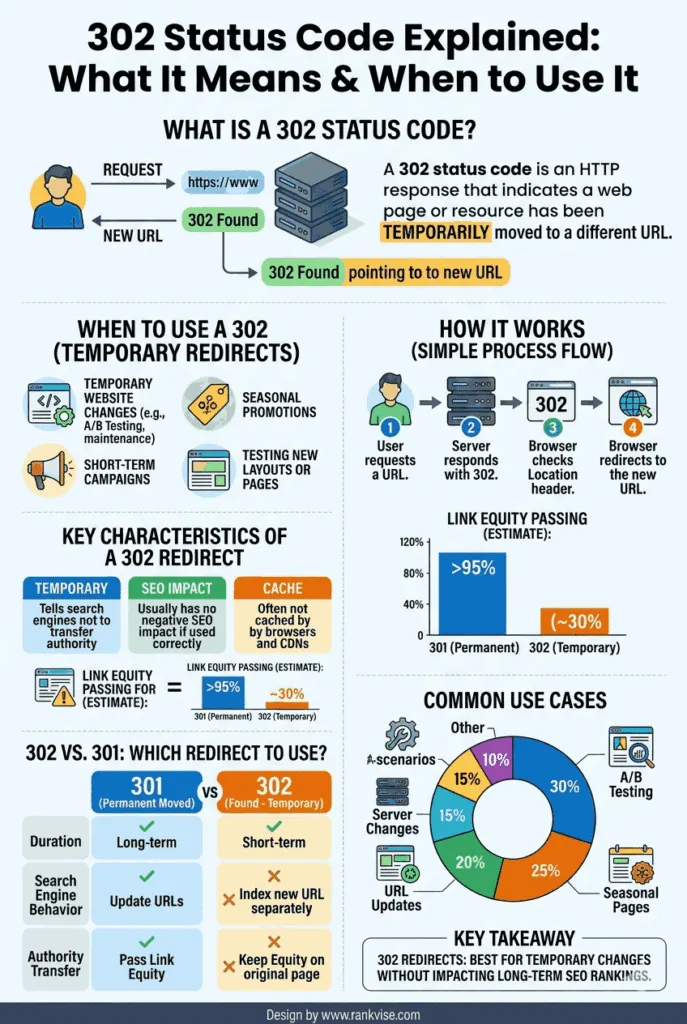
A 302 status code tells a browser or search engine that a webpage has temporarily moved to a different URL. The server sends this response when the original page still exists and will return to its current address in the future. The visitor is automatically redirected to the new location without taking any action.
The official HTTP specification defines 302 as “Found,” though it is widely known as a temporary redirect. When a browser receives a 302 response, it follows the redirect to the new URL. But it remembers that the original URL is still the correct permanent address.
This distinction matters for both user experience and search engine optimisation. A 302 tells search engines to keep the original URL in their index. The redirect is temporary, so the search engine should not replace the old URL with the new one in its results.
How a 302 Redirect Works Behind the Scenes
Every time you visit a webpage, your browser sends a request to a server. The server responds with an HTTP status code that tells the browser what happened. A 302 status code is part of the 3xx category, which handles all types of redirects.
Here is the step-by-step process when a server issues a 302 redirect:
| Step | What Happens |
|---|---|
| 1 | User clicks a link or types a URL into the browser |
| 2 | Browser sends a request to the server for that URL |
| 3 | Server responds with a 302 status code and a “Location” header containing the new temporary URL |
| 4 | Browser automatically follows the redirect to the new URL |
| 5 | New page loads for the user seamlessly |
| 6 | Browser retains the original URL as the canonical address |
The entire process takes milliseconds. The user sees only the final destination page. From their perspective, nothing unusual happened. But from a technical and SEO perspective, the type of redirect used carries significant consequences.
When to Use a 302 Status Code
A 302 redirect is the right choice in specific temporary situations. The key word is temporary. If the move is permanent, a 302 is the wrong tool.
During Website Maintenance or Redesign
When you take a page offline for updates, a 302 redirect sends visitors to an alternative page while the original is unavailable. Once the maintenance ends, you remove the redirect and restore the original URL. This keeps users from hitting a dead end during the downtime.
For A/B Testing and Experiments
Many businesses test different versions of a landing page to see which one converts better. A 302 redirect lets you send a portion of traffic to a test page without signalling to search engines that the original page has moved. When the test concludes, you remove the redirect with no lasting SEO impact.
Seasonal or Promotional Campaigns
Retailers often redirect a product category page to a seasonal sale page during major shopping events. A 302 status code works perfectly here because the redirect only lasts for the campaign period. After the promotion ends, the original page resumes its normal function.
Geographic or Device-Based Redirects
Some websites redirect users based on their location or device type. A user in Europe might see a localised version of a page, while a mobile user might see a streamlined layout. These conditional redirects are temporary by nature and suit the 302 status code well.
When a Page Is Temporarily Unavailable
If a specific page goes down due to a server issue or content update, a 302 redirect sends visitors to a relevant alternative. This prevents users from seeing an error page while you resolve the problem behind the scenes.
302 vs 301 — The Most Important Difference
This is where most website owners make mistakes. The difference between a 302 and a 301 redirect has major implications for search engine rankings.
A 301 status code signals a permanent redirect. It tells search engines the original URL has moved to a new address forever. Search engines then transfer the SEO value — link equity, ranking signals, and authority — from the old URL to the new one. Over time, the old URL drops out of the search index entirely.
A 302 status code signals a temporary redirect. It tells search engines the original URL is still the correct address and will return. Search engines keep the original URL in their index and do not transfer full SEO value to the temporary destination.
| Factor | 301 Redirect | 302 Redirect |
|---|---|---|
| Type | Permanent | Temporary |
| SEO value transfer | Passes link equity to new URL | Retains link equity on original URL |
| Search index behaviour | New URL replaces old URL over time | Original URL stays indexed |
| Browser caching | Browser caches the redirect | Browser checks the redirect each time |
| Best used for | URL migrations, deleted pages, domain changes | Testing, maintenance, temporary campaigns |
Using a 302 when you mean 301 is a common and costly error. Your old URL keeps its index position, but the new page never gains the ranking authority it should. Traffic stalls. Rankings suffer. And the issue often goes undetected for months because the redirect itself works fine for users.
How the 302 Status Code Affects SEO
Google has stated that it will eventually treat a long-standing 302 redirect similarly to a 301 if the redirect remains in place for an extended period. However, relying on that behaviour is risky and unpredictable. The safest approach is to always use the correct redirect type from the start.
A properly used 302 redirect has minimal SEO impact. Search engines understand the redirect is temporary and continue to index the original URL. Rankings for the original page remain stable because the search engine knows the redirect will be reversed.
Problems arise when a 302 redirect stays active for months or years. At that point, the redirect is functionally permanent, but the signal sent to search engines is still temporary. This creates confusion. Google may eventually consolidate the URLs, but the timing and outcome are inconsistent.
Audit your redirects regularly. Any 302 redirect that has been active for more than a few weeks deserves a review. If the original page is not coming back, convert it to a 301 and let search engines handle the transition cleanly.
How to Identify and Fix 302 Redirect Issues
Catching misused 302 redirects requires a simple audit process. Several tools make this straightforward.
Use a site crawling tool like Screaming Frog, Ahrefs, or Semrush to scan your website for all active redirects. Filter the results to show only 302 status codes. Review each one and ask a single question — is this redirect truly temporary?
If the answer is no, change it to a 301. Most web servers and content management systems let you update redirect types through configuration files or plugins. On Apache servers, you modify the .htaccess file. On Nginx, you update the server configuration block. WordPress users can manage redirects through plugins like Redirection or Yoast SEO Premium.
After converting any 302 to a 301, resubmit the affected URLs in Google Search Console. This prompts Google to re-crawl and recognise the updated redirect type more quickly than waiting for the next natural crawl cycle.
FAQs
A 302 status code means a webpage has temporarily moved to a different URL. The server tells browsers and search engines that the original address is still valid and will return.
A correctly used 302 redirect does not harm SEO. However, using a 302 when you should use a 301 prevents proper link equity transfer and can hurt your rankings over time.
A 301 redirect is permanent and passes SEO value to the new URL. A 302 redirect is temporary and keeps SEO value on the original URL. Choose based on whether the move is lasting or short-term.
A 302 redirect should only stay active for the duration of the temporary situation. If it remains active for more than a few weeks, evaluate whether a 301 permanent redirect is more appropriate.
Use a site crawling tool like Screaming Frog, Ahrefs, or Semrush to scan your URLs. Filter results by HTTP status code to identify all active 302 redirects and review each one for correctness.