A one pager is a single-page document that communicates a key message quickly and clearly. Businesses use one pagers to pitch ideas, summarize projects, or introduce products. The goal is simple — deliver maximum value with minimum words.
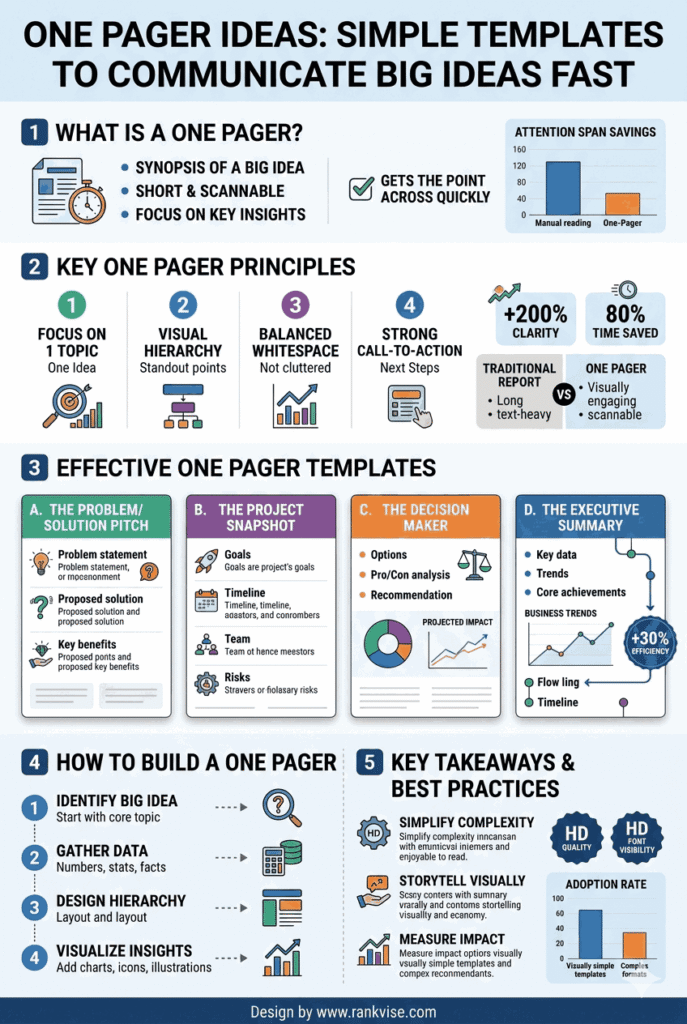
- Drive faster decisions by answering key questions upfront, reducing extra rounds of questions and focusing stakeholders on essential information.
- Start with one clear objective; structure headline, problem, solution, proof, and a direct call to action to guide readers to decide.
- Design clean, readable layouts with limited fonts and colors, useful visuals, consistent branding, and mobile testing to ensure clarity across devices.
One pagers work because attention spans are shrinking. Decision-makers rarely read ten-page proposals before forming an opinion. A well-crafted one pager earns attention in under sixty seconds. It forces you to distill complex ideas into their most essential points.
Whether you are a startup founder, a project manager, or a sales professional, one pager ideas can transform how you communicate. The format is versatile, portable, and easy to share digitally or in print. Mastering this format gives you a real competitive advantage in any business setting.
Why Businesses Need One Pagers?
They Save Time for Everyone
Nobody wants to read a twenty-page document for a simple decision. One pagers respect your audience’s time by presenting only what matters. Executives, investors, and clients all prefer concise communication. A single page forces clarity and eliminates unnecessary detail.
They Drive Faster Decisions
One pagers reduce back-and-forth by answering key questions upfront. When stakeholders have all essential information on one page, they decide faster. This is especially true in sales meetings, investor pitches, and internal project approvals. Speed matters in competitive business environments.
They Work Across Every Industry
From tech startups to real estate agencies, one pagers serve universal purposes. Schools use them for student learning summaries. Nonprofits use them for donor outreach. Consultants use them for client proposals. The format adapts to virtually any communication need.
15+ One Pager Ideas for Different Business Needs
Startup and Business One Pager Ideas
Startups frequently need to communicate their vision in a compact format. These one pager ideas help founders make strong first impressions.
- Company overview one pager – summarizes your mission, product, target market, and team on a single page
- Startup pitch one pager – highlights the problem, solution, market size, traction, and funding ask for investors
- Business model one pager – maps out revenue streams, cost structure, and value proposition visually
- Partnership proposal one pager – outlines mutual benefits, collaboration scope, and expected outcomes for potential partners
Each of these templates serves a specific audience. Tailor your language and data points to match what that audience cares about most.
Sales and Marketing One Pager Ideas
Sales teams need documents that convert conversations into commitments. These one pager ideas support every stage of the sales funnel.
- Product one pager – showcases features, benefits, pricing, and a clear call to action
- Case study one pager – tells a client success story with measurable results in a compact format
- Competitive comparison one pager – positions your product against competitors using a simple comparison table
- Event or launch one pager – promotes an upcoming event with key details, agenda highlights, and registration links
Sales one pagers work best when they focus on customer outcomes rather than product features. Lead with the benefit, then support it with proof.
Project and Internal One Pager Ideas
Internal communication benefits enormously from one pagers. Teams stay aligned when information is clear and accessible.
- Project brief one pager – defines scope, objectives, timeline, and key stakeholders for any initiative
- Status update one pager – summarizes progress, milestones achieved, risks, and next steps
- Process overview one pager – explains a workflow or procedure using simple steps and visuals
- New hire onboarding one pager – gives new employees essential company information on day one
These documents reduce unnecessary meetings and email chains. They create a single source of truth that everyone can reference quickly.
Creative and Educational One Pager Ideas
One pagers are not limited to corporate use. Creative professionals and educators use them effectively too.
- Portfolio one pager – showcases your best work samples, skills, and contact information
- Course summary one pager – condenses a training module into key takeaways and action items
- Book or research summary one pager – distills a long document into essential insights for quick reference
- Personal brand one pager – presents your professional identity, expertise, and unique value proposition
These formats work well for freelancers, consultants, and educators who need to make fast impressions.
How to Create an Effective One Pager
Start With a Clear Objective
Every one pager needs a single purpose. Ask yourself what action you want the reader to take after reading it. That answer shapes every word and design choice on the page. Without a clear objective, your one pager becomes a cluttered summary of everything.
Structure Your Content Strategically
Good one pagers follow a logical flow that guides the reader from interest to action. Use this proven structure as your starting framework:
| Section | Purpose | Ideal Length |
|---|---|---|
| Headline | Grabs attention and states the core message | 5–10 words |
| Problem or context | Explains why this matters to the reader | 2–3 sentences |
| Solution or key message | Presents your main idea or offering | 3–5 sentences |
| Supporting data or proof | Builds credibility with facts or results | 2–4 bullet points |
| Call to action | Tells the reader what to do next | 1–2 sentences |
This structure works for nearly every type of one pager. Adjust the sections based on your specific audience and goal.
Write for Scanners, Not Readers
Most people scan documents before deciding whether to read them fully. Use short headlines, bullet points, and bold text to guide the eye. Break up dense paragraphs into smaller chunks. White space is your best friend on a one pager.
Every sentence should earn its place on the page. If a sentence does not support your main objective, remove it. Ruthless editing separates great one pagers from mediocre ones.
One Pager Design Tips That Improve Results
Keep the Visual Layout Clean
A cluttered one pager defeats its own purpose. Use consistent fonts, a limited color palette, and clear section dividers. Stick to two or three font sizes maximum. Align all elements to a grid for a polished, professional appearance.
Use Visual Elements Wisely
Icons, charts, and images can communicate faster than text. A simple bar chart showing revenue growth says more than a paragraph of numbers. Use visuals to replace text wherever possible. But avoid decorative graphics that add no informational value.
Brand It Consistently
Your one pager represents your brand. Include your logo, brand colors, and consistent typography. A branded one pager looks professional and builds trust immediately. It signals that you take communication seriously and pay attention to detail.
Prioritize Readability on All Devices
Many one pagers are shared as PDFs or viewed on mobile screens. Use a minimum font size of 10 points for body text. Test your one pager on a phone screen before finalizing. If it is hard to read on mobile, you will lose a significant portion of your audience.
Common Mistakes to Avoid With One Pagers
Even simple documents can go wrong. Watch out for these frequent errors when developing your one pager ideas.
- Cramming too much information – a one pager is not a compressed report; choose only essential points
- Ignoring the audience – what matters to an investor differs greatly from what matters to a new hire
- Weak or missing call to action – every one pager should tell the reader exactly what to do next
- Poor hierarchy – without clear headings and visual flow, readers lose interest within seconds
- Using generic templates without customization – cookie-cutter designs undermine your credibility and message
The best one pagers feel effortless to read. That effortlessness comes from deliberate planning and careful editing.
Tools to Build One Pagers Quickly
You do not need advanced design skills to create professional one pagers. Several tools make the process fast and intuitive.
- Canva – offers hundreds of free one pager templates with drag-and-drop editing
- Google Docs or Slides – simple and collaborative, ideal for text-heavy one pagers
- Notion – great for internal one pagers that teams can edit and update in real time
- Visme – provides data visualization features for more visual one pager designs
- Figma – best for design-focused teams that want pixel-perfect control over layout
Choose a tool that matches your skill level and the complexity of your one pager. Start with a template and customize it to fit your brand and message.
FAQs
A startup pitch one pager should include the problem, solution, market size, traction, team overview, and funding ask. Keep it data-driven and visually clean.
A one pager should fit on a single page, typically between 250 and 500 words. Focus on essential information and use visuals to replace lengthy text.
A one pager focuses on a single message or objective on one page. A brochure typically covers multiple topics across several panels or pages.
Yes, a one pager works well as a concise sales proposal. Include the client’s problem, your solution, key benefits, pricing overview, and a clear next step.
Canva, Google Slides, Visme, and Notion are popular tools for building one pagers. Each offers templates that you can customize without professional design skills.