Skip to content
Every business depends on software to operate. That software depends on executable files to run. And an infector virus targets those exact files to silently compromise your entire system.
- Common infection vectors: email attachments, unverified downloads, infected USB drives, and compromised software installers.
- Lifecycle: enters system, attaches to programs, activates on launch, then replicates across local drives and network shares.
- Evasion techniques include polymorphic code, payload encryption, and file size preservation to bypass signature-based detection.
- Prevention: deploy real-time endpoint protection with heuristics, enforce strict download policies, and automate timely software patching.
- If infected: disconnect the device, boot safe mode, run heuristic scans, restore from isolated backups, and monitor for 30 days.
Unlike flashy ransomware attacks that demand payment, an infector virus works quietly in the background. It attaches itself to legitimate programs, replicates each time those programs run, and spreads across connected devices before most users even notice something is wrong.
Understanding how this type of computer virus operates is the first step toward defending against it. This guide breaks down the mechanics, the major types, and the practical strategies you need to keep your systems safe.
What Exactly Is an Infector Virus?
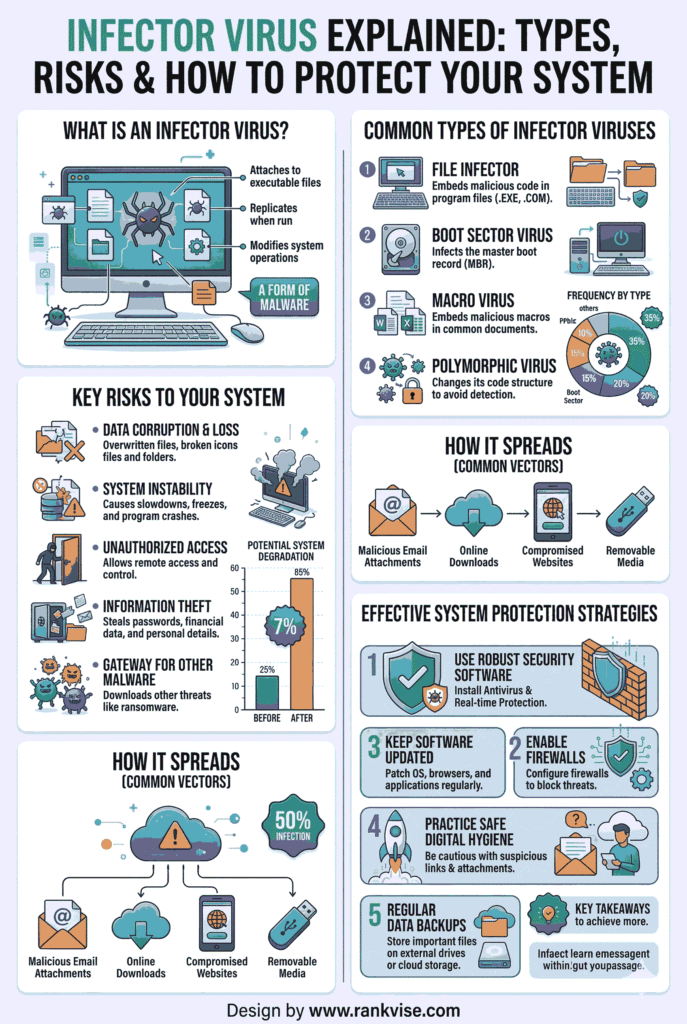
An infector virus is a category of malware that embeds itself into executable files on your computer. These are the files that power your applications, typically carrying extensions like .exe, .dll, or .com. When you launch an infected program, the virus activates alongside it.
What makes this threat distinct from other malware is its parasitic nature. It does not exist as a standalone program. Instead, it piggybacks on trusted software, making it harder to detect through casual observation. Every time you open the compromised application, the virus scans for additional executable files to infect.
This self-replicating behavior allows a single infected file to contaminate dozens of programs across a system within hours. In a networked business environment, the damage multiplies even faster.
How Does an Infector Virus Spread Through Your System?
The infection lifecycle follows a predictable pattern. Knowing each stage helps IT teams and business owners identify threats before they escalate.
Stage 1: Initial Entry
The virus first arrives on your system disguised within a seemingly harmless file. Common delivery methods include email attachments from unknown senders, downloads from unverified websites, infected USB drives shared between colleagues, and compromised software installers from unofficial sources.
A single careless click is usually all it takes. Once the malicious file lands on your device, the virus is ready to activate.
Stage 2: Attachment to Executable Files
After arriving, the infector virus modifies the binary code of legitimate executable files. It inserts its own instructions into the file structure so that the malicious code runs automatically whenever the host program launches. The original application still appears to work normally, which keeps the infection hidden.
Stage 3: Activation and Replication
The moment you open the infected program, the virus executes its payload. It then searches for other executable files on your local drive, shared network folders, and connected external devices. Each file it finds becomes a new carrier.
This rapid replication is what makes file infector viruses particularly dangerous in office environments. A single infected workstation can compromise an entire department’s shared drive within a business day.
Stage 4: Payload Delivery
Beyond replication, many infector viruses carry a secondary payload. This could involve deleting critical system files, opening backdoor access for remote attackers, corrupting stored data beyond recovery, or installing additional malware such as keyloggers or spyware.
The severity depends on the specific virus variant, but the business impact is almost always significant.
Major Types of Infector Viruses You Should Know
Not all infector viruses behave the same way. Each type uses a different strategy to compromise your system, and recognizing those differences matters for effective cybersecurity defense.
Direct Action File Infector
This is the most straightforward type. It activates immediately when the infected file runs, targets other executable files in the same directory, and then goes dormant. It does not remain in memory after execution, which makes it easier to detect but still capable of rapid damage during its active phase.
Memory-Resident Infector
A memory-resident infector virus loads itself into your system’s RAM and stays active even after you close the original infected program. It continuously monitors file activity and infects new executables as they are accessed. This persistent presence makes it far more dangerous and significantly harder to remove than direct action variants.
Macro Virus
While traditional infector viruses target compiled executable files, macro viruses attack document-based files created in programs like Microsoft Word and Excel. They exploit the macro scripting functionality built into these applications. Email remains their primary distribution channel, making them a frequent threat in business communication workflows.
Sparse Infector
A sparse infector virus deliberately limits how many files it compromises at any given time. By infecting only a small number of targets on an irregular schedule, it avoids triggering the pattern-based detection methods used by many antivirus programs. This calculated restraint makes it one of the most elusive variants.
Multipartite Virus
The multipartite virus combines the tactics of file infectors and boot sector viruses. It can infect both executable files and the boot record of your hard drive simultaneously. This dual-attack capability means it survives standard cleanup procedures that only address one infection vector, making complete removal a complex process.
| Virus Type | Primary Target | Persistence Level | Detection Difficulty |
|---|---|---|---|
| Direct Action File Infector | Executable files in active directory | Low — activates once, then dormant | Moderate |
| Memory-Resident Infector | All executables accessed during session | High — stays active in RAM | High |
| Macro Virus | Office documents with macro support | Moderate — reactivates on file open | Moderate |
| Sparse Infector | Select executables on irregular schedule | Low to moderate | Very high |
| Multipartite Virus | Executable files and boot sector | Very high — dual infection points | Very high |
How Infector Viruses Evade Detection
Modern infector viruses are not simple scripts. They employ advanced evasion techniques that challenge even well-maintained security environments.
Polymorphic Code
Some variants rewrite their own code each time they replicate. This means every copy of the virus has a slightly different signature, making it nearly invisible to antivirus tools that rely on signature-based detection.
Code Encryption
Certain infector viruses encrypt their malicious payload and only decrypt it at the moment of execution. The encrypted version sitting on your hard drive looks like harmless data to most scanning tools.
File Size Preservation
Sophisticated variants adjust their code insertion to maintain the original file size of the infected executable. Since many users and basic security tools flag unexpected file size changes, this technique helps the virus avoid casual discovery.
Warning Signs Your System May Be Infected
Early detection limits damage. Watch for these indicators across your organization’s devices:
- Applications crash unexpectedly or refuse to launch entirely
- System performance degrades noticeably without a clear cause
- Executable files show altered modification dates you did not authorize
- Antivirus software becomes disabled or behaves erratically
- Unusual network traffic spikes occur during off-hours
- New, unrecognized processes appear in your task manager
Any single symptom could have an innocent explanation. Two or more occurring together should prompt an immediate security investigation.
Practical Strategies to Protect Your Business
Prevention delivers far more value than recovery. These strategies address the most common infection pathways for file infector viruses.
Deploy Real-Time Endpoint Protection
Choose antivirus and endpoint detection solutions that use both signature-based and heuristic analysis. Heuristic detection identifies suspicious behavior patterns rather than relying solely on known virus signatures, giving you stronger defense against polymorphic and newly released variants.
Enforce Strict Download Policies
Establish clear organizational rules about software downloads. Employees should only install applications from verified, approved sources. Block access to known malicious domains at the network level using DNS filtering.
Maintain Consistent Update Schedules
Outdated software contains known vulnerabilities that infector viruses exploit. Automate operating system and application updates across all company devices. Patch management should be a weekly process, not a quarterly afterthought.
Segment Your Network
Network segmentation limits how far a virus can spread after initial infection. If one department’s shared drive is compromised, proper segmentation prevents that infection from reaching your finance, HR, or executive systems.
Implement Regular Backup Protocols
Maintain automated backups stored in isolated environments. Follow the 3-2-1 backup rule: three copies of your data, on two different media types, with one copy stored offsite or in the cloud. This ensures recovery even after a severe file corruption event.
Train Your Team
Human error remains the leading cause of malware infections. Conduct quarterly security awareness training that covers how to identify suspicious email attachments, the risks of using unauthorized USB devices, and the importance of reporting unusual system behavior immediately.
What to Do If You Detect an Infector Virus
Speed matters once you confirm an infection. Follow these steps to contain and eliminate the threat:
- Disconnect the affected device from your network immediately to stop lateral spread
- Boot into safe mode to prevent the virus from loading into active memory
- Run a full system scan using updated antivirus software with heuristic detection enabled
- Quarantine and delete all flagged files identified during the scan
- Check all connected devices and shared drives for signs of secondary infection
- Restore compromised files from your most recent clean backup
- Monitor the system closely for 30 days to confirm the threat has been fully eliminated
For businesses without dedicated IT security staff, engaging a professional cybersecurity firm for post-infection forensic analysis is a worthwhile investment.
FAQs
An infector virus is malware that hides inside executable files like .exe or .dll and spreads to other programs every time an infected file runs on your system.
A file infector virus replicates by attaching to executable files, while ransomware encrypts your data and demands payment. They use fundamentally different attack methods and goals.
Yes. Infector viruses commonly spread through infected email attachments, especially executable files or macro-enabled documents disguised as legitimate business files.
Unexplained system slowdowns, crashing applications, disabled antivirus software, and altered file modification dates are the most common early warning signs of infection.
Antivirus software is essential but not sufficient alone. Combine it with regular updates, network segmentation, employee training, and strict download policies for comprehensive protection.