Skip to content
Checks may feel old-fashioned, but they still play a surprisingly active role in everyday finance. Employers request them for payroll setup. Landlords need them to arrange rent payments. Insurance companies ask for them when setting up automatic withdrawals.
The common thread in all these situations is the voided check. Knowing how to void a check correctly protects your bank account from unauthorized use. It also speeds up routine financial tasks that would otherwise require extra paperwork.
This guide walks you through the process step by step. You will also learn when voided checks are needed, how to handle them securely, and what alternatives exist if you do not have a checkbook.
What Is a Voided Check and Why Does It Matter?
A voided check is a standard personal check with the word “VOID” written across its face. This marking tells anyone who handles it that the check cannot be cashed, deposited, or used to withdraw funds.
However, the important details on the check remain fully readable. Your bank routing number, account number, and name stay visible. That is exactly the point. A voided check gives the recipient your banking details in a verified, standardized format without giving them the ability to take money from your account.
Think of it as handing someone a locked display case. They can see the information inside, but they cannot access the funds.
When Do You Need a Voided Check?
Most people assume voided checks are only for setting up direct deposit at a new job. In reality, businesses and financial institutions request them for a wider range of purposes.
Here are the most common situations where you will need one:
- Setting up direct deposit for your salary or freelance payments
- Authorizing automatic bill payments for utilities, insurance, or loan installments
- Enrolling in employer-sponsored benefits like health savings accounts or retirement contributions
- Linking an external bank account to an investment or brokerage platform
- Establishing recurring charitable donations through a nonprofit organization
Each of these situations requires your bank routing number and account number. A voided check delivers both in a single, universally accepted document.
How to Void a Check in 5 Simple Steps
The process takes less than a minute. You need a blank check from your checkbook and a pen with permanent ink. A black or blue ballpoint pen works well. A fine-tip permanent marker is even better.
- Take a fresh, unused check from your checkbook.
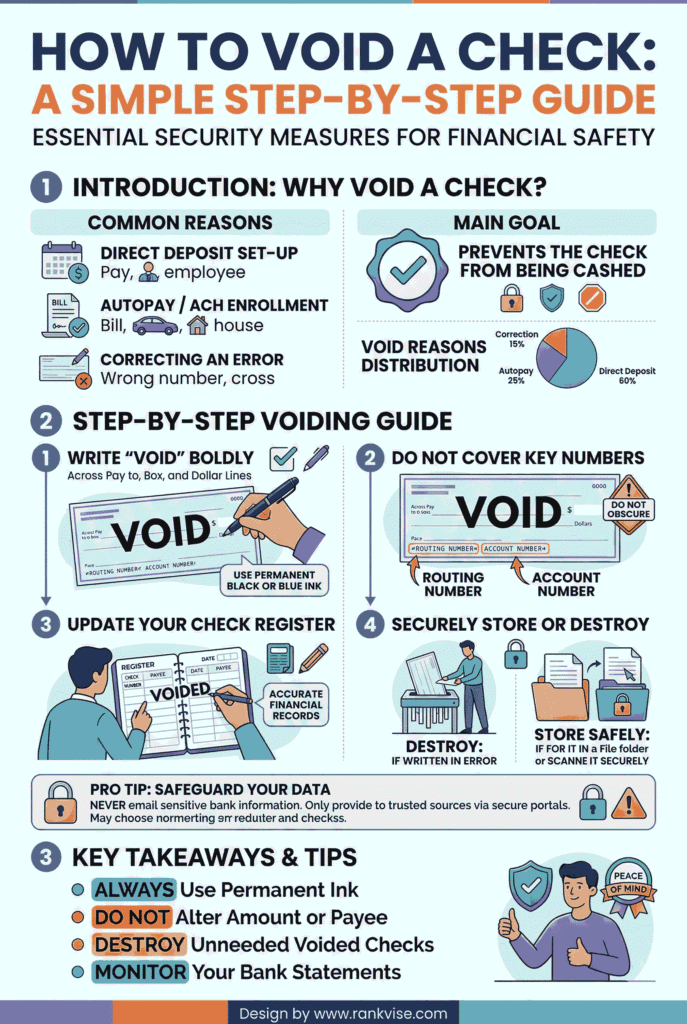
- Write the word “VOID” in large, bold capital letters across the entire front of the check. Spread the letters across the payee line, the amount box, and the signature line.
- Make sure the word is large enough to be immediately obvious. Letters should be at least half an inch tall so they cannot be overlooked or erased.
- Do not sign the check. A signed voided check is a security risk because someone could attempt to alter or replicate your signature.
- Record the voided check number in your check register or personal records. This helps you track it if questions arise later.
One critical detail to remember: your writing should not cover the bank routing number or your account number printed along the bottom edge of the check. The recipient needs those numbers to complete the setup.
What Each Number on Your Check Means
Understanding the numbers on a voided check helps you verify that the right information reaches the right place. Here is a quick reference:
| Number | Location on Check | Purpose |
|---|---|---|
| Routing number | Bottom left (9 digits) | Identifies your bank or credit union |
| Account number | Bottom center (varies) | Identifies your specific bank account |
| Check number | Bottom right or top right | Tracks the individual check for your records |
When you hand over a voided check, the recipient uses the routing number and account number to connect electronically to your bank. The check number is only for your own recordkeeping.
How to Void a Check for Direct Deposit
Direct deposit is the most common reason people void a check. Employers use the banking information to route your paycheck electronically into your account. The process eliminates paper checks, speeds up payment, and reduces the chance of lost or stolen wages.
Here is how to handle it properly:
- Void a blank check using the steps described above.
- Attach the voided check to your employer’s direct deposit authorization form. Fill in any additional fields the form requires, such as the percentage of your paycheck to deposit.
- Submit both documents to your payroll or human resources department.
- Wait for confirmation that direct deposit is active. Most employers process it within one to two pay cycles.
- Once confirmed, shred the voided check using a cross-cut shredder. Never toss it in regular trash where someone could retrieve your banking details.
Some employers now accept digital submissions. If you need to send a voided check electronically, scan it or take a clear photo. Use a secure, encrypted method to transmit it. Avoid sending it through standard, unencrypted email whenever possible.
Security Tips for Handling Voided Checks
A voided check still carries sensitive financial information. Treating it carelessly opens the door to check fraud and identity theft. The Federal Trade Commission reported over 1.1 million cases of identity theft in the United States in 2024 alone.
Follow these practices to keep your information safe:
- Never leave voided checks lying on a desk or in an unsecured folder. Store them in a locked drawer or safe until you submit them.
- Avoid emailing voided checks as unencrypted attachments. If digital submission is necessary, use a password-protected PDF or your employer’s secure upload portal.
- Shred the voided check immediately after confirming the setup is complete. A cross-cut shredder provides better protection than a strip-cut model.
- Monitor your bank account for several weeks after submitting a voided check. Flag any unfamiliar transactions with your bank immediately.
- Record the check number and the date you submitted it. This creates a paper trail that helps resolve disputes quickly.
These steps take only a few extra minutes. They significantly reduce your exposure to unauthorized withdrawals and account takeovers.
What to Do If You Made a Mistake on a Check
Sometimes you start writing a check and realize you entered the wrong date, amount, or payee name. Voiding it is the safest correction method.
Do not try to cross out the error and rewrite it. Most banks reject altered checks, and a partially corrected check can raise fraud concerns. Instead, write “VOID” across the face of the check, record the number in your register, and start fresh with a new check.
If you already mailed a check with an error, contact your bank to place a stop payment on it. A stop payment prevents the bank from processing the check. Most banks charge a fee for this service, typically between 20 and 35 USD. It is a small cost compared to the consequences of an incorrect or unauthorized payment clearing your account.
What If You Do Not Have Checks?
Many people no longer carry checkbooks. Digital banking has made paper checks less common, especially for younger account holders. If you do not have checks, several alternatives accomplish the same goal.
| Alternative | How It Works | Accepted By |
|---|---|---|
| Direct deposit form from your bank | A pre-printed form listing your routing and account numbers | Most employers and payroll services |
| Bank verification letter | An official letter on bank letterhead confirming your account details | Employers, landlords, benefits administrators |
| Online banking screenshot | A screenshot showing your name, routing number, and account number | Some employers and payment platforms |
| Deposit slip | A pre-printed slip from your checkbook with routing and account numbers | Select employers and billing offices |
Call your bank or visit a branch to request any of these documents. Most banks provide them free of charge and can issue them within one business day.
Voiding a Check in Accounting Software
If you run a small business or manage bookkeeping, you may need to void a check inside your accounting platform. The purpose here is different. You are canceling a previously recorded transaction to keep your financial records accurate.
In most platforms like QuickBooks or Sage, the process involves locating the check in your register, selecting the void option, and confirming the action. The software resets the check amount to zero and marks the entry as voided. This preserves the audit trail without deleting the original record.
Always run a payment register report after voiding a check in your software. This confirms the void was recorded correctly and your account balances remain accurate.
Voided Check vs. Canceled Check: What Is the Difference?
People sometimes confuse these two terms. They are not the same.
A voided check is a blank, unused check that you mark as “VOID” before anyone processes it. It has never been deposited or cashed.
A canceled check is a check that was written, submitted, and fully processed by the bank. The bank marks it as canceled after the funds have been withdrawn from your account. You might receive canceled checks as part of your monthly bank statement or digital records.
Understanding this distinction matters when an employer or institution specifically requests one or the other.
FAQs
Yes, as long as the routing number and account number are still active and match your current bank account. Verify with your bank before submitting.
Write “VOID” across a blank check and attach it to the automatic payment authorization form provided by your landlord, insurer, or billing company.
It is reasonably safe if you use a secure upload portal or encrypted messaging. Avoid sending it through regular email, which lacks encryption and exposes your banking details to interception.
Banks are trained to reject checks marked “VOID.” If a voided check is submitted for deposit, the bank will decline the transaction and may flag it for review.
No. Once a check clears your bank, voiding is no longer possible. You would need to contact the recipient directly to resolve any payment errors or disputes.