Skip to content
Every modern business runs on multiple software systems. Your CRM talks to your ERP. Your ERP talks to your warehouse platform. Your finance system talks to payroll. But here is the problem: these systems rarely speak the same language.
- Centralized repository storing integration definitions, message schemas, and transformation rules; it governs how applications exchange data, not the business data itself.
- Core objects include data types, message types, service interfaces, message mappings, and operation mappings that together define executable integration logic.
- In SAP PI/PO the repository handles design time while the Integration Directory manages runtime configuration and routing rules.
- Well-governed repository improves reuse, prevents duplicate interfaces, decouples systems for safer upgrades, and reduces long-term maintenance costs.
An enterprise service repository solves that problem. It acts as the central reference point where every integration definition, data structure, and message mapping lives. Without it, teams build duplicate interfaces, break connections during upgrades, and waste months troubleshooting inconsistencies.
This guide explains what an enterprise service repository is, how its components work together, where it fits inside SAP PI/PO environments, and how organizations use it to build faster, cleaner, and more reliable integrations.
What Exactly Is an Enterprise Service Repository?
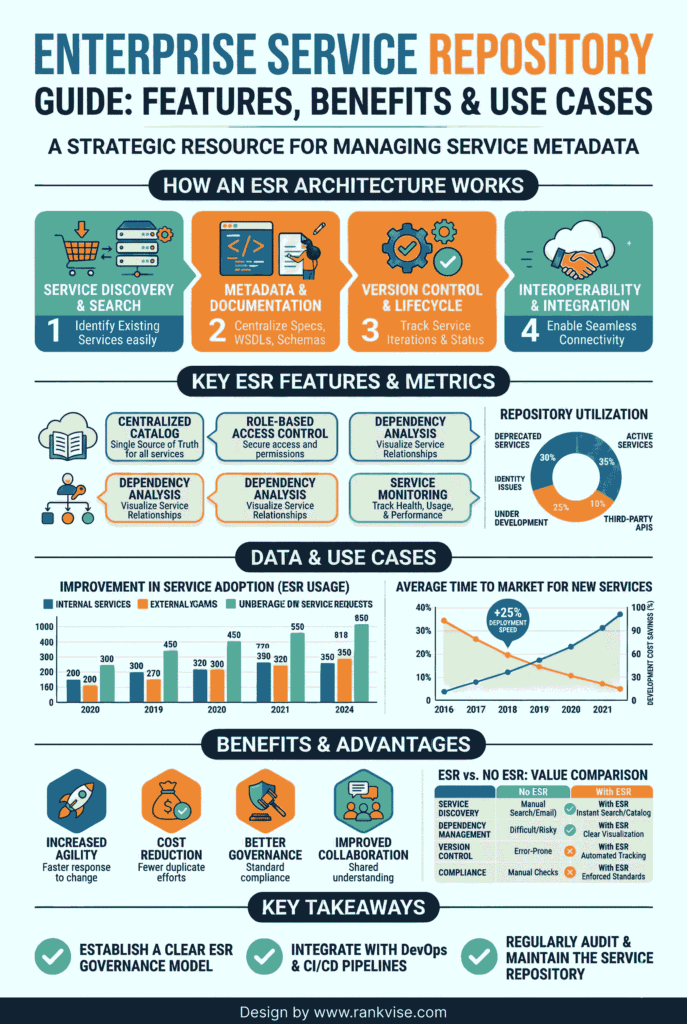
An enterprise service repository is a centralized database that stores metadata for service definitions. Think of it as a blueprint library for your entire integration landscape. It holds the rules for how applications exchange data, what formats they use, and how messages transform from one structure to another.
It does not store your actual business data. It stores the instructions that govern how that data moves between systems. When your sales platform sends an order to your fulfillment system, the enterprise service repository defines the message structure, the field mappings, and the communication direction.
This centralization eliminates a common pain point. Without a single repository, different teams build their own integration logic independently. The result is duplicated work, conflicting definitions, and a tangled web of interfaces that nobody fully understands.
How It Differs From a Data Repository and a Metadata Repository
The term “repository” appears across many enterprise contexts. Clarity matters here because confusing these concepts leads to poor architecture decisions.
An enterprise data repository warehouses actual business information. Customer records, transaction histories, and financial reports live there. Organizations use it for analytics, reporting, and business intelligence. It stores the content itself.
An enterprise metadata repository is broader. It catalogs data about data across the entire organization. Data lineage, business glossaries, and schema definitions all fall under its scope. It helps teams understand where data comes from and how it flows.
An enterprise service repository is more focused. It stores only the definitions related to service interfaces and integration logic. This includes data type structures, message schemas, and transformation rules that govern how systems communicate. It is the integration architect’s primary workspace.
Core Components That Power the Enterprise Service Repository
The enterprise service repository is built on a set of interconnected objects. Each object plays a specific role in defining an integration scenario. Understanding these components is essential for anyone working with system integration or service-oriented architecture.
- Data types define the smallest building blocks. A data type specifies whether a field is a string, integer, date, or other format. For example, “CustomerID” might be defined as a ten-digit integer.
- Message types bundle data types into structured containers. A “PurchaseOrder” message type might combine customer data, product details, quantity, and delivery address into one defined package.
- External definitions allow you to import structures from outside systems. If a banking partner sends payment files in a specific XML schema, you import that schema directly into the repository rather than rebuilding it manually.
- Service interfaces define the direction and behavior of communication. They specify whether a message is inbound or outbound, and whether the exchange is synchronous (waits for a reply) or asynchronous (sends and moves on).
- Message mappings handle the translation. They define how a field in the source system corresponds to a field in the target system. Mapping “MATNR” from SAP to “ProductID” in a third-party XML file happens here.
- Operation mappings tie everything together. They link the source interface, the target interface, and the message mapping logic into one executable integration package.
These components work together to decouple the sender from the receiver. Neither system needs to know the other’s internal structure. The enterprise service repository manages the translation layer between them.
The Role of an Enterprise Service Repository in SAP PI/PO
Within SAP environments, the enterprise service repository sits at the heart of SAP Process Integration (PI) and SAP Process Orchestration (PO). It serves as the design-time environment where developers build all integration logic before deployment.
SAP PI/PO splits integration work into two phases. The enterprise service repository handles design time. This is where teams define interfaces, create message mappings, and structure data transformations. The Integration Directory handles configuration time. That is where routing rules, communication channels, and endpoint assignments are set up.
This separation is powerful. It means the integration logic (the “what” and “how”) stays independent from the routing configuration (the “where”). You can redesign a mapping without touching your routing rules, or redirect a message to a new endpoint without rebuilding the interface.
Teams access the SAP enterprise service repository through the Enterprise Services Builder, launched either via the transaction code SXMB_IFR or through a browser-based URL pointing to the PI/PO start page.
Real-World Integration Scenario: IDOC to File
A practical example brings these concepts to life. Consider a common business scenario where SAP ECC sends purchase order data to a third-party logistics provider as an XML file.
Here is how the enterprise service repository handles this:
- The integration team imports the relevant IDOC structure from SAP ECC into the repository under “Imported Objects.”
- They create data types and a message type defining the XML structure the logistics provider expects.
- They build two service interfaces: an outbound interface for the IDOC and an inbound interface for the target XML file.
- A message mapping translates each IDOC field to its corresponding XML field. “MATNR” maps to “ProductID.” “MENGE” maps to “Quantity.”
- An operation mapping links both interfaces and the message mapping into a single deployable integration object.
The entire design happens within the enterprise service repository. Once complete, the Integration Directory handles how and where the message gets routed at runtime.
Key Advantages for Business and IT Teams
Organizations that invest in a well-governed enterprise service repository see measurable returns across multiple areas.
| Advantage | Business Impact |
|---|---|
| Centralized definitions | Every team references the same data formats, eliminating mismatches between departments |
| Service reusability | Developers search existing interfaces before building new ones, reducing redundant work by up to 30% |
| System decoupling | Upgrading one application does not break integrations because the mapping layer absorbs structural changes |
| Cross-team collaboration | SAP and non-SAP developers share a single source of truth for integration definitions |
| Lower maintenance costs | Reusing standard content and existing mappings cuts both development time and long-term support effort |
These benefits compound over time. As the repository grows, each new integration project becomes faster because teams build on what already exists rather than starting from scratch.
Common Challenges and How to Overcome Them
The enterprise service repository is a powerful tool, but it comes with real challenges that teams must address proactively.
Complexity in initial setup. Getting the SAP NetWeaver stack running requires specialized Basis administration skills. Beginners often struggle to understand how the System Landscape Directory, the enterprise service repository, and the Integration Directory connect. Investing in structured training before the first project pays dividends.
Governance gaps. Without strict rules, the repository becomes cluttered. Multiple developers create duplicate objects, use inconsistent naming, and leave deprecated versions behind. This makes the repository difficult to search and maintain. Clear naming conventions, folder structures organized by business process, and periodic cleanup cycles prevent this decay.
Performance degradation. A repository loaded with thousands of objects slows down the Enterprise Services Builder. Archiving unused objects and managing version history carefully keeps response times acceptable. Teams should treat repository hygiene as an ongoing responsibility, not a one-time cleanup task.
Enterprise Service Repository vs. Service Registry: What Is the Difference?
These two concepts are often confused, but they serve distinct purposes in a service-oriented architecture.
| Aspect | Enterprise Service Repository | Service Registry |
|---|---|---|
| Primary role | Stores integration definitions and mappings at design time | Discovers and locates services at runtime |
| Content stored | Data types, message schemas, transformation logic | Service endpoints, bindings, access policies |
| When it is used | During interface development and configuration | During message execution and service discovery |
| Core question it answers | “How is this service built and how does data transform?” | “Where does this service live and how do I call it?” |
Oracle’s Service Registry, for example, follows the UDDI standard and focuses on runtime service lookup. SAP’s enterprise service repository focuses on design-time definition and mapping. In mature integration architectures, both work together: the repository defines the service, and the registry helps locate it during execution.
Best Practices for Managing Your Enterprise Service Repository
Getting the most value from your repository requires discipline. These practices separate well-run integration teams from those drowning in technical debt.
- Establish strict naming conventions from day one. Use prefixes like “DT_” for data types, “MI_” for message interfaces, and “MM_” for message mappings. This makes the repository instantly searchable.
- Organize content by business process or connected system. Group all “Order-to-Cash” interfaces in one namespace and all “Procure-to-Pay” interfaces in another. This logical structure helps new developers find relevant objects quickly.
- Check for pre-delivered SAP content before building custom interfaces. The SAP enterprise services repository includes standard integration content for common scenarios. Using it saves hundreds of development hours.
- Schedule quarterly reviews to archive deprecated objects and remove unused versions. A lean repository performs better and causes less confusion during development.
- Document every object with clear descriptions. Future developers and support teams need context, not just technical definitions.
The Future: Cloud Repositories and API-Led Integration
The traditional on-premise enterprise service repository is evolving. As SAP Integration Suite gains adoption on the Business Technology Platform, the center of gravity is shifting toward cloud-based integration design.
Cloud repositories offer API-led connectivity and pre-packaged integration flows called iFlows. These replace many traditional ESR artifacts with ready-to-deploy templates. For organizations running hybrid landscapes, this means faster time-to-value on new integration projects.
API management platforms are also absorbing some responsibilities that historically belonged to the enterprise service repository. Defining interfaces, managing versions, and documenting data contracts increasingly happen inside API gateways rather than standalone repositories.
That said, the classic enterprise service repository remains essential for organizations with legacy on-premise SAP systems. Many enterprises will run hybrid architectures for years, making the repository a critical component of their integration strategy well into the future.
FAQs
The transaction code is SXMB_IFR. It opens the SAP Process Integration start page in your browser, where you launch the Enterprise Services Builder.
The enterprise service repository handles design-time work like defining interfaces and mappings. The Integration Directory manages configuration-time tasks like routing rules and communication channels.
Yes. You can import external definitions such as XSD or WSDL files from any third-party system, then map them to SAP structures within the repository.
The primary objects are data types, message types, service interfaces, message mappings, and operation mappings. Together, they define the complete structure and logic of an integration.
Yes. While cloud-based tools like SAP Integration Suite are gaining ground, the enterprise service repository remains essential for organizations running on-premise SAP PI/PO systems and hybrid landscapes.