Background app refresh is a feature on smartphones that allows apps to update their content even when you are not actively using them. Your phone gives apps permission to check for new data, download updates, and refresh information while running in the background.
- OS intelligently schedules suspended apps to wake, fetch updates based on usage patterns, battery, connection, and available resources.
- Keeps apps ready with fresh content, but increases battery drain, mobile data use, and may raise privacy concerns.
- Manage per app or globally: iOS Settings > General > Background App Refresh; Android uses battery optimization and Data Saver.
- Enable only for daily-use apps, set Wi-Fi only for others, review monthly, and disable when low battery or limited data plans.
Think of it like a newspaper delivered to your door every morning. You didn’t ask for it right then, but it arrives ready for you. Apps do the same thing. They fetch emails, social media updates, news articles, and location data before you even open them.
Both iPhone and Android devices include this feature. Apple calls it Background App Refresh in iOS settings. Android handles it through battery optimization and background data settings. The concept remains the same across both platforms.
How Does Background App Refresh Work?
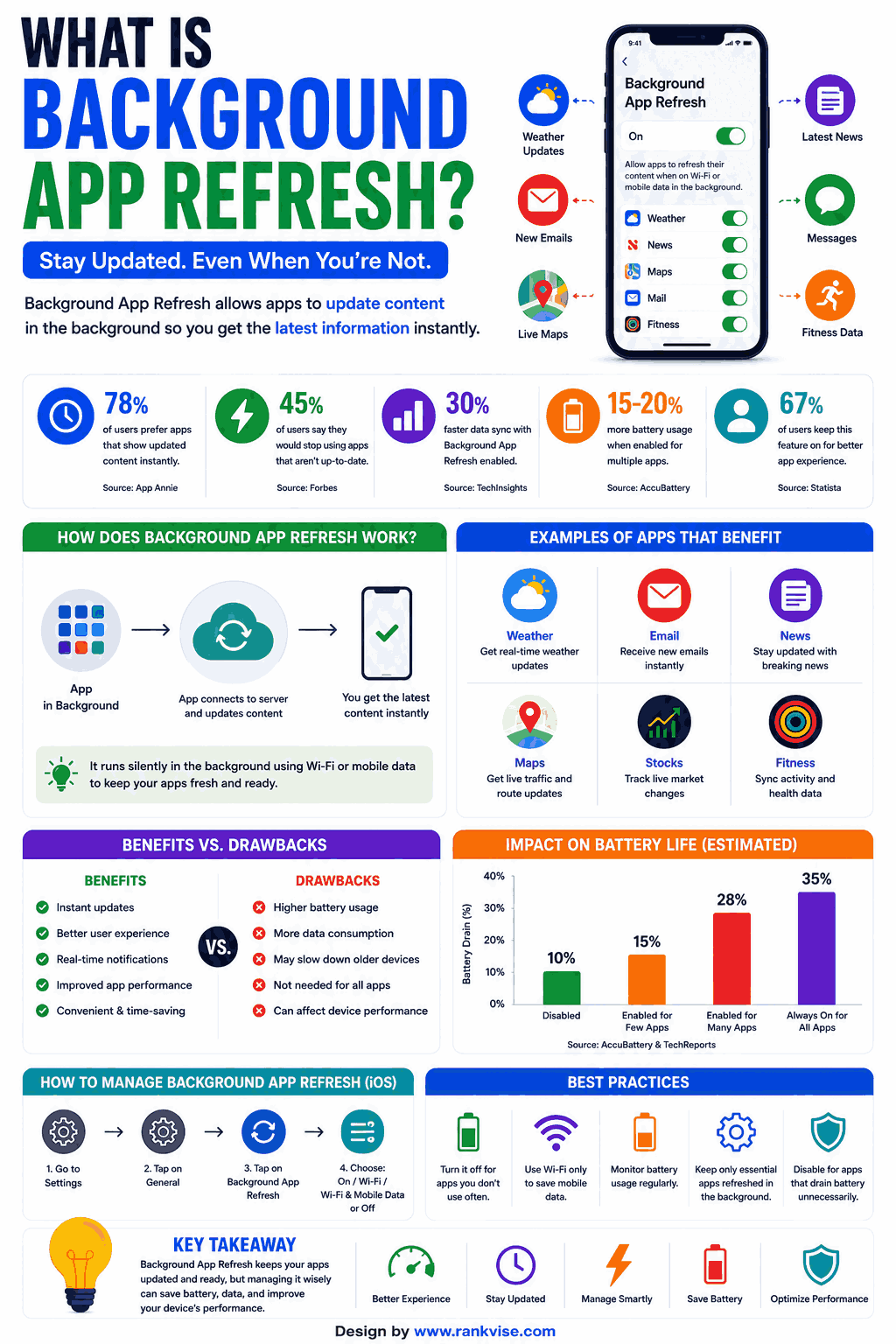
Your operating system manages which apps can refresh and when. It uses intelligent scheduling to minimize resource usage while keeping apps current.
The Technical Process Simplified
When you close an app, it doesn’t fully shut down. It enters a suspended state. With background app refresh enabled, the system periodically wakes these suspended apps. Each app then connects to its servers, downloads new content, and returns to sleep.
The system considers several factors when scheduling refreshes:
- Your typical usage patterns and times
- Current battery level and charging status
- Whether you are connected to Wi-Fi or cellular data
- How frequently you open each specific app
- Available system resources at that moment
Your phone learns your habits over time. If you check Instagram every morning at 8 AM, the system refreshes it shortly before. This makes the app feel instant when you open it.
What Happens When Background App Refresh Is Enabled?
Enabling this feature creates noticeable effects on your device performance. Some are positive. Others may concern you depending on your priorities.
Benefits of Keeping It On
- Apps load fresh content immediately when opened
- Email arrives without manually checking
- Navigation apps maintain updated location data
- Messaging apps deliver notifications reliably
- News and weather apps show current information instantly
Potential Downsides
- Battery drains faster as apps constantly wake and connect
- Mobile data usage increases without your direct knowledge
- Older devices may feel sluggish from continuous background processes
- Privacy concerns arise from apps tracking location continuously
- Storage fills faster with pre-downloaded content
The impact varies based on how many apps you have installed and how aggressively each one refreshes. A phone with 50 apps refreshing hourly drains significantly faster than one with 10 apps refreshing daily.
Does Background App Refresh Drain Battery?
Yes, background app refresh consumes battery life. Every refresh cycle requires the processor, network radio, and sometimes GPS to activate briefly. Multiply that by dozens of apps throughout the day, and the cumulative drain becomes measurable.
How Much Battery Does It Actually Use?
The exact percentage varies by device and app count. However, most users see a 10-20% improvement in battery life after disabling background refresh for non-essential apps. Heavy social media users with many apps may notice even greater savings.
| Usage Profile | Estimated Battery Impact | Recommended Action |
|---|---|---|
| Light user (under 15 apps) | 5-10% daily drain | Leave enabled for key apps |
| Moderate user (15-40 apps) | 10-20% daily drain | Disable for unused apps |
| Heavy user (40+ apps) | 20-30% daily drain | Enable only for essential apps |
Battery-conscious users should audit which apps truly need background access. Email and messaging apps benefit from it. Games and shopping apps rarely do.
Does Background App Refresh Use Mobile Data?
Every background refresh that occurs over cellular connection consumes mobile data. Apps download new content, sync files, and transmit usage data without your active involvement. This adds up quietly over your billing cycle.
How to Monitor Data Usage from Background Activity
Check your phone’s data usage settings. Both iOS and Android show data consumed per app. Look specifically at background data versus foreground data for each app.
Common data-hungry background activities include:
- Social media apps preloading images and videos
- Cloud storage services syncing photos automatically
- Email apps downloading attachments
- News apps refreshing article feeds with media
- Podcast apps auto-downloading new episodes
If you have a limited data plan, restrict background refresh to Wi-Fi only. This preserves your cellular data allowance while still keeping apps current when connected to home or office networks.
How to Turn Off Background App Refresh on iPhone
Apple provides granular control over this feature. You can disable it entirely or manage it app by app.
Steps to Disable on iOS
- Open the Settings app on your iPhone
- Tap General from the menu
- Select Background App Refresh
- Choose Off to disable completely, or select Wi-Fi only
- Alternatively, toggle individual apps on or off below
Recommended Apps to Keep Enabled on iPhone
- Mail and calendar for timely notifications
- Messages and communication apps you use daily
- Navigation apps if you commute regularly
- Banking apps for real-time transaction alerts
Apps Safe to Disable on iPhone
- Games and entertainment apps
- Shopping and deal apps
- Social media apps you check manually
- Utility apps like calculators or converters
- Apps you haven’t opened in weeks
How to Manage Background App Refresh on Android
Android handles background processes differently than iOS. It uses battery optimization and background data restrictions rather than one single toggle.
Steps to Restrict Background Activity on Android
- Open Settings and tap Apps or Application Manager
- Select the app you want to restrict
- Tap Battery or Battery usage
- Enable Restrict background activity
- Repeat for other non-essential apps
Alternatively, use Data Saver mode to limit all background data usage across apps simultaneously. This approach works well for users with limited cellular plans.
Android Adaptive Battery
Modern Android versions include Adaptive Battery. This feature uses machine learning to identify apps you rarely use. It then automatically limits their background activity. Over time, this reduces battery drain without requiring manual configuration for every app.
When Should You Disable Background App Refresh?
Certain situations make disabling this feature a smart choice. Consider turning it off when these conditions apply to you.
Low Battery Situations
When your battery drops below 20% and you cannot charge soon, disabling background refresh extends your remaining power. Every prevented refresh cycle saves processor and radio activation energy.
Limited Data Plans
Users with capped mobile data benefit from restricting background refresh to Wi-Fi only. This prevents apps from silently consuming your monthly allowance on content you might never view.
Older Devices Running Slowly
Aging phones with limited RAM and slower processors struggle with constant background activity. Disabling refresh for most apps frees system resources. Your device feels noticeably faster for active tasks.
Privacy-Sensitive Users
Some apps use background refresh to collect location data, usage patterns, and behavioral information. Restricting this access limits what apps can gather without your direct interaction.
Does Turning Off Background App Refresh Cause Problems?
Disabling this feature does not break apps. They still function normally when you open them. The only difference is a brief loading moment while the app fetches current data upon launch.
What You Might Notice
- Slight delay when opening apps as they load fresh content
- Notifications may arrive slightly later for some apps
- Email might not appear until you manually open the mail app
- Social media feeds take a moment to populate new posts
For most people, these minor delays are imperceptible. The trade-off of better battery life and lower data usage outweighs waiting an extra second or two for content to load.
Background App Refresh and Privacy Concerns
This feature grants apps periodic access to system resources including network connections and sometimes location services. Privacy-conscious users should understand what apps do during these background sessions.
Some apps transmit analytics data during refreshes. Others update location tracking. A few download advertising content for later display. Reviewing each app’s privacy policy reveals what it does during background activity.
Disabling background refresh for apps you don’t fully trust reduces their ability to collect data passively. It limits their access to only the moments you actively choose to open them.
Best Practices for Managing Background App Refresh in 2026
Follow these guidelines to balance convenience with performance.
- Enable background refresh only for apps you use daily
- Disable it for apps you open less than once per week
- Set refresh to Wi-Fi only if you have limited cellular data
- Review your enabled apps list monthly and remove outdated permissions
- Use your phone’s battery usage report to identify the biggest background drains
- Keep your operating system updated for improved background process management
This selective approach gives you the best of both worlds. Essential apps stay current. Non-essential apps stop wasting your resources silently.
FAQs
Yes, disabling it for non-essential apps saves 10-20% battery daily. Keep it enabled only for communication and productivity apps you rely on throughout the day.
Yes, apps still refresh over Wi-Fi but it doesn’t count against your mobile data plan. Setting refresh to Wi-Fi only prevents cellular data consumption while keeping apps updated.
Push notifications still work independently of background app refresh. You will continue receiving alerts for messages, emails, and app notifications even with refresh disabled.
Background app refresh downloads content proactively so apps open faster. Push notifications are alerts sent by servers to your device instantly when new events occur, regardless of refresh settings.
No, both iOS Low Power Mode and Android Battery Saver automatically disable background app refresh. The system restores it once you charge your device or turn off the power-saving mode.