A client management interface is a centralized dashboard for organizing customer interactions and data. It consolidates contact details, communication history, project status, and billing into one accessible workspace. Teams use this interface daily to track relationships from first contact through long-term retention.
- Provide a single source of truth so all team members access consistent client data, preventing miscommunication and speeding decisions.
- Automate communication tracking and workflows to ensure follow-ups, onboarding sequences, and renewals occur without manual effort.
- Integrate with accounting, project management, and communication tools via APIs to eliminate double entry and enable custom workflows.
- Prioritize intuitive UX, scalable pricing, and strong security to drive adoption, support growth, and protect client data.
Unlike scattered spreadsheets or disconnected tools, a unified interface eliminates information silos. Every team member sees the same client data without hunting through emails or shared drives. This single source of truth accelerates decision-making and prevents costly miscommunication.
Why Your Business Needs a Dedicated Client Management Interface
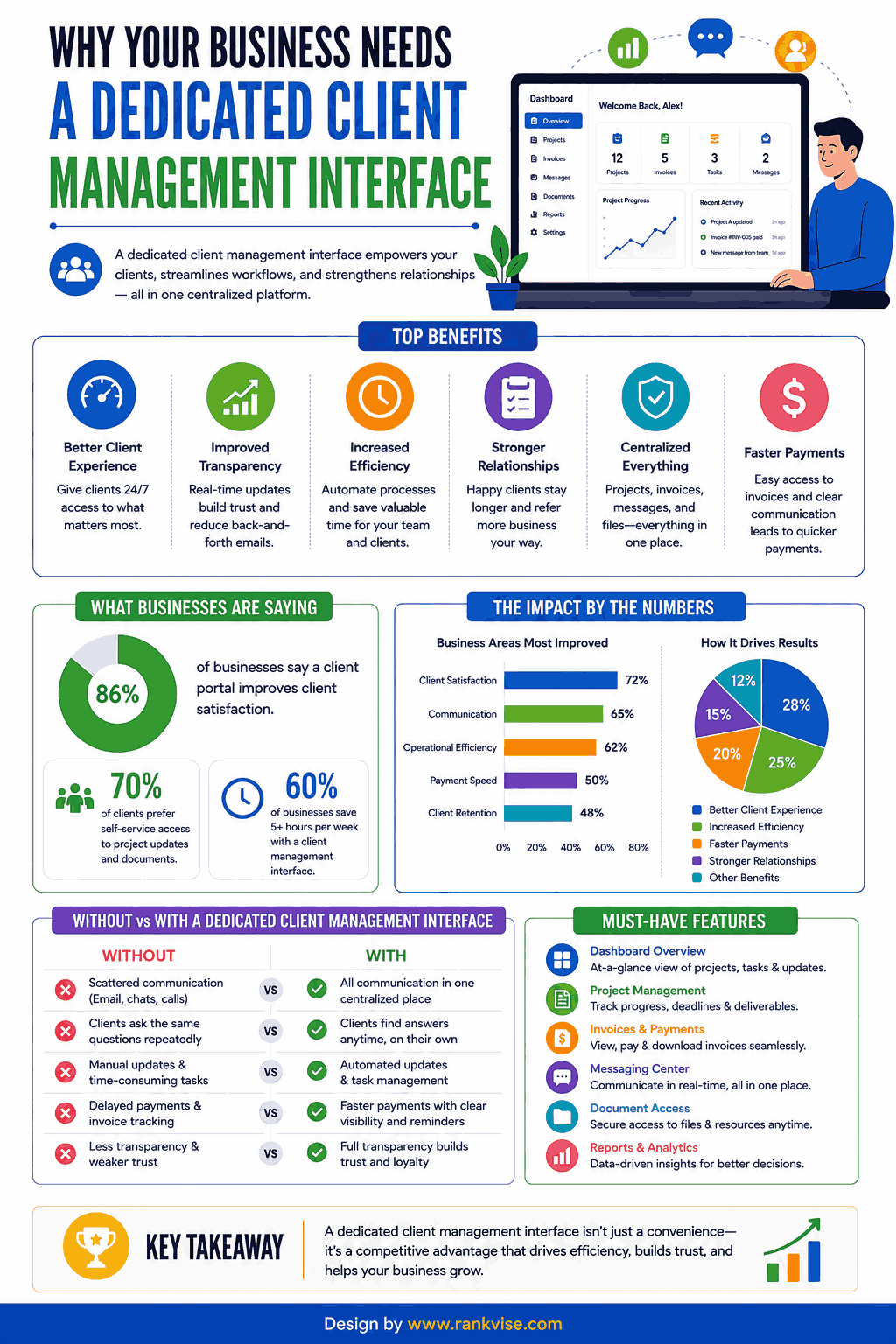
Growing businesses reach a tipping point where manual client tracking breaks down. Missed follow-ups, duplicated efforts, and forgotten details erode trust with valuable accounts. A purpose-built client management interface prevents these failures systematically.
Core problems this interface solves:
- Lost communication threads between team members and clients
- Inconsistent service delivery across different account managers
- Delayed invoicing and payment follow-ups damaging cash flow
- Lack of visibility into client health scores and churn risk
- Inability to scale personalized service beyond a handful of accounts
Essential Features of a Strong Client Management Interface
Contact and Account Organization
Every client record should display complete relationship context at a glance. Contact details, company hierarchy, decision-makers, and engagement history belong in unified profiles. Tag-based segmentation enables teams to filter accounts by industry, value tier, or lifecycle stage.
Communication Tracking and Logging
The interface must capture every touchpoint automatically—emails, calls, meetings, and messages. Manual logging creates gaps that undermine relationship visibility over time. Automated syncing with email platforms and calendar tools ensures nothing slips through unnoticed.
Task and Workflow Automation
Repetitive client management tasks drain hours from high-value relationship work. Automated workflows trigger follow-up reminders, onboarding sequences, and renewal notifications without manual intervention. Teams spend less time on administration and more time delivering meaningful client outcomes.
Pipeline and Deal Management
Visual pipelines show exactly where each client opportunity stands in your process. Drag-and-drop interfaces let account managers update deal stages instantly during calls. Revenue forecasting becomes reliable when pipeline data stays current and accurate.
Reporting and Analytics Dashboard
Data-driven teams need real-time visibility into client satisfaction, revenue trends, and activity metrics. Customizable dashboards surface the KPIs that matter most to your specific business model. Exportable reports support executive presentations and strategic planning sessions.
Integration Capabilities
No client management interface operates in isolation from your broader tech stack. Seamless connections with accounting software, project management tools, and communication platforms eliminate double-entry. API access enables custom integrations for specialized business workflows.
How to Choose the Right Client Management Interface
Define Your Primary Use Case
Some businesses need heavy project tracking while others prioritize sales pipeline visibility. Identify whether relationship management, billing, or communication drives your primary requirement. This clarity prevents investing in bloated platforms that overwhelm your team.
Evaluate User Experience and Adoption Potential
The most powerful interface delivers zero value if your team refuses to use it. Prioritize clean, intuitive designs that require minimal training for daily users. Request trial periods and involve end-users in evaluation before committing financially.
Consider Scalability and Pricing Structure
Your client base will grow—choose an interface that scales without punishing success. Per-user pricing models suit small teams while enterprise plans serve larger organizations better. Calculate total cost of ownership including implementation, training, and integration expenses.
Assess Security and Compliance Standards
Client data carries significant legal responsibility under GDPR, CCPA, and industry regulations. Verify encryption standards, access controls, and data residency options before storing sensitive information. Compliance certifications like SOC 2 indicate mature security practices worth trusting.
Top Benefits of Implementing a Client Management Interface
Businesses adopting dedicated client management interfaces report measurable performance gains across multiple dimensions. Relationship visibility improves immediately while long-term benefits compound over time.
- Retention improvements of 15-27% through proactive engagement triggered by health score monitoring
- Revenue per account increases when teams identify upsell opportunities through complete interaction history
- Response times drop by 40-60% when all client context lives in one searchable location
- Team onboarding accelerates because new hires access full relationship history from day one
- Client satisfaction scores rise when consistent service delivery replaces fragmented handoffs
Common Mistakes When Implementing Client Management Tools
Overcomplicating the Setup
Teams that configure every possible field and automation before launch often stall adoption entirely. Start with core features your team needs daily and expand gradually. Complexity should grow alongside team comfort and genuine workflow demands.
Neglecting Data Migration Quality
Importing messy data from legacy systems poisons your new interface from the beginning. Clean, deduplicate, and validate records before migration rather than inheriting years of accumulated errors. Invest time upfront to ensure your foundation supports reliable insights.
Ignoring Mobile Accessibility
Account managers meeting clients in the field need full interface access from mobile devices. Choose platforms with native mobile apps rather than poorly optimized browser-based alternatives. Mobile functionality ensures real-time updates regardless of location.
Client Management Interface vs. Traditional CRM
While traditional CRM platforms focus primarily on sales pipeline progression, a modern client management interface encompasses the entire relationship lifecycle. Post-sale account management, service delivery tracking, and renewal workflows receive equal emphasis alongside acquisition.
This broader scope suits businesses where client retention matters more than constant new acquisition. Agencies, consultancies, and service providers benefit most from interfaces designed around ongoing relationship depth rather than transactional volume alone.
FAQs
A centralized digital workspace that organizes all client data, communications, tasks, and billing into one accessible platform for relationship management.
Pricing ranges from free basic plans to 150 USD per user monthly for enterprise solutions, depending on features and team size.
Yes—small businesses gain the most from eliminating scattered tools and centralizing client data before disorganization becomes
A client management interface covers the full relationship lifecycle including service delivery, while traditional CRMs focus primarily on sales pipeline tracking.
Basic implementation takes one to two weeks, while complex migrations with custom integrations may require four to eight weeks for full deployment.