A sales manager asks an AI assistant, “Which deals over ₹10 lakh have gone quiet for two weeks?”
- Enable AI assistants to access CRM, analytics, SEO, and workflow tools so teams ask plain-language questions, automate tasks, and combine data for insights.
- Prioritize official, vendor-maintained MCP servers, begin with read-only access, and add least-privilege write permissions after testing.
- Treat MCP integrations as sensitive: involve IT, use OAuth, test in sandboxes, monitor costs, and keep humans approving critical actions.
A year ago, the assistant could only guess. Today, connected to the CRM through an MCP server, it pulls the real deals, checks the last activity, and drafts follow-up emails for each one.
That is the promise of the Model Context Protocol (MCP). It lets AI tools like Claude, ChatGPT, and Cursor work with your real business apps instead of working blind.
This guide explains what MCP servers are, the best MCP servers for business, sales, and marketing, how teams use them, and how to connect them safely.
What Is an MCP Server?
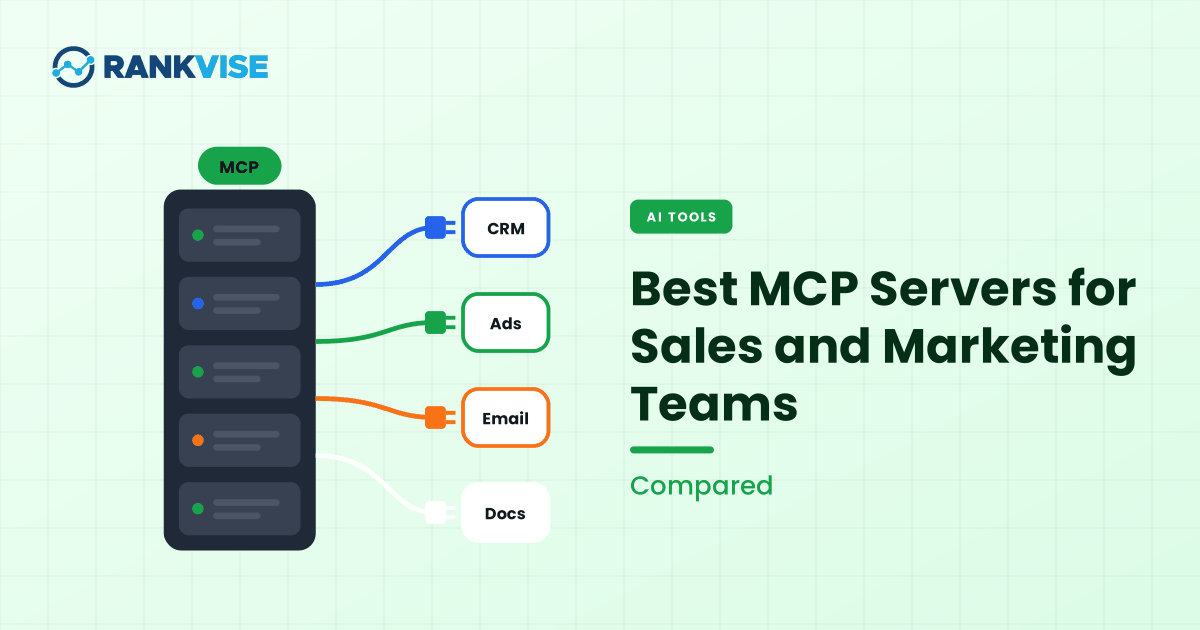
The Model Context Protocol is an open standard that lets AI assistants connect to outside tools and data. An MCP server is the connector for one app or service.
Think of it like a universal adapter. Instead of every AI tool building a custom integration for every app, the app offers one MCP server. Any compatible AI assistant can then use it.
With an MCP server, an AI assistant can:
- Read data, such as CRM deals, analytics reports, or keyword rankings.
- Take actions, such as creating a contact, drafting an email, or updating a task.
- Combine data across tools, such as matching ad spend with CRM revenue.
Why MCP Matters for Sales and Marketing
Sales and marketing teams use many tools. Data lives in the CRM, analytics, ad platforms, SEO tools, email, and documents.
MCP servers help teams:
- Ask questions in plain language instead of building reports.
- Save time on copying data between tools.
- Automate routine work, such as logging calls and updating records.
- Get faster insights by combining data from several sources.
- Keep work inside approved tools with proper permissions.
How We Grouped the Best MCP Servers
The list below groups servers by business function. We prioritised official, vendor-maintained servers where they exist. Features and pricing change quickly, so check each vendor’s documentation before connecting.
Best MCP Servers for Sales Teams
1. HubSpot MCP
HubSpot offers an official remote MCP server. It lets AI assistants read and write CRM records such as contacts, companies, deals, tickets, and engagements.
Best for: Pipeline reviews, deal summaries, contact updates, and follow-up drafts.
Watch out for: Write access changes live CRM data. Reviews also note limits around custom objects.
2. Salesforce MCP
Salesforce offers a hosted MCP option that exposes approved actions, flows, and queries to AI agents under user permissions.
Best for: Enterprises that want AI agents to work inside existing Salesforce rules.
Watch out for: Setup is admin-heavy, and access depends on your Salesforce edition.
3. Apollo.io MCP
Apollo’s MCP server connects AI assistants to prospect search, enrichment, sequences, and deals.
Best for: Building prospect lists, enriching leads, and managing outreach sequences.
Watch out for: Many actions use credits, so monitor usage.
4. Calendar and Meeting Tools
MCP servers for tools like Google Calendar, Calendly, and meeting recorders such as Fathom or Zoom help with scheduling and call notes.
Best for: Preparing for calls, summarising meetings, and booking follow-ups.
Best MCP Servers for Marketing Teams
5. Ahrefs MCP
Ahrefs runs an official remote MCP server with dozens of tools for keyword research, backlinks, rank tracking, site audits, and batch analysis.
Best for: SEO research, competitor analysis, and content planning through AI.
Watch out for: It requires a paid plan from Lite upward, and calls use API units.
6. Semrush MCP
Semrush offers an official MCP server for keyword, domain, and competitive research data.
Best for: Agencies already using Semrush who want AI-driven research and reporting.
Watch out for: Usage draws from API units, and heavy pulls can exhaust them.
7. Google Analytics MCP
Google’s analytics team maintains an open-source MCP server for GA4. It offers read-only access to reports, dimensions, and real-time data.
Best for: Asking questions like “Which landing pages drove the most conversions last month?”
Watch out for: Setup is technical, using Google Cloud credentials.
8. Ad Platform MCP Servers
Microsoft Advertising has a first-party, read-only MCP pilot for campaign audits. For Meta Ads, the popular options are third-party servers.
Best for: Auditing campaigns and spotting wasted spend.
Watch out for: Any server with write access to an ad account can spend real money. Test carefully.
9. Adobe Marketo Engage MCP
Adobe offers a Marketo Engage MCP server, reported as being in open beta, with tools for programs, forms, smart lists, and leads.
Best for: Enterprise marketing operations teams.
Best MCP Servers for Workflow and Productivity
10. Zapier MCP
Zapier’s MCP server connects AI assistants to thousands of apps through one connection.
Best for: Teams using many smaller apps without their own MCP servers.
Watch out for: Tool calls use Zapier tasks, which can consume plan limits quickly.
11. Make MCP
Make lets teams expose automation scenarios as tools an AI can run.
Best for: Running proven, repeatable workflows, such as publishing a blog draft to WordPress or adding a lead to a sheet.
12. Notion MCP
Notion offers an official hosted MCP server for reading and writing pages and databases.
Best for: Content calendars, campaign briefs, meeting notes, and knowledge bases.
13. Email, Docs, and Design Tools
MCP servers or connectors exist for tools such as Gmail, Google Drive, Slack, Canva, and Figma. They help AI assistants draft emails, find documents, and create design drafts.
Quick Comparison Table
| MCP server | Main use | Typical access | Risk level |
|---|---|---|---|
| HubSpot | CRM records and deals | Read and write | Medium |
| Salesforce | Enterprise CRM actions | Read and write | Medium |
| Apollo.io | Prospecting and sequences | Read and write | Medium |
| Ahrefs | SEO research | Read | Low |
| Semrush | SEO and competitive research | Read | Low |
| Google Analytics | GA4 reporting | Read-only | Low |
| Microsoft Advertising | Campaign audits | Read-only pilot | Low |
| Meta Ads (third-party) | Campaign management | Read and write | High |
| Zapier | Multi-app actions | Varies | Medium to high |
| Make | Run saved automations | Varies | Medium |
| Notion | Docs and databases | Read and write | Medium |
Risk level reflects what a mistake could cost, such as wrong CRM updates or unplanned ad spend.
Real Use Cases for Sales and Marketing Teams
Weekly Pipeline Review
Ask the AI to list deals with no activity in 14 days, summarise each one, and draft a follow-up. A rep reviews and sends.
SEO Content Planning
Combine Ahrefs or Semrush data with Search Console to find keywords where you rank 5 to 15. Ask the AI to suggest content updates.
Campaign Performance Summary
Pull GA4 conversions and ad platform spend into one summary. Ask for the top three wins and top three problems.
Lead Research Before Calls
Use Apollo and the CRM to summarise a prospect’s company, role, and past interactions before a discovery call.
Content Publishing Workflow
Draft a blog with AI, then use a Make or Zapier MCP tool to create a WordPress draft with SEO fields filled in.
How to Choose the Right MCP Servers
- Start with your core systems. Usually the CRM and analytics.
- Prefer official servers. Vendor-maintained servers tend to be more secure and stable.
- Start read-only. Add write access once your team trusts the workflows.
- Check costs. Many servers use API units, credits, or tasks.
- Check your AI client. Make sure your AI assistant supports remote MCP servers.
- Involve IT early, especially for customer data.
Security and Governance: Do Not Skip This
MCP servers connect AI to real business data. Treat them like any other integration.
- Use least-privilege access. Give the AI only the permissions it needs.
- Prefer OAuth over shared API keys where possible.
- Keep a human in the loop for actions that send emails, spend money, or change records.
- Test on sandboxes or test accounts before connecting live systems.
- Review third-party servers carefully. Check who maintains them and what data they access.
- Watch for prompt injection. Data from emails, web pages, or documents can contain hidden instructions. Treat tool output as data, not commands.
- Follow data protection rules, such as GDPR and India’s DPDP Act, for personal data.
Common Mistakes When Adding MCP Servers
- Connecting too many tools at once, which confuses workflows.
- Giving full write access on day one.
- Ignoring usage costs, such as API units and tasks.
- Trusting AI summaries without checking the source data.
- Using unknown third-party servers for sensitive systems.
- Skipping training, so teams do not know what the AI can and cannot do.
Real-World Example: A Small Agency Connects Its Stack
Consider a digital marketing consultant who manages SEO and ads for several clients.
He connected four tools to his AI assistant: Ahrefs for SEO data, Google Analytics for performance, Notion for client briefs, and Make for publishing blog drafts to WordPress.
Now a typical request looks like this: “Find keywords where the client ranks 6 to 15, check last month’s GA4 conversions for those pages, and draft three content update briefs in Notion.”
The work that once took half a day now takes under an hour, with the consultant reviewing every output before it reaches the client.
Conclusion: Start Small, Connect What Matters
The best MCP servers for business, sales, and marketing are the ones connected to your most important data. For most teams, that means the CRM, analytics, SEO tools, and a workflow tool like Make or Zapier.
Start with official servers, begin with read-only access, and keep people in charge of actions that affect customers or budgets. As trust grows, expand to more tools and more automated workflows.
MCP will not replace your team. It will give them faster answers and more time for the work that needs human judgment.
FAQs
What is an MCP server in simple terms?
It is a connector that lets AI assistants securely read data from, and act inside, a specific business app.
Which MCP servers are best for sales teams?
HubSpot, Salesforce, and Apollo.io are strong choices for CRM, pipeline, and prospecting work.
Which MCP servers are best for marketing teams?
Ahrefs, Semrush, Google Analytics, Notion, and workflow tools like Make or Zapier are popular choices.
Are MCP servers safe for business data?
They can be, with official servers, OAuth, least-privilege access, and human approval for important actions.
Do MCP servers cost extra?
Some are free, but many use API units, credits, or tasks from your existing plan. Check each vendor.