Skip to content
Online learning has transformed how organizations train employees and educate students. At the center of this shift sits Moodle, the world’s most widely used open-source learning management system. But what exactly is Moodle development, and why does it matter?
- Moodle development customizes and extends the LMS beyond installation to meet specific learning objectives and workflows.
- Common development areas include plugins, themes, integrations, mobile apps, and performance optimization for scale.
- Custom plugins and themes enable branding, accessibility, mobile-first design, and tailored learner experiences.
- Integrations connect Moodle to HR, CRM, video tools, SSO, authoring tools, and payment gateways to reduce manual work.
- Choose partners with Moodle experience, community contributions, QA processes, and knowledge of eLearning standards and security.
This guide explains everything you need to know about Moodle development. You will learn what it involves, why organizations invest in it, and how to approach it strategically. Whether you run a corporate training program or manage an academic institution, this is your blueprint for smarter eLearning.
What Is Moodle and Why Is It So Popular?
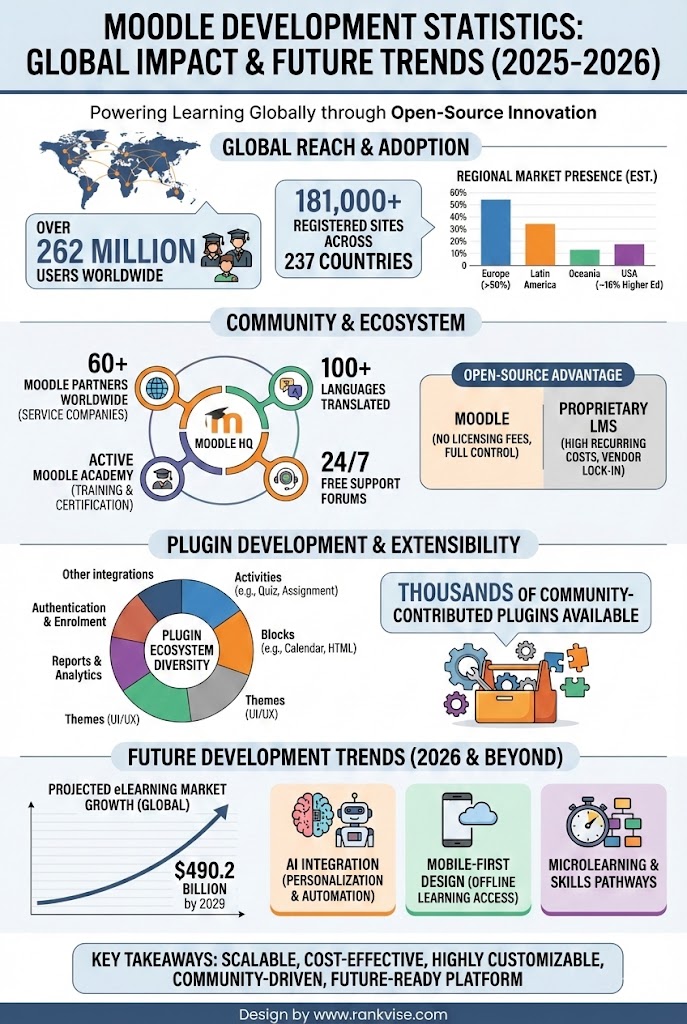
Moodle stands for Modular Object-Oriented Dynamic Learning Environment. It is a free, open-source learning management system used by over 400 million people worldwide. Schools, universities, corporations, and government agencies rely on it daily.
The platform’s popularity comes from three key strengths. First, it costs nothing to download and install. Second, its open-source nature allows unlimited customization. Third, a massive global community continuously improves and supports it.
From small training academies to Fortune 500 companies, organizations choose Moodle because it scales affordably. You control your data, your features, and your user experience without vendor lock-in.
What Does Moodle Development Actually Mean?
Moodle development refers to the process of building, customizing, and extending Moodle’s core functionality. It goes far beyond installing the software and uploading courses. True development transforms the platform to match your exact learning objectives.
This work typically falls into several categories:
- Creating custom Moodle plugins that add new features or integrations
- Designing and building custom Moodle themes to match brand identity
- Developing bespoke reports and analytics dashboards
- Integrating Moodle with third-party tools like CRMs, HR systems, or video platforms
- Building mobile applications that connect to the Moodle backend
- Optimizing performance for large user bases and high traffic loads
Developers use PHP, JavaScript, HTML, CSS, and MySQL to work within Moodle’s architecture. Understanding Moodle’s plugin API and coding standards is essential for quality results.
Core Components of Moodle Development
Effective Moodle development touches multiple layers of the platform. Understanding these components helps you scope projects accurately and communicate with developers clearly.
Moodle development involves a strategic combination of technical customization, user experience optimization, and system integration to create a scalable and efficient eLearning environment. From plugin development to theme customization and third-party integrations, each layer plays a crucial role in delivering a seamless learning experience. Professional moodle development services ensure your platform is secure, performance-optimized, and aligned with your business or educational goals.
Plugin Development
Plugins extend what Moodle can do. The official Moodle plugins directory contains over 2,000 community-built additions. However, organizations often need custom solutions that do not exist publicly.
Common plugin types include:
| Plugin Type | Purpose | Example Use Case |
|---|---|---|
| Activity modules | Add new learning activities | Custom quiz formats, simulations |
| Blocks | Display information on course pages | Personalized dashboards, progress trackers |
| Authentication | Control how users log in | Single sign-on with corporate systems |
| Enrolment | Manage course access | Automated enrolment from HR databases |
| Reports | Generate custom analytics | Compliance tracking, skill gap analysis |
| Themes | Change visual appearance | Branded interfaces, accessibility improvements |
Skilled Moodle developers build plugins that integrate seamlessly with core updates. This ensures your customizations survive version upgrades without breaking.
Theme Development
Your Moodle site’s look and feel directly impacts learner engagement. Custom Moodle themes go beyond colors and logos. They restructure navigation, improve mobile responsiveness, and enhance accessibility compliance.
Modern theme development follows a mobile-first approach. With learners increasingly accessing courses from smartphones and tablets, responsive design is non-negotiable. Themes also need to meet WCAG 2.1 accessibility standards for inclusive learning.
A well-designed theme reduces cognitive load. Learners find content faster, complete courses more efficiently, and return more often.
Integration Development
Moodle rarely operates in isolation. Organizations need it connected to their existing technology ecosystem. Integration development makes this happen.
Common integrations include:
- HR systems for automated user provisioning and role assignment
- Customer relationship management platforms for sales-driven training programs
- Video conferencing tools like Zoom, Microsoft Teams, and BigBlueButton
- Content authoring tools such as Articulate, Adobe Captivate, and H5P
- Single sign-on systems using SAML, OAuth, or LDAP protocols
- Payment gateways for selling courses directly through Moodle
Well-built integrations eliminate manual data entry and reduce administrative overhead. They create a seamless experience where learners move between systems without friction.
Why Organizations Invest in Custom Moodle Development
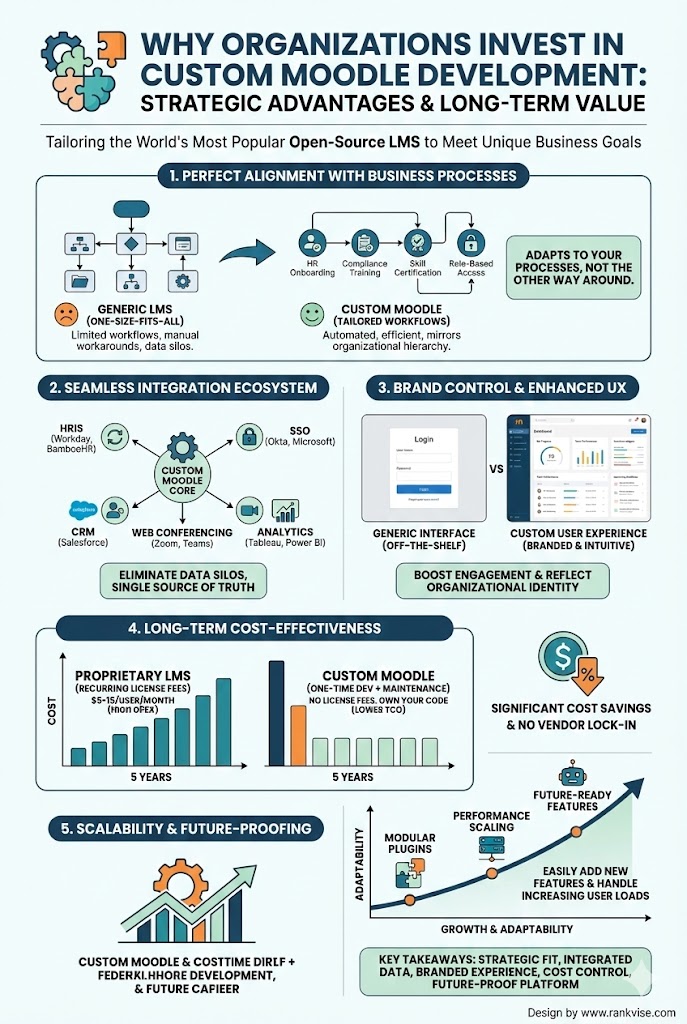
Off-the-shelf Moodle installations serve basic needs. But growing organizations quickly hit limitations. Custom development solves problems that generic setups cannot address.
Unique workflow requirements drive many projects. A pharmaceutical company might need custom compliance tracking. A franchise network might require territory-based course assignments. These needs demand tailored solutions.
Brand consistency matters for learner trust. A generic Moodle interface feels disconnected from your corporate identity. Custom themes align the learning experience with your broader brand presence.
Competitive differentiation separates leading training providers from the rest. Unique features, gamification elements, and personalized learning paths attract and retain learners.
Scalability concerns push organizations toward optimization. A site serving 50,000 concurrent users requires different architecture than one serving 500. Custom development ensures performance at scale.
Data and analytics need often exceed standard reporting. Executives want dashboards showing training ROI. Compliance officers need audit trails. Custom reports deliver exactly what stakeholders require.
Key Trends Shaping Moodle Development
The eLearning platform development landscape evolves rapidly. Staying current with trends ensures your investment delivers long-term value.
AI-Driven Personalization
Artificial intelligence is transforming how learners interact with Moodle. AI-powered analytics identify struggling students before they fail. Adaptive learning paths adjust content difficulty based on individual performance.
Moodle’s plugin ecosystem now includes AI tools for content recommendations, automated feedback, and predictive analytics. Organizations that leverage these capabilities see improved completion rates and learning outcomes.
Mobile-First Development
Mobile learning is no longer optional. The majority of learners access content from smartphones at least some of the time. Moodle development now prioritizes mobile experiences as the primary design target.
Progressive web applications and native mobile apps built on Moodle’s web services API deliver smooth offline-capable experiences. Learners complete modules during commutes, breaks, and downtime.
Microlearning Module Design
Attention spans are shrinking. Long-form courses struggle to maintain engagement. Microlearning breaks content into focused segments of five to ten minutes each.
Moodle developers now build course structures optimized for bite-sized consumption. Custom activity plugins support quick knowledge checks, flashcard reviews, and scenario-based micro-simulations.
Enhanced Accessibility
Regulatory requirements and social responsibility push accessibility to the forefront. Moodle development now routinely includes screen reader optimization, keyboard navigation, and color contrast compliance.
Custom themes undergo accessibility audits before deployment. Activity plugins include alternative content formats for learners with different needs.
How to Choose the Right Moodle Development Partner
Not all developers understand Moodle’s architecture deeply. Choosing the wrong partner leads to buggy code, upgrade headaches, and security vulnerabilities.
Look for these qualities when evaluating potential partners:
- Proven experience with Moodle-specific projects, not just general PHP development
- Contributions to the Moodle community through plugins, forums, or documentation
- Understanding of Moodle’s coding standards and plugin API
- Portfolio of successful implementations at organizations similar to yours
- Clear process for testing, quality assurance, and post-launch support
- Knowledge of eLearning standards like SCORM, xAPI, and LTI
Ask for references from past clients. Speak with their technical teams about code quality, communication, and problem-solving during the project.
Common Challenges in Moodle Development
Every Moodle project encounters obstacles. Anticipating these challenges helps you plan realistic timelines and budgets.
Upgrade compatibility concerns many organizations. Moodle releases major updates annually. Custom code must be maintained to work with new versions. Budget for ongoing maintenance, not just initial development.
Performance optimization becomes critical at scale. Database queries that work fine for 100 users may crash under 10,000. Experienced developers build with scalability in mind from day one.
Security vulnerabilities in custom code can expose learner data. Insist on security audits and penetration testing before launching any custom plugin or integration.
Scope creep derails timelines and budgets. Define requirements thoroughly before development begins. Use agile methodologies to manage changes without losing control.
Getting Started With Your Moodle Development Project
Starting a Moodle customization project requires clear planning. Follow these steps to set yourself up for success.
- Define your learning objectives and how Moodle should support them.
- Audit your current Moodle setup to identify gaps and pain points.
- Research existing plugins that might meet your needs before building custom solutions.
- Document detailed requirements for any custom development work.
- Evaluate and select a qualified Moodle development partner.
- Plan for testing, training, and change management alongside technical delivery.
- Budget for ongoing maintenance and future enhancements.
Successful projects balance ambition with pragmatism. Start with high-impact, achievable improvements before tackling complex customizations.
FAQs
Costs vary widely based on complexity. Simple plugins may cost 2,000 to 5,000 USD, while enterprise integrations can exceed 50,000 USD.
Basic customizations use Moodle’s built-in settings. However, true plugin development requires PHP, JavaScript, and database knowledge.
Simple projects take two to four weeks. Complex enterprise implementations may require three to six months or longer.
Absolutely. Many Fortune 500 companies use customized Moodle installations for employee onboarding, compliance training, and professional development.
Moodle is built primarily with PHP. Developers also use JavaScript, HTML, CSS, and MySQL for themes, front-end features, and database work.