Skip to content
Every second counts on the internet. According to Google, 53% of mobile users abandon a site that takes longer than three seconds to load. Now imagine your website just went through a deployment or server restart. The stored data that kept pages loading quickly is gone. Your next visitor hits a blank slate, and the server scrambles to rebuild everything from scratch.
- Automate warmup cache requests after deployments to pre-render and store priority pages for instant serving.
- Warm only high-impact URLs (top 20% traffic) to avoid wasted resources and speed up critical pages.
- Rate limit and stagger warmup requests to prevent origin overload and thundering herd failures.
- Measure cache hit ratio, TTFB, and origin load to validate effectiveness and adjust warming strategy.
This is exactly the problem a warmup cache request solves. It tells your server to prepare content before any real visitor arrives. Think of it as opening a restaurant and prepping the kitchen before the first customer walks through the door. No one wants to wait while the chef figures out the menu.
This guide explains what a warmup cache request is, why it matters for your business, and how to implement one without overcomplicating your workflow.
What Exactly Is a Warmup Cache Request?
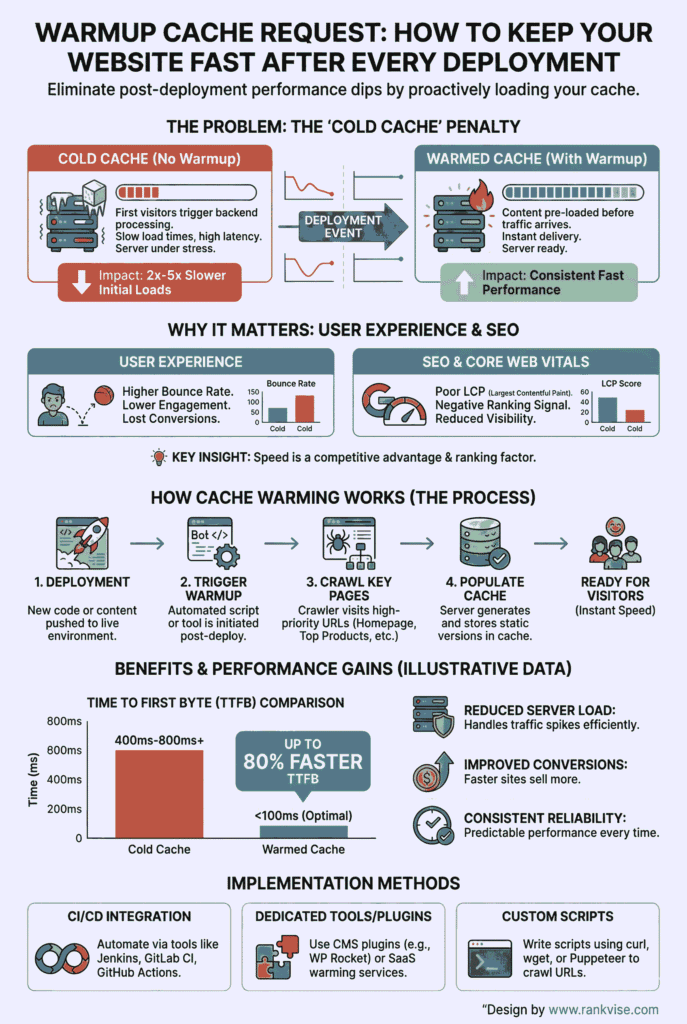
A warmup cache request is an automated signal sent to your server or content delivery network after a deployment, restart, or cache purge. Its purpose is simple: load your most important pages into temporary storage so they are ready to serve instantly.
Without this step, the first visitors after a deployment experience what engineers call “cold start latency.” The server has to query the database, render the page, and build the response from zero. That process can take anywhere from 500 milliseconds to over two seconds, depending on page complexity.
A warmup cache request eliminates that delay. It simulates a visitor hitting your key pages so the server generates and stores the content ahead of time. When real users arrive, they get a fast, pre-built response instead of waiting in line behind a cold server.
Why Cache Warming Matters More Than You Think
Cache preloading is not just a technical nicety. It directly affects revenue, search rankings, and infrastructure costs. Understanding these three areas helps justify the effort.
Revenue and User Experience
Akamai research found that a 100-millisecond delay in load time can reduce conversion rates by up to 7%. For an e-commerce site generating 100,000 USD per day, that translates to 7,000 USD in daily lost revenue from a single slow page load.
When you implement a warmup cache request strategy, your highest-traffic pages remain responsive even during deployments. Visitors experience consistent speed. Bounce rates stay low. Conversion funnels stay intact.
Search Engine Optimization
Google’s Core Web Vitals are now established ranking signals. Two metrics are directly improved by cache warming.
| Metric | Without Cache Warming | With Warmup Cache Request |
|---|---|---|
| Time to First Byte (TTFB) | 500ms – 2,000ms+ | Under 50ms |
| Largest Contentful Paint (LCP) | Delayed rendering | Near-instant delivery |
| Crawl Efficiency | Bots wait on slow responses | Bots index more pages per visit |
When search engine crawlers encounter a fast, responsive server, they index more pages within the allocated crawl budget. According to a Moz analysis, improving TTFB by even 200 milliseconds can positively influence crawl frequency. A well-executed cache warming strategy keeps your site competitive in search results.
Infrastructure Protection
Without cache warming, a deployment followed by a traffic spike creates what is known as the “thundering herd” problem. Thousands of users simultaneously request uncached pages. Every request hits the origin database. CPU usage spikes. The server can crash.
A warmup cache request absorbs that shock. It pre-fills the cache layer so incoming traffic is served from memory, not from live database queries. This reduces server load, prevents outages, and lowers compute costs.
How a Warmup Cache Request Actually Works
The process follows a straightforward sequence. After a deployment or cache flush, an automated script sends HTTP requests to your most critical URLs. The server processes each request, generates the page, and stores the result in the cache layer.
That cache layer might be a CDN edge node, an application-level store like Redis or Memcached, or a reverse proxy like Varnish. The key point is that the data moves from the slow origin database into fast, temporary storage.
Here is a simplified view of the workflow:
- New code deploys to production.
- The old cache is invalidated or purged.
- An automated warmup script sends requests to priority URLs.
- The server renders each page and stores the output in cache.
- Real user traffic arrives and gets served from the warm cache instantly.
The entire process can complete in seconds or minutes, depending on the number of URLs and the server’s capacity.
Which Pages Should You Warm Up First?
Not every page on your website needs a warmup cache request. Warming everything wastes server resources and can actually slow down the process. The smarter approach is to focus on what matters most.
Use your analytics platform to identify your high-impact pages. These typically include your homepage and primary landing pages, top product or service category pages, the 20 to 50 most-visited blog posts or articles, and any critical API endpoints that power dynamic content.
According to the Pareto principle observed across most web traffic patterns, roughly 20% of your pages generate 80% of your traffic. Focus your cache warming efforts on that 20%. Everything else can warm naturally as users visit.
Types of Cache You Can Warm
Different layers of your technology stack require different warming approaches. Understanding these distinctions helps you target the right level.
A CDN cache sits at edge servers distributed globally. Warming it means sending requests from multiple geographic locations so each edge node stores a local copy. Providers like Cloudflare, Akamai, and Fastly offer built-in tools to simplify this CDN cache warmup process.
An application cache uses tools like Redis or Memcached to store frequently queried database results in memory. Warming this layer requires scripts that trigger the same database queries your application would normally run on a page load.
A reverse proxy cache, such as Varnish or Nginx, sits between users and your application server. It stores full HTTP responses. Warming it means requesting each URL so the proxy captures and holds the rendered output.
Each layer serves a different function, but together they form a comprehensive cache preloading strategy.
Advanced Strategies Used by High-Traffic Sites
Enterprises handling millions of daily visitors take cache warming beyond basic scripting. Three advanced techniques stand out.
Tiered Edge Caching
Cloudflare’s Tiered Cache architecture checks an upper-tier node before reaching the origin server. If a lower-tier edge misses, it asks a centralized hot cache first. This reduces the total number of warmup requests needed because one warm upper tier serves many lower-tier nodes.
Predictive Pre-Fetching
Akamai’s Prefresh feature refreshes cached content just before its expiration. If a page has a 10-minute cache lifetime, the system dispatches a background warmup cache request at the 9-minute mark. Users always get served from cache. There is never a gap.
Request Collapsing
Fastly uses request collapsing to handle simultaneous cold-cache requests for the same resource. If 50 users request the same uncached page, Fastly sends only one request to the origin and queues the others. This acts as a real-time warmup and prevents origin overload.
How to Integrate Cache Warming Into Your Deployment Pipeline
The most reliable approach ties your warmup cache request directly into your CI/CD pipeline. Manual warming is error-prone and easy to forget. Automation guarantees consistency.
Your deployment script should follow this sequence: deploy the new code, flush or invalidate the old cache, immediately execute the warmup script targeting priority URLs, and only route live traffic to the new instance after warming completes.
This approach, sometimes called “blue-green deployment with cache priming,” ensures that no user ever encounters a cold server. According to AWS best practices documentation, pre-warming load balancers and caches before traffic cutover is recommended for any production deployment handling significant user volume.
Rate limiting your warmup requests is essential. Firing hundreds of simultaneous requests can overwhelm your origin server, effectively creating the same problem you are trying to prevent. Space requests 50 to 200 milliseconds apart, depending on your server’s capacity.
Measuring Whether Your Warmup Strategy Works
You cannot improve what you do not measure. Three metrics tell you whether your warmup cache request strategy is performing.
Cache hit ratio is the most important indicator. A healthy site should maintain a ratio above 90% even immediately after deployments. If it drops below that threshold, your warmup script may be targeting the wrong URLs.
Time to first byte measures how quickly the server sends the first byte of a response. After a successful warmup, TTFB for warmed pages should stay under 100 milliseconds. Tools like Google PageSpeed Insights, WebPageTest, and your CDN’s built-in analytics dashboard all report this metric.
Origin load during deployment should remain stable. If CPU or memory usage spikes sharply during the warmup phase, reduce the concurrency of your warmup requests or stagger them over a longer period.
Common Mistakes That Undermine Cache Warming
Even well-intentioned cache warming strategies can backfire. Three pitfalls appear more often than any others.
The first is warming too many pages. Sending warmup requests for every URL on a 50,000-page site wastes compute resources and delays the warming of pages that actually matter. Stay focused on your working set of high-traffic content.
The second is ignoring security. If your warmup script hits publicly accessible endpoints without authentication, bad actors could potentially discover and abuse those URLs. Run warmup scripts over an internal network or protect them with token-based authentication.
The third is skipping cache invalidation logic. Warming stale content is worse than not warming at all. Make sure your deployment pipeline purges old cache entries before the warmup script runs. Otherwise, users may see outdated content served confidently and quickly, which creates a different kind of problem.
Warmup Cache Request Compared to Other Speed Optimizations
Cache warming works alongside other performance techniques, not as a replacement. Here is how it compares.
| Technique | What It Targets | When It Acts | Primary Benefit |
|---|---|---|---|
| Warmup cache request | Server and database latency | Before user arrival | Eliminates first-request delay |
| Image optimization | File size and bandwidth | On upload or request | Reduces download time |
| Code minification | JavaScript and CSS parsing | At build time | Speeds up browser rendering |
| Lazy loading | Below-the-fold assets | During user scroll | Reduces initial page weight |
A warmup cache request handles the server side of performance. Image optimization and minification handle the client side. A complete website performance optimization strategy uses all of these together.
FAQs
It pre-loads your most important pages into cache after a deployment or restart so visitors get instant responses instead of slow, first-time server renders.
Run them after every deployment, cache purge, or server restart. For content with short expiration times, schedule recurring warmups just before cache entries expire.
Yes, if done without rate limiting. Sending too many simultaneous warmup requests can overload your origin server. Always stagger requests and monitor CPU usage during the process.
Cloudflare offers Tiered Cache and Cache Reserve, Akamai provides Prefresh for predictive warming, and Fastly uses request collapsing to handle cold-cache traffic efficiently.
Monitor your cache hit ratio, time to first byte, and origin server load after deployments. A hit ratio above 90% and TTFB under 100ms indicate effective warming.