Skip to content
Every time you open a browser, you face a quiet decision. Do you search Google or type a URL directly into the address bar? Most people never think twice about it. Yet the method you choose affects your speed, privacy, and overall browsing experience.
- Use Google search for exploration, comparisons, and local queries that need multiple sources or contextual results.
- Type a URL directly for fast, distraction-free access to known sites and routine tasks.
- Direct URL entry improves privacy by avoiding search-query logging and reduces exposure to malicious ads.
- Use bookmarks and HTTPS-only mode to combine speed, accuracy, and secure connections for frequent sites.
- Leverage the omnibox and keyboard shortcuts to switch intentionally between searching and direct navigation.
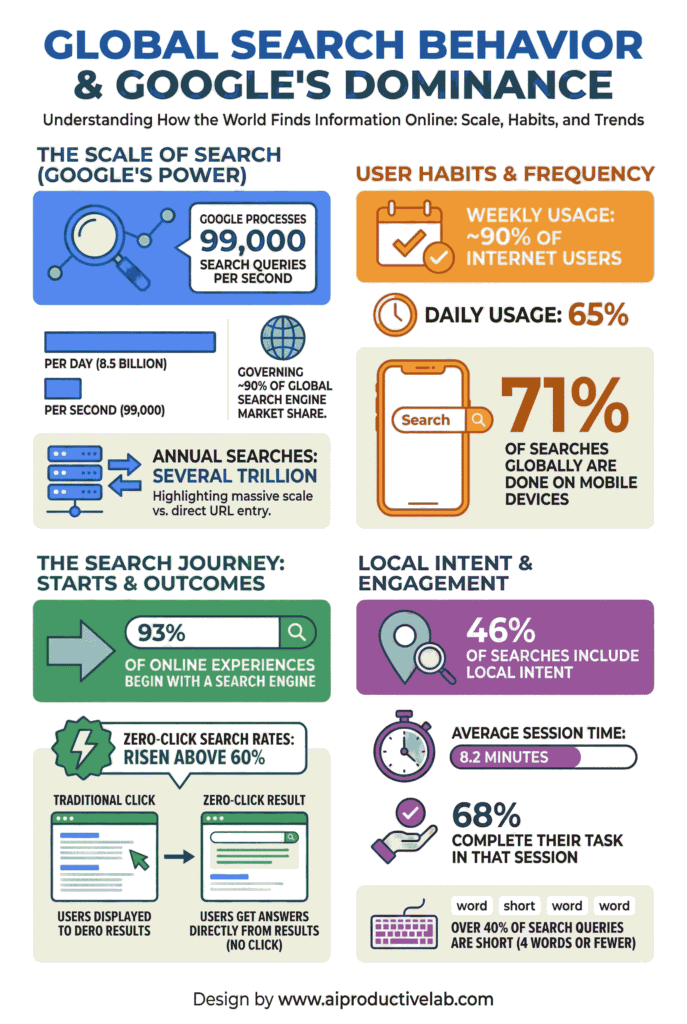
According to Statista, Google processes over 8.5 billion searches per day worldwide. At the same time, millions of users bypass search entirely by typing web addresses directly. Understanding the difference between these two actions helps you browse the internet with more confidence and efficiency.
This guide breaks down both methods, explains when each one works best, and gives you practical tips to navigate the web like a pro.
What Happens When You Search Google or Type a URL
Your browser’s address bar serves a dual purpose. It works as both a google search bar and a direct navigation tool. Google Chrome calls this the omnibox because it combines search and URL entry into one field.
When you type a full web address like “www.example.com,” your browser sends a DNS request. That request translates the domain name into an IP address and connects you directly to the website’s server. No search engine is involved.
When you type a phrase or question instead, your browser recognizes it as a search query. It routes your input through your default search engine, usually Google, and returns a list of ranked results. According to Google’s own documentation, their algorithm evaluates over 200 ranking factors to deliver the most relevant pages within milliseconds.
The distinction matters because each path creates a different browsing experience. One is direct and immediate. The other is exploratory and research-oriented.
How Google Search Actually Works Behind the Scenes
Google search is far more than a simple text-matching tool. When you enter a query, Google’s crawlers have already indexed billions of web pages. The algorithm then ranks those pages based on relevance, authority, user experience signals, and hundreds of other criteria.
Here is what happens in the background after you hit enter. Google parses your query for intent. It checks its index for matching content. It then applies ranking algorithms like BERT and MUM to understand context and meaning. Finally, it returns a results page complete with links, featured snippets, maps, images, and “People Also Ask” boxes.
According to a 2024 SparkToro study, roughly 58.5% of Google searches in the US result in zero clicks. This means Google often answers your question directly on the search results page. For users who want to explore or research topics, this makes the google search bar an incredibly powerful tool.
Why Typing a URL Directly Still Matters
Direct URL navigation is the fastest way to reach a website you already know. You skip the search engine results page entirely. There are no ads, no competing links, and no distractions. You land exactly where you intended.
This method is especially valuable for routine tasks. Checking your email, logging into your bank portal, or visiting your company dashboard are all situations where typing a web address saves time. According to the Nielsen Norman Group, reducing unnecessary steps in digital workflows improves task completion rates by up to 20%.
Direct URL entry also carries privacy advantages. When you type a web address into the browser address bar, you avoid sending query data to Google’s servers. For users who care about data tracking, this is a meaningful difference.
Search Google or Type a URL: A Side-by-Side Comparison
Understanding the strengths of each approach helps you make better choices daily.
| Feature | Google Search | Direct URL Typing |
|---|---|---|
| Speed to destination | Moderate (requires scanning results) | Fast (immediate connection) |
| Content discovery | Excellent | Limited |
| Privacy | Lower (queries tracked) | Higher (no search data shared) |
| Risk of malicious sites | Moderate (phishing ads possible) | Lower (if URL is correct) |
| Best for | Research, exploration, new topics | Known sites, routine tasks, secure access |
| Required knowledge | None (just type your question) | Must know the exact web address |
This comparison shows that neither method is universally better. The right choice depends on what you are trying to accomplish.
When You Should Use Google Search
Google search is the better option in several common scenarios. Use it when you do not know the exact website you need. Use it when researching a topic that requires multiple sources. And use it when you want to compare products, services, or information across different sites.
For example, searching “best project management tools 2026” returns articles, reviews, comparison tables, and expert opinions all on one page. You could not get this breadth of information by typing a single URL.
Google search also excels when you need local results. Typing “coffee shops near me” into the google search bar triggers location-based results with maps, reviews, hours, and directions. This kind of contextual search is impossible through direct URL navigation.
Business owners should also note that roughly 46% of all Google searches have local intent, according to Search Engine Roundtable. If your customers are searching rather than typing URLs, your site needs to rank well.
When Typing a URL is the Smarter Choice
Direct URL typing wins when speed and certainty are your priorities. If you visit the same ten websites every day, memorizing or bookmarking their addresses eliminates unnecessary steps.
This method also reduces your exposure to phishing attacks. Cybercriminals frequently purchase ads on Google that mimic legitimate websites. According to Malwarebytes, malvertising incidents increased by 42% in 2023 alone. When you type a URL directly into your browser address bar, you avoid clicking on deceptive ads entirely.
Direct navigation is also the safer choice for sensitive transactions. Accessing your banking portal, healthcare account, or corporate intranet through a bookmarked or manually typed URL ensures you reach the authentic site. Security professionals consistently recommend this practice.
How the Google Chrome Omnibox Changed Everything
Modern browsers have blurred the line between searching and navigating. The Google Chrome omnibox, introduced in 2008, merged the search bar and the address bar into one unified field. Today, every major browser uses a similar approach.
The omnibox auto-detects whether your input is a search query or a URL. If you type something that looks like a web address, it navigates directly. If your input resembles a question or keyword phrase, it searches Google.
This design means most users never consciously choose between the two methods. However, understanding how to search on google versus how to type a web address gives you more control over your experience. You can be intentional about when you want exploration and when you want precision.
Privacy Tips for Both Methods
Regardless of which method you use, a few habits improve your privacy online.
Consider using a privacy-focused browser or enabling enhanced tracking protection. When you search Google, your queries are logged and associated with your account. According to Google’s own transparency report, they retain search data for up to 18 months by default.
When typing URLs, always verify the address before pressing enter. A single mistyped character can redirect you to a malicious lookalike site, a practice known as typosquatting. The Anti-Phishing Working Group reported over 1.3 million phishing attacks in the first quarter of 2024, many leveraging misspelled domains.
Using bookmarks for frequently visited sites combines the speed of direct URL entry with the accuracy of saved addresses. This simple practice eliminates both tracking and typo risks.
Practical Tips to Browse the Internet More Efficiently
Combine both methods strategically for the best experience. Here are actionable tips you can apply immediately.
- Use Google search for research, comparisons, and discovering new content you have never visited before.
- Bookmark your top 10 most-visited websites to skip search entirely for routine tasks.
- Enable HTTPS-only mode in your browser settings to ensure secure connections regardless of how you navigate.
- Use keyboard shortcuts like Ctrl+L (or Cmd+L on Mac) to jump straight to the address bar for direct URL navigation.
- Review your Google search history regularly and delete entries you want to keep private.
These small adjustments add up to a faster, safer, and more intentional browsing experience over time.
Conclusion: Which Method Should You Choose
There is no single right answer. The smartest approach uses both methods based on the situation. Search Google when you need to explore, discover, or compare. Type a URL when you know exactly where you want to go and want to get there quickly and securely.
The browser address bar gives you the power to do both. Understanding how each method works puts you in control of your time, your privacy, and your productivity online.
FAQs
It is the placeholder text in your browser’s address bar, inviting you to either enter a search query or type a specific web address to navigate directly to a site.
Yes. Typing a URL takes you directly to the website without loading search results first, making it faster when you already know the exact address.
Yes. When you use Google as your default search engine, queries entered in the address bar are logged. Use incognito mode or a privacy-focused search engine to limit tracking.
Absolutely. All major browsers like Chrome, Firefox, Safari, and Edge allow you to switch your default search engine in the settings menu to options like Bing, DuckDuckGo, or Brave Search.
The omnibox is Chrome’s combined address and search bar. It automatically detects whether your input is a URL or a search query and acts accordingly.