Skip to content
Salesforce platform events are powerful. They let systems talk to each other in real time without waiting around. But there is a hidden danger that catches even experienced IT admins off guard.
- Design for asynchronous behavior: decouple publishing from processing and build graceful retries and error handling into subscribers.
- Test and monitor at scale: use full sandboxes with production-like volumes and dashboards with alerts at 80% of limits.
- Make subscribers idempotent and secure: enforce deduplication, unique event IDs, OAuth/SSL, and least-privilege access.
It is called the platform event trap. This term describes a pattern of avoidable mistakes that lead to data loss, system outages, and production failures. According to Salesforce’s own documentation, organizations that misunderstand asynchronous processing account for a large share of event-related support cases.
The worst part? Everything works perfectly in development. Problems only surface when real users and real data volumes hit production. This guide explains what causes the platform event trap, how to spot early warning signs, and what proven strategies prevent it from derailing your Salesforce operations.
What Exactly Is a Platform Event Trap
A platform event trap occurs when teams deploy Salesforce platform events without fully understanding their asynchronous nature and built-in limitations. It is not a single mistake. It is a collection of design flaws and configuration oversights that compound over time.
These traps typically show up as failed integrations, duplicated records, throttled event processing, or complete system breakdowns under production-level loads. The term captures a frustrating reality. Your event-driven architecture passes every test in a sandbox but collapses when it matters most.
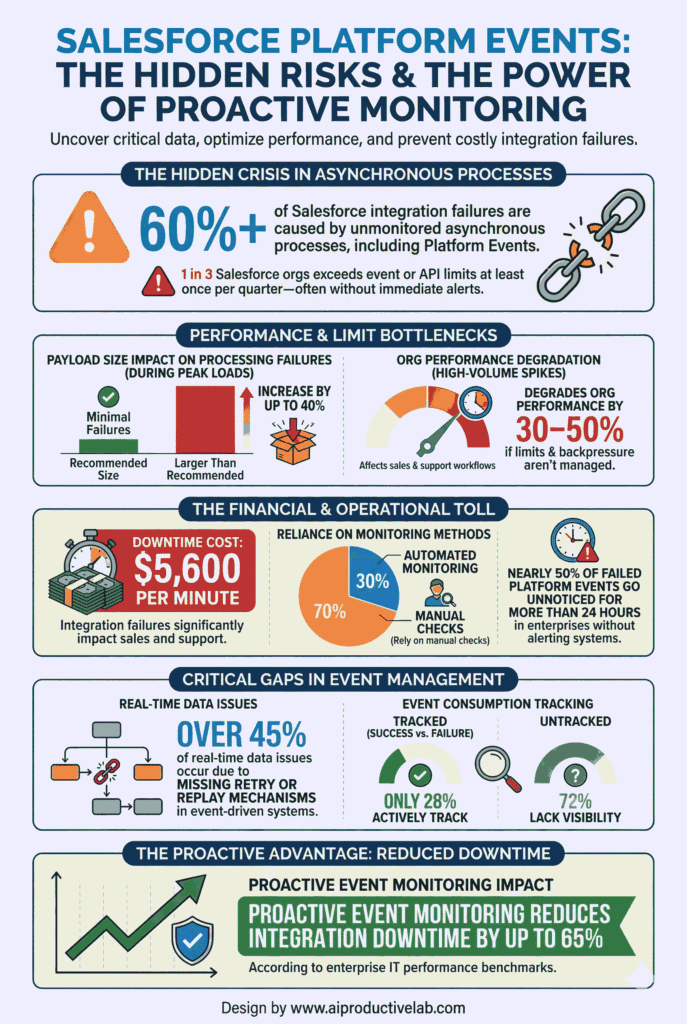
According to a 2024 Salesforce Architect survey, nearly 40% of organizations reported unexpected issues after their first platform event deployment. Most of those issues traced back to the same handful of preventable mistakes.
Why Platform Events Fail in Production but Not in Testing
The gap between development and production is where the platform event trap thrives. Developer Edition environments operate with dramatically reduced limits. They support only 10,000 daily events compared to 250,000 or more in Enterprise Edition. They also handle far fewer concurrent subscribers.
Testing in these limited environments creates a false sense of confidence. Your logic works. Your integrations fire correctly. But the environment never stress-tests your design against real-world conditions like high concurrency, network latency, or complex multi-system data flows.
This disconnect explains why IT admins often discover event-driven architecture problems only after go-live. Simulating production-level volumes in a full sandbox is the only reliable way to close this gap before it costs your organization time and money.
The Five Most Common Mistakes That Create the Trap
Understanding the root causes helps you build defenses before problems appear. These five mistakes account for the vast majority of platform event trap scenarios.
Forcing Synchronous Behavior on Asynchronous Events
Platform events are asynchronous by design. They do not guarantee instant processing. Depending on system load, there can be delays of milliseconds to several seconds between publishing and subscriber execution.
Many admins try to use platform events for immediate UI feedback or real-time user-facing updates. This creates an unreliable user experience. Lightning Web Components, Apex methods, or Salesforce Flow are better choices when users need instant responses. Reserve platform events for background processes and system integrations where small delays are acceptable.
Assuming Events Arrive in Order
Salesforce does not guarantee delivery order for platform events. Network retries, processing queues, and system load balancing can all shuffle the sequence. A single event might even be delivered more than once.
Building business logic that depends on sequential event processing is a direct path into the platform event trap. Instead, design every subscriber to operate independently of order. Use timestamps or sequence numbers in your event payload to reconstruct order when your business rules demand it.
Ignoring Governor Limits and Volume Caps
Every Salesforce edition enforces specific limits on platform event volume. Exceeding these limits causes events to fail silently or triggers system throttling.
| Limit Type | Developer Edition | Enterprise Edition | Production Notes |
|---|---|---|---|
| Daily event volume | 10,000 | 250,000+ | Varies by license type |
| Events per hour | 1,000 | 10,000+ | Active monitoring required |
| Event payload size | 1 MB | 1 MB | Design for lean payloads |
| Subscriber count | 5 | Unlimited | Performance degrades at scale |
Proactive monitoring dashboards and threshold alerts are essential. Set alerts at 80% of your daily volume limit. This gives your team time to respond before failures occur.
Testing Only in Developer Sandbox
As outlined above, Developer Edition environments mask real-world problems. Low volume thresholds, simplified integrations, minimal concurrent users, and small data sets all contribute to misleading test results.
A robust testing strategy requires full sandbox environments with production-equivalent data volumes, concurrent user simulations, and real external system connections. According to Gartner, organizations that test integrations under production-like conditions reduce post-deployment incidents by up to 60%.
Leaving Event Subscribers Unsecured
Security gaps in event subscriber configuration create both operational and compliance risks. Unauthenticated external subscribers can access sensitive business data. Overly broad event channel permissions expose information beyond what each subscriber needs.
Common security oversights include missing OAuth authentication, absent SSL/TLS encryption, excessive event access permissions, and no audit logging for subscriber activity. Each of these gaps can quietly expand into a serious vulnerability.
Seven Best Practices to Avoid the Platform Event Trap
Preventing the platform event trap requires intentional architecture decisions from day one. These seven best practices form a reliable framework.
1. Embrace Asynchronous, Decoupled Design
Separate event publishing from business logic validation. Design subscribers to handle processing delays gracefully. Build proper error handling and retry mechanisms into every event flow. Accept that platform events work best when you stop fighting their asynchronous nature.
2. Choose High Volume Platform Events for Scale
If your organization processes more than 100,000 events daily, standard platform events may not keep up. High volume platform events provide higher throughput and different delivery mechanics. They are essential for IoT integrations, real-time analytics pipelines, and high-transaction system connections.
3. Implement Idempotent Subscriber Logic
Idempotent processing means handling the same event multiple times produces the same result every time. This approach neutralizes duplicate delivery, one of the most common platform event trap triggers.
Use unique event identifiers for deduplication. Check processing status before executing business logic. Maintain processing logs that let you trace every event from publication to completion.
4. Monitor Event Usage Proactively
Routine monitoring catches problems before they reach production users. Track these key metrics continuously.
| Monitoring Area | Key Metric | Alert Threshold |
|---|---|---|
| Event volume | Daily and hourly publishing rates | 80% of edition limit |
| Processing delays | Time between publish and process | Greater than 5 seconds |
| Error rates | Failed event processing count | Greater than 1% failure rate |
| Subscriber performance | Processing time per event | 50% above baseline |
Dashboards that surface these metrics in real time give your team the visibility needed to intervene early.
5. Secure Every External Subscriber
Configure OAuth 2.0 authentication for all external subscribers. Enforce SSL/TLS encryption on every event communication channel. Apply IP restrictions where possible. Conduct regular access audits to ensure permissions follow the principle of least privilege.
6. Test in Production-Like Environments
Replicate production data volumes, integration complexity, user concurrency patterns, and network conditions in your test environment. Validate security configurations match production settings exactly. This single practice eliminates the majority of platform event trap surprises.
7. Document Event Flows Thoroughly
Clear documentation protects your organization during team transitions, system upgrades, and troubleshooting sessions. Document event schema definitions, subscriber logic, error handling procedures, and performance expectations. Well-documented Salesforce event monitoring workflows reduce mean time to resolution when issues arise.
When Should You Actually Use Platform Events
Platform events excel in specific scenarios. Using them outside these scenarios increases your risk of falling into the platform event trap.
They are ideal for ERP synchronization, cross-cloud communication, marketing automation data transfers, compliance reporting triggers, and alert systems that notify admins of critical events. They work well whenever asynchronous processing is acceptable and system decoupling improves resilience.
They are not suitable for immediate UI updates, real-time data validation, or any workflow where users expect instant feedback. For those scenarios, Apex triggers, Lightning Web Components, or Salesforce Flow deliver the responsiveness users need.
Building a Resilient Event-Driven Architecture
The platform event trap is avoidable. It requires deliberate design choices, thorough testing, and continuous monitoring. Treat your event-driven architecture as a living system that evolves alongside your business.
Review your event architecture quarterly. Analyze monitoring data for emerging patterns. Measure performance metrics against your baselines. According to Salesforce’s best practice guides, organizations that conduct regular architecture reviews catch potential failures 3x faster than those that do not.
Your Salesforce platform events should grow with your business, not become a liability. The strategies in this guide give you the foundation to build integrations that are reliable, secure, and scalable from day one.
FAQs
A platform event trap is a set of common mistakes in deploying Salesforce platform events that cause failures in production, including data loss, duplicate processing, and system outages due to misunderstanding their asynchronous nature.
No. Salesforce platform events do not guarantee delivery order due to network delays and processing queues. Use timestamps or sequence numbers in your event payload to enforce ordering in subscriber logic.
Limits range from 10,000 events per day in Developer Edition to 250,000 or more in Enterprise Edition. Your exact limit depends on your Salesforce license type and any additional purchased capacity.
Implement idempotent logic in every subscriber by using unique event identifiers, logging processed events, and checking for duplicates before executing business logic or database operations.
No. Platform events are asynchronous and cannot guarantee instant processing. Use Lightning Web Components, Apex methods, or Salesforce Flow for immediate user-facing feedback and real-time interface updates.