Few things frustrate website visitors more than a page that refuses to load. When you see an http error 504 on your screen, it means something went wrong between servers behind the scenes. Your request never made it through.
- 504 gateway timeout: a gateway server did not receive a timely response from an upstream server.
- Common causes: server overload, slow backend queries, DNS resolution delays, firewall blocks, network failures, or CDN misconfiguration.
- Visitor fixes: refresh, try another browser or network, clear cache, wait, or check third-party status pages.
- Owner fixes: review logs, increase proxy timeouts, optimize slow queries, scale resources, disable faulty plugins, or contact hosting support.
This error affects everyone — site visitors, business owners, and developers. It can cost you traffic, revenue, and search engine rankings if it lingers. The good news is that most 504 gateway timeout errors have identifiable causes and straightforward fixes.
This guide explains exactly what a 504 error is, what triggers it, and how to resolve it whether you manage the server or simply browse the web.
What Does HTTP Error 504 Mean?
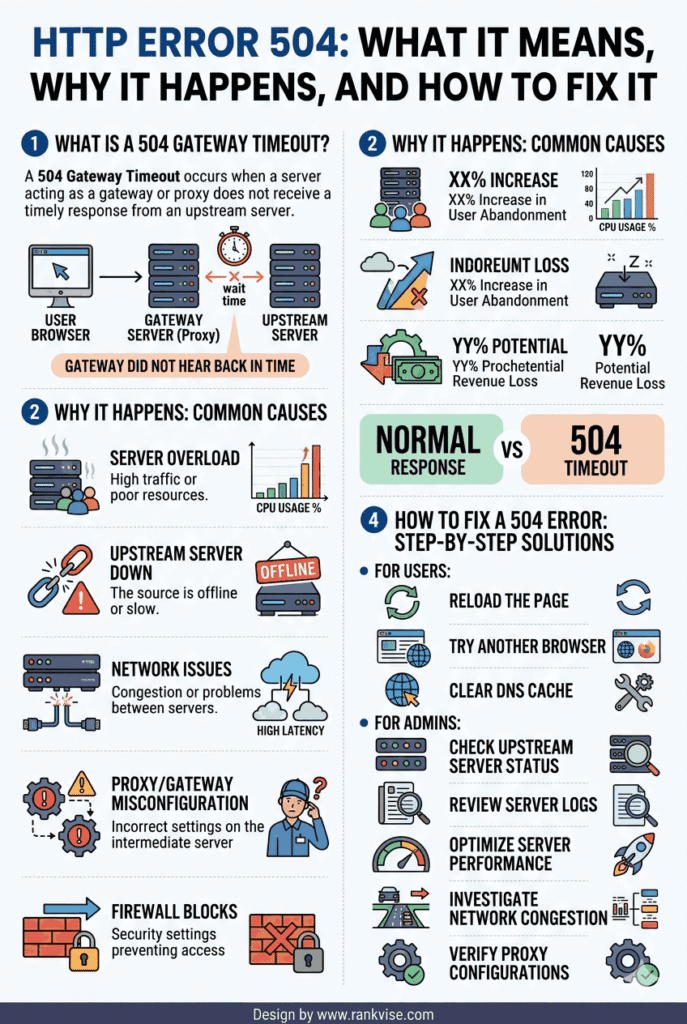
An http error 504, also called a 504 gateway timeout, occurs when one server fails to receive a timely response from another server. According to the Internet Engineering Task Force, this status code means the upstream server took too long to reply.
Think of it like a relay race. Your browser sends a request to a gateway server, such as a reverse proxy or load balancer. That server forwards the request to an origin server to fetch the actual content. If the origin server does not respond within the allowed time, the gateway gives up and returns a 504 timeout error to your browser.
This is entirely a server-side issue. The visitor did nothing wrong. The problem sits somewhere in the communication chain between servers.
What Causes a 504 Gateway Timeout Error?
Multiple factors can trigger this error. Identifying the root cause is the first step toward fixing it. Here are the most common reasons a 504 error appears.
Server Overload
When a web server receives more requests than it can handle, response times spike. The gateway server waiting for a reply eventually hits its timeout limit. High traffic during sales events, product launches, or viral content frequently causes this.
Slow Backend Processes
Sometimes the origin server is running complex database queries or heavy scripts. These operations take longer than the gateway allows. Poorly optimized code or unindexed database tables are typical culprits.
DNS Resolution Issues
If the gateway cannot resolve the domain name of the upstream server quickly enough, the connection stalls. Misconfigured DNS settings or slow DNS providers contribute to this delay.
Firewall or Security Blocks
Firewalls and security plugins sometimes block legitimate server-to-server communication. The gateway sends a request, but a firewall drops or delays it before it reaches the origin server. This results in a timeout.
Network Connectivity Problems
Physical infrastructure issues — like a faulty router, network congestion, or a downed data center link — can interrupt communication between servers. These are less common but harder to diagnose remotely.
CDN or Proxy Misconfiguration
Content delivery networks and reverse proxies like Cloudflare or Nginx sit between the visitor and the origin server. If timeout settings on these intermediaries are too short, they may give up before the origin server finishes processing.
How to Fix a 504 Error as a Website Visitor
If you encounter a 504 gateway timeout while browsing, the problem is usually on the website’s end. However, a few quick steps can help rule out issues on your side.
- Reload the page — Sometimes the error is temporary. Wait 30 seconds and refresh.
- Try a different browser — This helps rule out browser-specific caching or extension issues.
- Clear your browser cache — Old cached data can occasionally interfere with server responses.
- Check your internet connection — Make sure your own network is stable and responsive.
- Visit the site later — If the server is overloaded, giving it time often resolves the problem.
If the error persists across devices and networks, the issue lies with the website’s server infrastructure. You can check third-party status pages like Downdetector to confirm whether others are experiencing the same problem.
How to Fix a 504 Error as a Website Owner
Server-side 504 errors demand a more technical approach. Work through these steps systematically to find and resolve the issue.
Step 1: Check Your Server Logs
Start with your web server error logs. Apache, Nginx, and application-level logs reveal which upstream request timed out and why. Look for patterns tied to specific URLs, scripts, or time periods.
Step 2: Increase Timeout Settings
If your server processes legitimate long-running requests, adjust the timeout values on your reverse proxy or load balancer. For Nginx, the proxy_read_timeout directive controls how long it waits for a response. For Apache, adjust ProxyTimeout. For Cloudflare users, the platform applies its own timeout limits depending on your plan tier.
Step 3: Optimize Slow Database Queries
Slow queries are a leading cause of 504 errors on dynamic websites. Use tools like MySQL’s slow query log or a performance monitoring service to identify bottlenecks. Add proper indexes, reduce query complexity, and cache frequent results.
Step 4: Review Your DNS Configuration
Confirm that DNS records resolve correctly and quickly. Switch to a reliable DNS provider if resolution times are inconsistent. Misconfigured A records or CNAME entries can cause silent failures.
Step 5: Disable Plugins or Themes Temporarily
On WordPress and similar CMS platforms, a faulty plugin or theme can cause server-side timeouts. Deactivate plugins one by one to isolate the problem. Re-enable them individually and monitor for the error’s return.
Step 6: Scale Server Resources
If traffic has outgrown your hosting plan, upgrade your server resources. Add more RAM, CPU capacity, or switch to a higher-tier hosting package. Consider a dedicated server or cloud-based auto-scaling solution for traffic spikes.
Step 7: Contact Your Hosting Provider
If none of the above steps work, reach out to your hosting company. They can inspect server health, network routes, and infrastructure issues that are not visible from your control panel.
How a 504 Error Impacts SEO and User Experience
A brief, occasional 504 error will not damage your search rankings. Google understands that servers sometimes experience temporary problems. However, frequent or prolonged 504 gateway timeout errors create real consequences.
Search engine crawlers that repeatedly encounter a 504 status code may reduce their crawl frequency for your site. Pages stuck behind timeout errors cannot be indexed. Over time, this can lead to ranking drops and reduced organic visibility.
From a user perspective, visitors who see a server timeout error are unlikely to wait. They leave and visit a competitor instead. High bounce rates and lost conversions follow quickly. Monitoring uptime and fixing 504 errors promptly protects both your rankings and your revenue.
HTTP Error 504 vs. Other Server Errors
Understanding how a 504 differs from similar errors helps you troubleshoot more efficiently.
| Error Code | Name | Meaning |
|---|---|---|
| 500 | Internal Server Error | A generic server failure with no specific cause identified |
| 502 | Bad Gateway | The gateway received an invalid response from the upstream server |
| 503 | Service Unavailable | The server is temporarily overloaded or under maintenance |
| 504 | Gateway Timeout | The gateway did not receive any response from the upstream server in time |
A 502 error means the upstream server responded, but with something invalid. A 504 error means it never responded at all within the timeout window. This distinction matters when diagnosing the root cause.
FAQs
A 504 error means one server waited too long for another server to respond. It is a timeout issue between servers, not a problem caused by the visitor.
Yes, temporary 504 errors often resolve on their own when server load decreases or a brief network disruption clears. Persistent errors require manual troubleshooting by the site owner.
Occasional 504 errors will not hurt rankings. However, frequent or prolonged timeouts can reduce Google’s crawl frequency and lead to deindexed pages over time.
A 502 means the gateway received an invalid response from the upstream server. A 504 means the gateway received no response at all before the timeout limit expired.
Try accessing the site from a different device and network. If the error appears everywhere, the problem is on the server side. You can also check status monitoring sites like Downdetector for confirmation.