Skip to content

Choosing web hosting for SEO isn’t about finding the cheapest plan. It’s about understanding which features actually support search visibility. A low monthly price might look attractive at first. But poor uptime and slow performance can cost you more through lost traffic and technical problems.
- Evaluate hosting value: look for consistent performance, reliability, growth capacity, and simplified site management over initial discounts.
- Prioritize fast servers, SSD storage, CDN availability, and low server response times to protect SEO and user engagement.
- Require strong uptime guarantees and monitoring; frequent downtime prevents crawlers and damages rankings.
- Verify fast, knowledgeable 24/7 support with quick response and resolution times before committing to a host.
- Plan for growth: choose scalable plans, clear pricing, migration support, and monitor resources to upgrade before limits harm performance.
Many site owners start with Hostinger coupon codes to save on initial hosting costs. This can work well for new websites. The real challenge is selecting a plan that performs after the promotional period ends. SEO results take months to build. Your hosting choice should prioritize consistency, speed, and long-term stability over short-term savings.
Why Cost and Value Aren’t the Same Thing
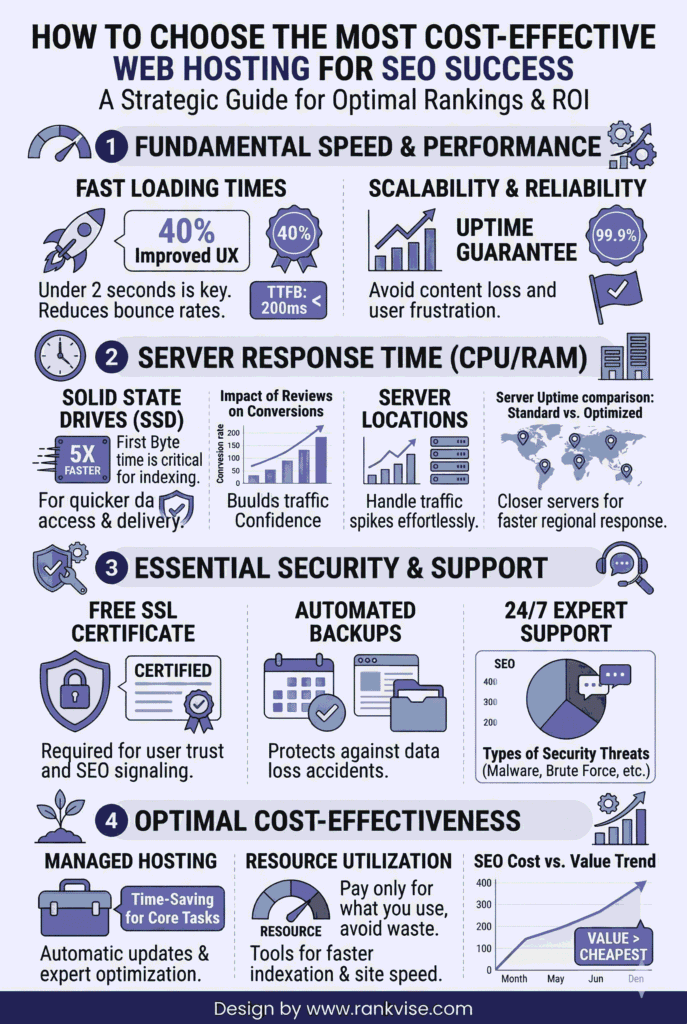
A cheap hosting plan that lacks essential features ends up costing more. Hosting directly impacts user experience signals that search engines monitor closely. Frequent downtime prevents search engine crawlers from accessing your pages. Slow server response times drag down page speed scores. Limited resources cause performance drops during traffic spikes.
Value matters more than the price tag. Affordable hosts can deliver sufficient speed, reliability, and room to grow. They keep site management simple so technical tasks don’t become overwhelming. This balance helps you focus on content and marketing instead of constant troubleshooting.
Look beyond the advertised monthly rate. Consider what you get for that price. Does the plan include SSL certificates? What about automated backups and malware scanning? These features protect your site and maintain search engine trust. Missing them means paying extra or risking security issues that hurt rankings.
How Server Speed Impacts Search Rankings
Site speed has been part of SEO conversations for years. But it’s also a business factor that affects real revenue. Pages that load slowly push visitors away before they engage. This creates weak user signals, fewer conversions, and missed opportunities that compound over time.
Compare hosting options by looking past generic speed promises. Check actual server response time benchmarks. Ask about caching mechanisms and storage types. Find out if CDN integration is available or included. A well-optimized small website can run fine on solid shared hosting. But the cheapest starter plan often lacks resources for larger sites or those with complex functionality.
What Makes Hosting Fast for SEO
Several technical factors determine hosting speed. Server hardware quality matters first. Older processors and traditional hard drives slow everything down. Modern hosts use SSD storage and current-generation processors. These handle requests faster and support better concurrent user loads.
Server location affects speed for your target audience. If most visitors come from North America, hosting in Europe adds latency. Choose data center locations near your primary traffic sources. This reduces the physical distance data travels.
Resource allocation determines performance under pressure. Shared hosting divides server resources among many sites. When neighboring sites spike in traffic, your performance may suffer. Higher-tier plans offer dedicated resources that maintain speed regardless of other users.
A hosting provider that maintains fast page loads during traffic peaks delivers better SEO value. This consistency matters more than occasional speed bursts during testing.
Uptime Reliability Prevents Ranking Problems
Most people assume uptime will be excellent until problems start. Sites that go offline frequently frustrate visitors and block search engine access. Businesses relying on local search, lead generation, or content publishing feel the impact most severely.
Downtime creates multiple SEO problems. Search engines can’t crawl pages that aren’t available. Repeated access failures signal reliability issues. Users who encounter errors develop negative associations with your brand. These problems accumulate and damage rankings over time.
Support Quality Makes the Difference
Affordable hosting should guarantee reliable uptime with clear monitoring. But support quality matters just as much. Many buyers underestimate this until they need help. A minor technical glitch can become a major SEO crisis if support is slow or unclear.
Fast, knowledgeable support resolves issues before they impact search performance. Delays in fixing problems affect indexing, page accessibility, and user trust. Look for hosts offering 24/7 support through multiple channels. Read customer reviews focusing on support experiences, not just general satisfaction.
Response time matters more than claimed availability. A host advertising 24/7 support means nothing if tickets take days to resolve. Check average response times and resolution speeds before committing to any plan.
Planning for Growth from the Start
Website needs change as SEO success builds. More traffic brings more pages, media files, and functionality requirements. Plugins add features but consume resources. What worked at launch may struggle six months later.
Scalability should factor into your initial hosting decision. Smart hosting choices let you expand without forcing premature upgrades to enterprise-level resources. Clear pricing structures help you understand future costs. Transparent resource limits prevent surprise overage charges.
Signs Your Hosting Needs to Scale
Watch for specific warning signs that indicate outgrown hosting. Pages loading slower than before signal resource constraints. Increased error messages suggest capacity problems. Backend operations taking longer point to database limitations.
Traffic analytics reveal patterns your hosting must handle. Sudden traffic spikes from successful content or campaigns test your plan’s limits. Sustained growth requires gradual resource increases. Plan upgrades before problems affect user experience.
The goal isn’t buying the biggest plan available. It’s preventing your hosting from restricting growth as your site improves. Flexible upgrade paths let you match resources to actual needs without overpaying.
Key Features That Support SEO Performance
| Feature | SEO Impact | What to Look For |
|---|---|---|
| SSL Certificate | Required for trust and rankings | Free, automatic installation |
| Server Response Time | Direct page speed factor | Under 200ms average |
| Uptime Guarantee | Maintains crawler access | 99.9% or higher SLA |
| Backup System | Protects against data loss | Automated daily backups |
| CDN Integration | Improves global speed | Built-in or easy setup |
| PHP Version | Affects WordPress performance | Current stable version support |
These features work together to create hosting that supports SEO. Missing any single element creates vulnerabilities. Cheap plans often skip several features to lower prices. This trade-off rarely benefits long-term search performance.
Common Hosting Mistakes That Hurt SEO
Choosing hosting purely by price creates predictable problems. The cheapest option typically means oversold servers and minimal support. These limitations surface as your site grows and attracts more traffic.
Ignoring storage type slows site performance unnecessarily. Traditional HDD storage costs less but performs significantly slower than SSD. This difference compounds across thousands of file operations daily. The small price savings aren’t worth the speed penalty.
Overlooking backup systems risks catastrophic data loss. Security breaches, update failures, and human errors happen to every site eventually. Without reliable backups, recovery becomes difficult or impossible. Search engines penalize sites that go offline permanently or show broken content.
Resource Limits Create Invisible Ceilings
Many cheap hosting plans impose strict resource limits. Bandwidth caps throttle traffic after certain thresholds. Storage limits restrict content growth. Processing limits slow down during traffic peaks. These constraints hurt SEO by limiting what your site can achieve.
Read the fine print on resource allocations. Unlimited bandwidth often has hidden fair use policies. Unmetered storage may limit file types or impose inode restrictions. Understanding real limits prevents choosing plans that can’t support your goals.
Evaluating Hosting Options for Long-Term Value
Compare hosting providers on factors beyond monthly cost. Calculate total first-year expense including renewal rates. Many hosts offer deep discounts for initial terms but charge significantly more upon renewal. This pricing strategy traps users who find migration too difficult.
Research hosting company reputation and track record. Established providers with positive long-term reviews offer more stability. New companies with attractive pricing may lack infrastructure to maintain quality. Industry forums and independent review sites provide authentic user experiences.
Test customer support before committing if possible. Send pre-sales questions and evaluate response quality. How quickly do they reply? Do answers address your actual questions? Support quality now predicts support quality later when you need urgent help.
Migration Support Matters
Consider how easy switching hosts will be if needed. Some providers offer free migration assistance for new customers. This service removes technical barriers to switching. Others provide detailed guides and tools for self-service migration.
Avoiding lock-in preserves flexibility. Hosting that supports standard formats and configurations makes future moves easier. Proprietary systems or unusual setups complicate migration and increase dependency on a single provider.
Making Smart Compromises
Budget constraints are real for most site owners. Finding the right balance requires understanding which features matter most. Speed and uptime can’t be compromised without SEO consequences. Other features may flex based on your specific needs.
Start with a plan matching your immediate requirements plus moderate growth room. Buying too much capacity wastes money on unused resources. Buying too little creates constant upgrade pressure and potential performance issues.
Monitor actual resource usage monthly. Most hosting dashboards show bandwidth consumption, storage used, and processing loads. This data guides upgrade timing and prevents reactive decisions during crises.
When to Spend More on Hosting
Some situations justify higher hosting costs from the start. E-commerce sites need robust security and consistent uptime. High-traffic blogs require substantial bandwidth and processing power. Sites with complex functionality demand dedicated resources.
Revenue-generating websites should view hosting as infrastructure investment, not pure expense. Better performance directly impacts conversion rates and earnings. The hosting cost difference between budget and mid-tier plans often pays for itself through improved results.
Finding Affordable Hosting That Works
Cost-effective hosting exists at various price points. The key is matching features to requirements without paying for unnecessary extras. Shared hosting works for many small to medium websites. VPS hosting suits growing sites needing dedicated resources. Cloud hosting offers scalability for variable traffic patterns.
Research hosting companies serving your specific site type. WordPress-optimized hosts understand that platform’s requirements. E-commerce specialists know online store security and performance needs. Specialized providers often deliver better value than generalists.
Read recent customer reviews from the past six months. Hosting quality can change quickly as companies grow, get acquired, or cut costs. Current feedback reflects actual service levels better than old reviews or awards.
Conclusion
The cheapest hosting is still a mistake if it fails to deliver basics. Website hosting underlies every user interaction and search engine visit. Beyond keywords and content, technical stability determines how well your SEO efforts convert to results. Poor hosting creates subtle but significant drag on search performance.
Compare hosting solutions by evaluating their long-term value proposition. Promotional discounts help reduce initial costs, especially for new sites. But discounts should complement a sound decision, not drive it. Budget-friendly hosting keeps your site fast, accessible, and easy to manage. That kind of value investment supports sustainable SEO success.
Frequently Asked Questions
Quality shared hosting starts around USD 3-5 monthly after promotions, offering adequate speed and uptime for small to medium sites.
Poor hosting affects speed and uptime, which impact user experience signals and crawler access—both influence rankings negatively.
Aim for 99.9% uptime minimum; anything less creates frequent access issues that harm search engine trust and user experience.
Managed hosting offers optimization and security benefits that support SEO, worth considering if budget allows and you use WordPress.
Yes, if your starter plan maintains good performance; upgrade before resource limits cause speed or uptime problems.