Skip to content
Few things frustrate website owners more than seeing a blank screen with an error message. Error code 521 is one of the most common issues for sites using Cloudflare. It tells visitors that the web server is down, even when you believe everything should be running fine.
The good news is that this error is almost always fixable. It usually points to a connection problem between Cloudflare and your origin server. This guide walks you through what causes it, how to diagnose it, and how to resolve it step by step.
What Does Error Code 521 Mean?
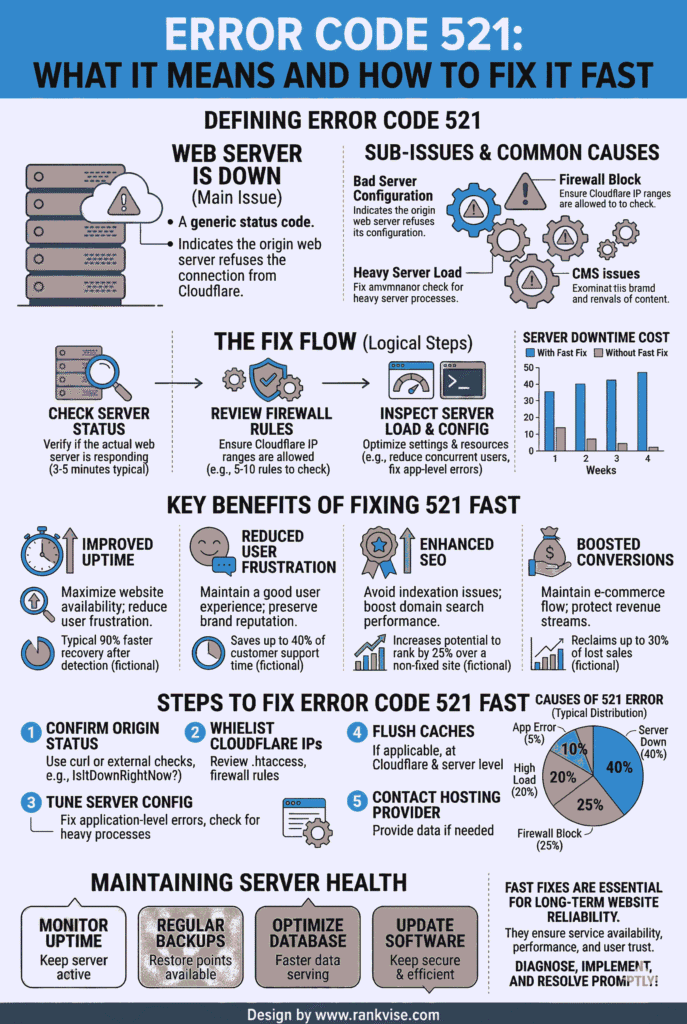
Error code 521 is an HTTP status code specific to Cloudflare. It means that Cloudflare attempted to connect to your origin web server, but the server refused the connection. In simple terms, Cloudflare knocked on your server’s door and nobody answered.
This is not a problem with the visitor’s browser or internet connection. It is a server-side issue between Cloudflare’s network and the machine that hosts your website. Your site may actually be running, but Cloudflare cannot reach it to serve content to your visitors.
The full message usually reads “Error 521: Web server is down.” Despite what it says, your server may not be completely offline. Something is simply blocking or rejecting the connection attempt from Cloudflare.
What Causes the 521 Web Server Is Down Error?
Several issues can trigger this error. Understanding the root cause helps you apply the right fix faster.
- Origin server is offline — Your hosting server has crashed, restarted, or gone down due to a hardware or software failure.
- Cloudflare IP addresses are blocked — A firewall, security plugin, or hosting provider rule is rejecting connections from Cloudflare’s IP ranges.
- Web server software is not running — Apache, Nginx, LiteSpeed, or whatever server software you use has stopped responding on the expected port.
- Port misconfiguration — Cloudflare connects on ports 80 (HTTP) and 443 (HTTPS). If your server does not listen on these ports, the connection fails.
- Hosting provider outage — Your web host may be experiencing infrastructure issues that prevent your server from accepting any incoming connections.
- Rate limiting or DDoS protection — Aggressive security rules on your server may mistake Cloudflare traffic for an attack and block it automatically.
In most cases, the cause falls into one of the first three categories. Checking those areas first saves significant troubleshooting time.
How to Fix Error Code 521: Step-by-Step Solutions
Each fix below addresses a specific cause. Work through them in order. Most site owners resolve the issue within the first three steps.
Step 1: Check if Your Origin Server Is Running
Log into your hosting control panel or use SSH to verify that your server is online. Run a basic status check on your web server software.
For Apache, use the command sudo systemctl status apache2. For Nginx, use sudo systemctl status nginx. If the service is stopped, restart it. A crashed server process is the single most common cause of the 521 error.
If you use managed hosting, contact your provider’s support team. Ask them to confirm that your server is running and responsive on port 80 and port 443.
Step 2: Whitelist Cloudflare IP Addresses
Cloudflare publishes its full list of IP ranges publicly. Your server’s firewall must allow incoming connections from every address on that list. If even one range is blocked, some visitors will see the 521 error intermittently.
Check your server firewall rules using iptables, UFW, or your hosting panel’s built-in firewall tool. Add all Cloudflare IP ranges to the whitelist. Also review any security plugins on your site, especially if you run WordPress. Plugins like Wordfence or Sucuri sometimes block Cloudflare by default.
Step 3: Verify That the Correct Ports Are Open
Cloudflare expects to connect on port 80 for HTTP traffic and port 443 for HTTPS traffic. If your server does not listen on these ports, the connection attempt fails immediately.
Run sudo netstat -tlnp | grep :80 and sudo netstat -tlnp | grep :443 to confirm both ports are active. If neither port shows a listening service, your web server configuration needs attention. Reinstall or reconfigure your server software to listen on the correct ports.
Step 4: Review Hosting Provider Status
Sometimes the problem is outside your control. Check your hosting provider’s status page for reported outages or maintenance windows. Providers like GoDaddy, Bluehost, SiteGround, and AWS all maintain public status dashboards.
If your host confirms an outage, you may need to wait for their team to resolve it. In the meantime, consider enabling Cloudflare’s “Always Online” feature. This serves a cached version of your site to visitors while your origin server is unreachable.
Step 5: Disable Aggressive Security Rules Temporarily
If your server uses tools like fail2ban, ModSecurity, or CSF Firewall, overly strict rules may block Cloudflare traffic. Temporarily disable these tools one at a time to isolate the cause.
Once you identify the blocking rule, adjust it to allow Cloudflare connections while keeping protection active for other traffic. This approach maintains security without breaking your site’s connection to Cloudflare.
Step 6: Test Direct Server Access
Try accessing your website directly using your server’s IP address instead of your domain name. Type the IP address into your browser. If the site loads directly but not through Cloudflare, the problem is confirmed as a connection issue between Cloudflare and your server.
If the site does not load directly either, the issue is entirely on your server side. Focus your troubleshooting on server configuration, resource limits, or hosting provider support.
How to Prevent Error 521 From Happening Again
Fixing the error once is not enough. Take these proactive steps to reduce the chance of recurrence.
- Set up server monitoring — Use tools like UptimeRobot or Pingdom to alert you the moment your server goes offline. Early detection means faster resolution.
- Keep Cloudflare IPs updated — Cloudflare occasionally adds new IP ranges. Review and update your whitelist quarterly to avoid accidental blocks.
- Use a reliable hosting provider — Budget hosting with frequent downtime makes error 521 more likely. Invest in a host with strong uptime guarantees and responsive support.
- Enable Cloudflare “Always Online” — This feature serves cached pages when your server is unreachable, keeping your site partially functional during outages.
- Automate server restarts — Configure your server to automatically restart web server processes if they crash. This minimises downtime from unexpected failures.
Error 521 vs. Other Cloudflare 5xx Errors
Cloudflare produces several 5xx error codes. Knowing the difference helps you troubleshoot the right problem.
| Error Code | Meaning | Likely Cause |
|---|---|---|
| 520 | Web server returns an unknown error | Unexpected or empty response from origin server |
| 521 | Web server is down | Origin server refuses Cloudflare’s connection |
| 522 | Connection timed out | Origin server is too slow to respond |
| 523 | Origin is unreachable | DNS records point to an incorrect IP address |
| 524 | A timeout occurred | Origin server starts responding but takes too long to finish |
Error 521 specifically means the connection was actively refused. Errors 522 and 524 involve timeouts, which point to slowness rather than outright refusal. This distinction matters because the fixes differ for each code.
When to Contact Your Hosting Provider
If you have worked through every step above and the error persists, your hosting provider needs to get involved. The issue may involve server-level configurations that only their team can access.
Provide your host with specific details. Tell them you are seeing a Cloudflare error 521. Mention that you have whitelisted Cloudflare IPs, confirmed your web server is running, and verified port availability. This saves time and helps their support team jump straight to advanced diagnostics.
Most hosting providers resolve escalated 521 issues within a few hours once they have the right information.
FAQs
Error code 521 means Cloudflare tried to connect to your website’s origin server, but the server refused the connection. It is a server-side issue, not a visitor’s browser problem.
Check if your web server is running, whitelist all Cloudflare IP addresses, and disable any security plugins temporarily. Restart Apache or Nginx if the service has stopped.
Yes. Server firewalls, security plugins, and hosting-level rules frequently block Cloudflare IP addresses. Whitelisting Cloudflare’s published IP ranges resolves this common cause.
It is almost always a hosting or server-side problem. Cloudflare reports the error, but the root cause sits with the origin server refusing or failing to accept the connection.
Most cases resolve within minutes to a few hours. Restarting your web server or whitelisting Cloudflare IPs fixes the majority of 521 errors immediately.