Skip to content
Every unpatched application is an open door for attackers. Most enterprises run thousands of third-party applications across their networks. Keeping each one updated manually is nearly impossible at scale. That is exactly the problem a corporate software inspector is designed to solve.
- Performs credentialed endpoint scans to inventory software, detect vulnerabilities, and assign risk scores for prioritized remediation.
- Follows a four-phase lifecycle: discovery, detection, remediation, and verification to ensure patches are deployed and validated across endpoints.
- Integrates with SCCM and WSUS for automated, vendor-verified patch creation, testing, and distribution, reducing manual effort.
- Risk-based prioritization and daily vulnerability database updates focus remediation on exploitable, high-impact CVEs instead of every alert.
- Deploy with asset audits, pilot rollouts, defined risk thresholds, and team training to avoid missed endpoints and integration failures.
This guide breaks down what a corporate software inspector does, why it matters in 2026, and how organizations use it to reduce risk, streamline patching, and maintain compliance — without drowning IT teams in manual work.
What Is a Corporate Software Inspector?
A corporate software inspector is a vulnerability management tool that scans enterprise endpoints for outdated or insecure software. It identifies missing patches, evaluates risk, and automates the deployment of updates across your environment.
Originally developed by Secunia (now part of Flexera), the tool evolved from a simple scanner into a full lifecycle security platform. Today, it supports over 20,000 third-party applications across Windows, macOS, and Red Hat Enterprise Linux.
Unlike basic antivirus or firewall solutions, a corporate software inspector focuses specifically on the software layer. It answers one critical question: are your applications up to date and free of known vulnerabilities?
Why Vulnerability Management Matters More Than Ever
Cybercriminals increasingly target unpatched third-party software. According to industry reports, over 60% of breaches involve known vulnerabilities that organizations failed to remediate in time. The attack surface grows with every new application installed.
Manual patch management cannot keep pace. IT teams juggle hundreds of vendor advisories weekly. Without automation, critical patches slip through the cracks. A single missed update can expose sensitive data or trigger a compliance violation.
A corporate software inspector closes this gap by continuously monitoring, detecting, and remediating vulnerabilities before attackers exploit them. It shifts your security posture from reactive to proactive.
How a Corporate Software Inspector Works
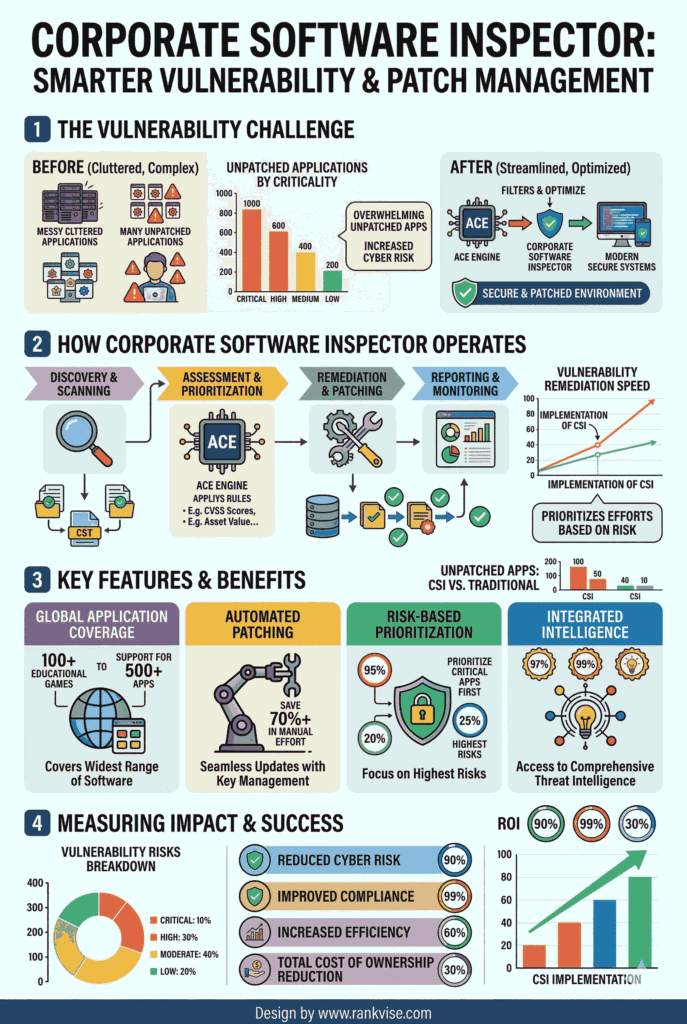
The tool follows a structured four-phase lifecycle. Each phase builds on the previous one, creating a continuous loop of protection.
Phase 1 — Discovery: The inspector scans all endpoints to build a comprehensive software inventory. It identifies every application installed across your network, including shadow IT and unauthorized installs.
Phase 2 — Detection: It cross-references your inventory against a daily-updated vulnerability database. Each detected vulnerability receives a risk score based on exploitability, severity, and business impact.
Phase 3 — Remediation: The tool generates pre-configured, vendor-verified patches. It deploys these patches automatically through integration with enterprise tools like SCCM or WSUS, reducing manual effort dramatically.
Phase 4 — Verification: After deployment, the inspector rescans endpoints to confirm patches were applied successfully. This validation step ensures no gaps remain and provides auditable proof of remediation.
Key Features That Set It Apart
Not all software vulnerability scanners offer the same depth. Here is what makes a corporate software inspector a standout choice for enterprise environments:
- Extensive application coverage — Supports 20,000+ third-party applications, far exceeding the scope of OS-native update tools.
- Daily vulnerability database updates — Backed by Flexera’s research team, the database includes verified CVEs and vendor advisories refreshed every 24 hours.
- Authenticated scanning — Performs deep, credentialed scans that deliver more accurate results than passive network monitoring.
- Automated patch deployment — Creates, tests, and distributes patches with minimal manual intervention through SCCM and WSUS integration.
- Risk-based prioritization — Ranks vulnerabilities by actual threat level, helping teams focus on what matters most instead of chasing every alert.
- Compliance reporting — Generates audit-ready reports aligned with ISO 27001, NIST, HIPAA, PCI DSS, and GDPR frameworks.
- Multi-platform support — Covers Windows, macOS, and select Linux distributions from a single console.
Who Benefits Most from a Corporate Software Inspector?
This tool delivers value across industries, but certain sectors see outsized returns due to their regulatory and operational requirements.
| Industry | Primary Benefit | Key Compliance Driver |
|---|---|---|
| Healthcare | Protects patient data across distributed endpoints | HIPAA |
| Financial Services | Reduces risk of data breach and fraud | PCI DSS, SOX |
| Government | Secures sensitive systems against nation-state threats | NIST, FISMA |
| Manufacturing | Shields OT-connected systems from lateral attacks | IEC 62443 |
| Education | Manages diverse, decentralized device fleets | FERPA |
Organizations with complex, multi-platform environments gain the most. If your enterprise manages hundreds or thousands of endpoints running diverse software stacks, automated patch management becomes essential — not optional.
Real-World Impact: What the Numbers Show
Deploying a corporate software inspector produces measurable results. Organizations typically see a 50% reduction in unpatched vulnerabilities within 90 days of deployment. Some report reductions as high as 80% within the first quarter.
These improvements translate directly into reduced risk exposure. Fewer unpatched applications mean fewer exploitable entry points for attackers. Security teams spend less time firefighting and more time on strategic initiatives.
Operational costs decrease as well. Automated patch deployment eliminates repetitive manual tasks. IT staff can redirect effort toward higher-value projects. Compliance audits become faster and less stressful with automated, audit-ready documentation.
How to Deploy a Corporate Software Inspector Successfully
Effective deployment requires thoughtful planning. Rushing the rollout leads to missed endpoints and incomplete coverage. Follow these steps for a smooth implementation:
- Audit your current environment — Map every endpoint, application, and OS version before deploying the inspector. A clean asset inventory prevents blind spots.
- Integrate with existing infrastructure — Connect the tool to your SCCM, WSUS, or other configuration management platforms. This ensures patches flow through established, tested channels.
- Define risk thresholds — Set clear policies for which vulnerabilities trigger automatic patching versus manual review. Critical and high-severity CVEs should receive immediate attention.
- Pilot before scaling — Test with a representative subset of endpoints. Validate patch compatibility and monitor for conflicts before organization-wide rollout.
- Establish a review cadence — Schedule weekly or bi-weekly reviews of scan results and remediation progress. Continuous visibility keeps your security posture strong.
- Train your team — Ensure IT staff understand the tool’s dashboards, reporting, and escalation workflows. Adoption depends on comfort and competence.
Common Challenges and How to Overcome Them
No tool is without friction. Here are the most common deployment challenges teams face with a corporate software inspector and practical solutions.
Integration complexity: Connecting to legacy systems sometimes requires custom configuration. Start with well-documented integration points like SCCM before tackling niche platforms.
Database dependency: The tool’s accuracy depends on daily vulnerability updates. Ensure your network allows uninterrupted access to the vendor’s update servers. Monitor update logs regularly.
Endpoint diversity: Environments with dozens of OS versions and application variants require careful testing. Use staged rollouts and compatibility checks to prevent patch conflicts.
Organizational buy-in: Leadership may question the investment. Present data on breach costs, compliance penalties, and operational savings. A 50% vulnerability reduction in 90 days makes a compelling business case.
The Future of Corporate Software Inspection
The next generation of vulnerability management tools will incorporate artificial intelligence and machine learning. Predictive vulnerability analysis will help organizations patch proactively, before exploit code even appears in the wild.
Expect tighter integration with cloud-native environments and containerized workloads. As enterprises move beyond traditional on-premise infrastructure, corporate software inspectors will need to cover hybrid and multi-cloud deployments seamlessly.
Automated threat intelligence feeds will further reduce the gap between vulnerability disclosure and remediation. The goal is a fully autonomous patch cycle — discover, prioritize, deploy, verify — with minimal human intervention.
FAQs
A corporate software inspector scans enterprise systems for outdated or vulnerable software. It automates patch detection and deployment to reduce security risk across your organization.
Antivirus detects malware already on your system. A corporate software inspector prevents breaches by identifying and patching software vulnerabilities before attackers can exploit them.
Most enterprise-grade tools support Windows, macOS, and Red Hat Enterprise Linux. Coverage spans over 20,000 third-party applications across these platforms.
Yes. It generates audit-ready reports aligned with frameworks like HIPAA, PCI DSS, NIST, ISO 27001, and GDPR, simplifying compliance verification.
Organizations typically achieve a 50% reduction in unpatched vulnerabilities within 90 days of deployment, with some reaching 80% in the first quarter.