You send a project update to a client and copy your manager. The client replies only to you. Your manager asks later, “Did they approve it?”
- Use CC to send a copy so people stay informed without expecting them to act.
- CC is transparent: everyone sees who was copied, message content, attachments, and receives Reply All replies.
- Use BCC for privacy or large recipient lists; BCC recipients are hidden and usually skip Reply All replies.
- Only CC people who truly need to know, explain why they are CC'd, and avoid CCing managers to pressure colleagues.
- When adding someone midthread, write one line explaining their role; remove people who no longer need updates.
Or the opposite happens. You copy ten people on a simple question, and your inbox fills with “Reply All” messages that nobody needed.
The CC field seems simple, but using it well makes a real difference at work. This guide explains what it means to CC someone in an email, how it differs from BCC, and when to use each. You will also find etiquette rules and practical examples.
What Does CC Mean in Email?
CC stands for “carbon copy.” When you CC someone, you send them a copy of the email so they are informed, even though the message is not mainly addressed to them.
The term comes from the days of typewriters. People placed carbon paper between sheets to make a duplicate copy of a letter. Email kept the name.
In simple terms:
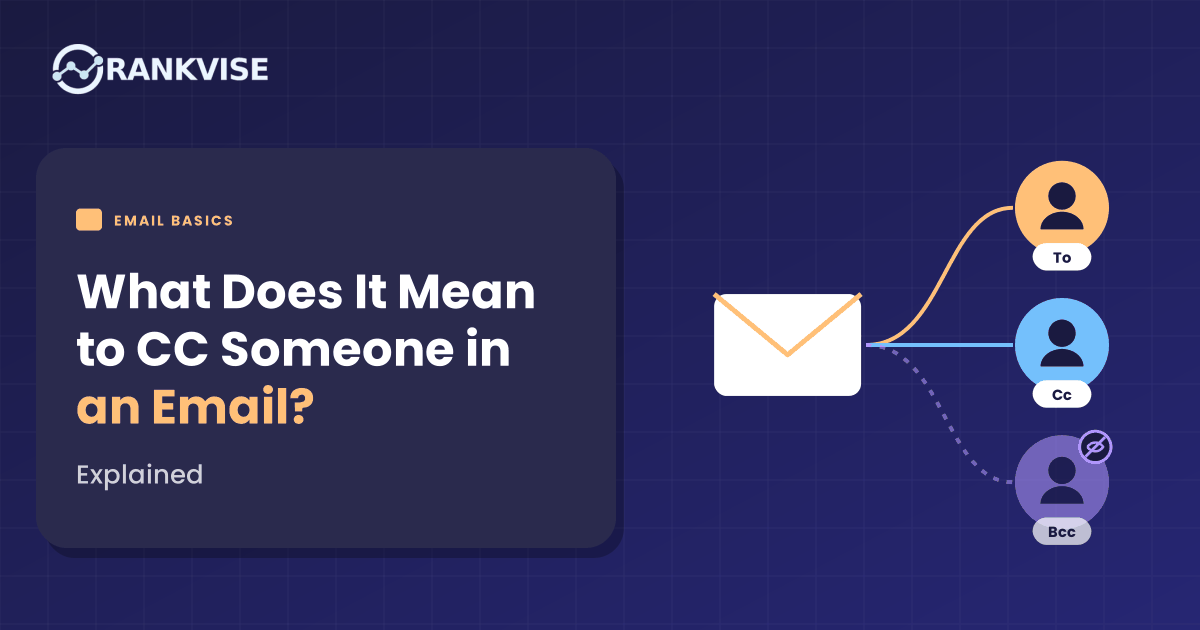
- To: The people the email is for. They are expected to read it and usually respond or act.
- CC: The people who should know about the email, but are not expected to act.
What Happens When You CC Someone?
When you add someone to the CC field:
- They receive the same email as the main recipients.
- Everyone can see who was CC’d.
- They see the full message and any attachments.
- If anyone clicks “Reply All”, CC’d people receive the reply too.
CC is transparent. Everyone knows who is included in the conversation.
What Does BCC Mean?
BCC stands for “blind carbon copy.” BCC recipients receive the email, but other recipients cannot see that they were included.
Key points about BCC:
- BCC recipients are hidden from the To and CC recipients.
- BCC recipients cannot see other BCC recipients.
- If a To or CC recipient clicks “Reply All”, BCC recipients usually do not receive the reply.
- If a BCC recipient clicks “Reply All”, everyone may discover they were copied.
CC vs BCC vs To: A Quick Comparison
| Field | Who it is for | Visible to others? | Expected to act? |
|---|---|---|---|
| To | Main recipients | Yes | Yes, usually |
| CC | People who should stay informed | Yes | Usually no |
| BCC | People who need a copy privately | No | Usually no |
When Should You CC Someone?
CC is useful when someone needs to be aware of the conversation, but not respond. Common situations include:
Keeping Your Manager Informed
To: Client
CC: Your manager“Hi Priya, I’ve attached the revised campaign plan for your approval…”
Your manager can see progress without being asked to respond.
Introducing Team Members
When you bring a colleague into a client conversation, CC them in the first email. This introduces them and shares the context.
Sharing Decisions With Stakeholders
When a decision affects other teams, CC the relevant people so everyone has the same information.
Creating a Record
CC can be used to keep a record of agreements. For example, CC your project manager when a client confirms a deadline.
Handing Over a Conversation
If you are passing a task to a colleague, CC them, explain the handover, and ask the recipient to reply to them going forward.
When Should You Use BCC Instead?
BCC is useful when you want to protect privacy or reduce noise.
Emailing Many People Who Don’t Know Each Other
Sending an announcement to clients, event attendees, or parents? Use BCC so you do not share everyone’s email address with the whole list.
Exposing email addresses in a large CC list can be a privacy problem. In some regions, it may even count as a data protection breach, especially for sensitive groups.
Moving Someone Out of a Thread
When someone introduces you to a contact, reply and move the introducer to BCC. For example:
“Thanks, Arjun (moving you to BCC to spare your inbox). Hi Neha, great to meet you…”
This thanks the introducer while keeping future replies out of their inbox.
Sending Yourself a Copy
Some people BCC their own address or their CRM to keep a record.
When Not to Use BCC
Avoid using BCC to secretly include someone in a sensitive conversation. If it is discovered, it can damage trust. For bulk marketing emails, use a proper email marketing platform instead of BCC.
Email CC Etiquette: 10 Rules to Follow
- Put people who need to act in “To”. CC is for awareness only.
- Only CC people who truly need to know. Unnecessary CCs add to inbox overload.
- Explain why someone is CC’d when it is not obvious. For example: “CC’ing Rahul, who will manage the design.”
- Don’t CC someone’s manager to pressure them. It can feel like a threat or complaint.
- Ask before adding senior people to a sensitive conversation, where appropriate.
- Use “Reply All” carefully. Only reply to everyone if they all need your response.
- Remove people who no longer need updates. Long threads rarely need everyone forever.
- Don’t expose private email addresses. Use BCC for large external groups.
- Don’t expect replies from CC’d people. If you need their input, move them to “To” and ask directly.
- Follow your company’s norms. Some organisations have specific rules about who to copy.
CC vs Forwarding: Which Should You Use?
Sometimes you need to decide whether to CC someone now or forward the email later.
| Situation | Better choice | Why |
|---|---|---|
| Someone should follow the whole conversation | CC | They see every reply in real time |
| Someone needs the information only once | Forward | Keeps them out of future replies |
| You want to add a private note | Forward | You can explain context privately |
| You want transparency with all parties | CC | Everyone knows who is involved |
| Someone joins a thread late | Forward, or CC with a short summary | Gives them the background they missed |
A useful habit: when you add someone to an existing thread, write one line explaining why. For example, “Adding Meera from finance, who will handle the invoice.” This avoids confusion and saves the new person from reading the whole history to understand their role.
Should You Reply to an Email You Were CC’d On?
Usually, no. Being CC’d means you are being kept informed.
Reply when:
- You have important information others need.
- You spot a mistake or risk.
- Someone asks you directly in the email.
- Your expertise is needed for the decision.
When you reply, think about whether everyone needs your answer. If not, reply only to the sender.
How to CC Someone in Gmail and Outlook
In Gmail
- Click Compose.
- Click Cc on the right side of the “To” field.
- Enter the email address.
- For BCC, click Bcc next to Cc.
In Outlook
- Click New mail or New Email.
- Enter addresses in the Cc field.
- If you do not see Bcc, look for the Bcc option in the message window. It is usually found near the To and Cc fields or in the Options tab, depending on your Outlook version.
On Mobile Apps
In most mail apps, tap the To field or a small arrow to reveal Cc and Bcc fields.
Common CC Mistakes to Avoid
- CC’ing too many people. It spreads responsibility and slows decisions.
- Using CC for people who must act. They may assume it is not their task.
- Exposing customer emails in CC. Use BCC or a mailing tool.
- Replying All by mistake. Double-check before sending, especially with sensitive content.
- Leaving out key people. Missing a decision-maker can create delays and confusion later.
- Using CC as a weapon. Copying bosses to embarrass colleagues damages relationships.
CC in Sales and Client Emails
In sales and client work, CC can support trust and teamwork.
- CC a colleague when introducing a new account manager.
- CC your technical lead when a client asks detailed questions.
- CC the client’s procurement contact when discussing contracts, if they asked to be included.
- Avoid CC’ing too many people on early sales emails. It can feel overwhelming or impersonal.
In multi-person buying groups, keep CC lists focused on people who genuinely need the update.
Real-World Example: Cleaning Up CC Habits in a Small Agency
Consider a digital marketing agency where every client email was CC’d to the founder, account manager, designer, and ad specialist.
Inboxes overflowed. People missed messages that actually needed their action, because everything looked the same.
The agency set simple rules:
- The account manager is in To for client communication.
- The founder is CC’d only on proposals, contracts, and escalations.
- Specialists are CC’d only on threads related to their work.
- Client announcements to multiple customers always use BCC or an email tool.
Inboxes became quieter, and people responded faster to emails where they were actually needed.
Conclusion: Use CC to Inform, Not to Overload
So, what does it mean to CC someone in an email? It means you are sending them a copy so they stay informed, without expecting them to act.
Use To for people who need to respond, CC for people who need to know, and BCC for privacy and large groups. Keep CC lists short, explain why people are included, and use Reply All with care.
Good CC habits make email clearer, faster, and more respectful for everyone involved.
FAQs
What does CC mean in an email?
CC means “carbon copy.” It sends a copy of the email to someone who should stay informed but is not the main recipient.
What is the difference between CC and BCC?
CC recipients are visible to everyone. BCC recipients are hidden from other recipients and usually miss “Reply All” replies.
Should I reply if I am CC’d on an email?
Usually not. Reply only if you have important information, spot a problem, or are asked something directly.
Is it rude to CC someone’s boss?
It can be, if done to pressure or complain. CC a manager only when there is a clear, fair reason.
When should I use BCC?
Use BCC when emailing many people who do not know each other, or to move an introducer out of a thread.